
iTunes 10: Turn Off or Disable Ping
With iTunes 10 Apple has introduced Ping, a music social network. However, many users do not want to use Ping at all. These directions show how to turn off the Ping service in iTunes. This article has been updated to include an additional way that can be used to turn it off.
Music is social. Thus, Apple has introduced Ping, a social network built around music, in the latest version of iTunes. However, a lot of people do not care about or want to participate in social networks. There are two methods for doing this.
First, you may turn it off through the Parental Controls in iTunes Preferences:
1. Open iTunes Preferences
2. Select Parental tab
3. Under Disable section click the checkbox for Ping
4. Click OK
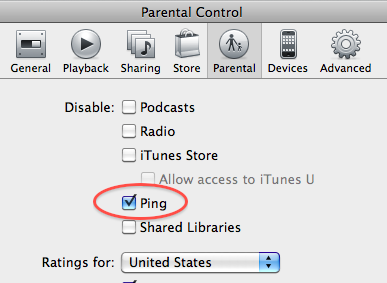
Second, you may turn it off through your iTunes store account:
1. Open iTunes
2. Under Store select View My Account
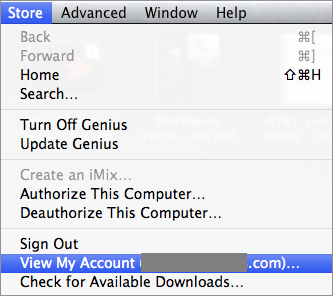
3. If prompted, enter your log in information
4. About half way down the account information, you will find the option to disable the ping service.






Vasva said on September 5, 2010
Thank you!
Sensei said on September 27, 2010
Follow this article to remove the drop downs too.http://hints.macworld.com/article.php?story=20100925045549512
Jonathan said on October 3, 2010
My account information already says “ping off”, and yet when a song is playing the annoying ping button still shows up next to it.
Guest said on October 3, 2010
Jonathan,
See comment above from Sensei to disable the ping button that appears beside a song title, even if ping is disabled. I just did it and it works perfectly.
Mikepapadapoulos said on October 7, 2010
This works. easy copy and paste into Terminal
Littletechnogirl said on October 11, 2010
Thank you so much for this! Ping was really slowing down my overall internet connectivity.
CPA Networks said on November 5, 2010
You can disable the Ping buttonand the iTunes store as follows
Edit -Preferences- Parental control -Disable: iTunes Store
Anonymous said on November 19, 2010
Thanks! Information added.
Gift said on November 23, 2010
Thank you soooooo much
La Flecha said on December 24, 2010
did all that but every time i purchase music an annoying ping window pops up above. i want no ping whatsoever and it just haunts me in itunes constantly :)
Hummveeman said on January 22, 2011
I still get the damn ping popup whenever I buy a song. How do I stop that? The above suggestions did not help.
jj4music said on February 11, 2011
Thank you Thank you Thank you! Ping has been driving me insane for months!
mmctag said on February 26, 2011
Ping is driving me made why do the people at Apple think I need PING for, why on earth would my friends want to know what songs i buy?
Seems like the most pointless ‘improvement’ to itunes ever!
I have done everything on this post and still the box pops up!
Wwhamilton said on March 6, 2011
Thanks, I’ve been dying to get rid of Ping.
Badassmini said on March 19, 2011
THANK YOU!!
Anonymous said on March 19, 2011
You need to go deeper to get rid of the song suggestions within the store. View Account, set Ping to “off,” then look farther down that same page at “Recommendations and Ping Posting.” It probably says “On” next to it, and there’s a “Manage” button next to that. Hit it, and uncheck the box next to “Show me recommendations…” (it’s the only box on that page). Here’s hoping it works, anyway.
Jfhhdfahha said on March 19, 2011
how to on windows 7?
Llcjay1 said on March 30, 2011
You’re awesome. Much appreciated.
Clairescavys said on May 4, 2011
Thank you cfein – that’s brilliant. Ping pop-ups were really annoying, despite me turning off the ping as per the above instructions.
Jimbe1969 said on May 22, 2011
Thank you, thank you, thank you, thank you, thank you, thank you, thank you, thank you, thank you, thank you, thank you, thank you, thank you, thank you, thank you, thank you, thank you, thank you, thank you, thank you…
Cam W said on November 9, 2011
God bless you
MikeW said on November 17, 2011
Every time iTunes is updated it starts showing Ping again.
So just now with the Ping screen showing AGAIN on iTunes 10.5 on Windows 7, I can see it is disabled in preferences, disabled under Parental Controls and disabled on my iTunes account. Which means that Apple doesn’t give a ^*&+(^*(&^(*&^toss about about my preferences.
Same problem on my laptop
Teresa Kimbel said on January 18, 2012
Thank you! Thank you! Thank you! WORKED!!!