
Facebook: How do I hide posts by others on my wall?

Usually, posts that others posted on your Facebook are personal messages. They may contain sensitive or embarrassing information, and you just want to delete them right away. However, this can affect your relationship if your friends find out that their posts were deleted. If you are facing the same situation, hiding those wall posts away is a good idea.

1. Log in to your Facebook account.

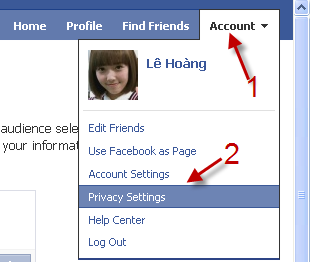
2. Go to Account -> Privacy Settings.
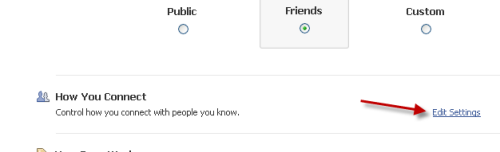
3. Click the Edit Settings link in the How You Connect section.
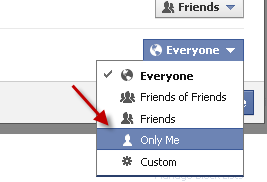
4. The How You Connect window will pop up, change the Who can see Wall posts by others on your profile? option to Only me.
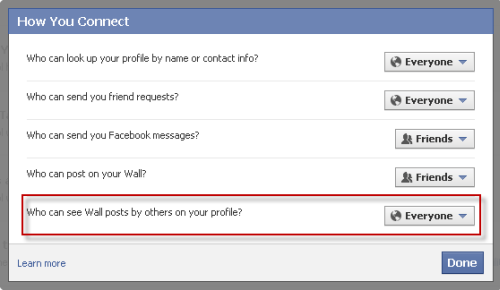
5. Click Done to save the setting.

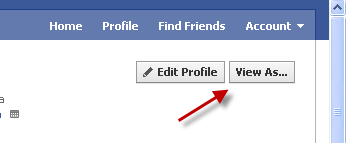
6. You can see how other will view your profile by going to your profile page -> View As…
 

About Lê Hoàng

When not creating exciting new Android games, Lê Hoàng is here crafting tutorials, tweaks, and fixes for your enjoyment.
View more articles by Lê Hoàng

The Conversation

Follow the reactions below and share your own thoughts.

One Response to “Facebook: How do I hide posts by others on my wall?”

  1. September 25, 2011 at 3:23 pm, Isabela said:

    Yes, but this setting also makes it impossible for anyone to post on your wall. So there is no point to it, and it is redundant with the “Who can post on your Wall?” feature. I wish this setting would still allow people to post on my wall, and perhaps even still see their own posts on my wall, but nobody else’s.

    Reply

Leave a Reply

You may also like-

Facebook: How to See Wall Posts from All of Your Friends and Liked PagesBy default, Facebook has your Wall set to only display posts on your Wall from Friends and Pages that you interact with most. Unfortunately, ...



