
Windows Skydrive: Edit folder’s permissions

When sharing your files, photos or documents on the internet via services like Skydrive, it is important to keep files’ permissions under control. This is how you can change the permissions of your existing folders in case you want to open the folders up to the public or narrow down the list of users who can access your files.

1. Log in to your Windows Skydrive account.

2. Move your mouse over the folder you want to change permission, click the i icon at the end of the line.

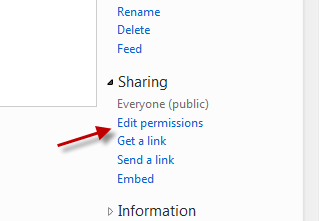
3. The Information panel will appear on the right side of the page, click the Edit permissions link under Sharing section.
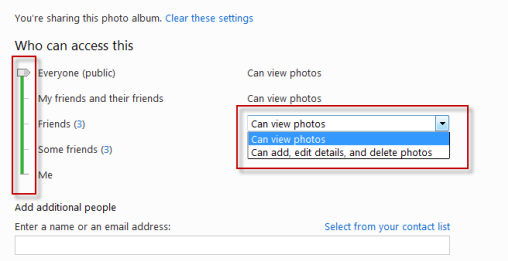
4. Drag the slider to change the accessing level, you can also change what can they do with your files from the small drop down menu on the right side.
5. You can also add people who are not in your Windows Live network by providing their email in the field (under Add additional people). If you want to select emails from your contact list, click Select from your contact list.

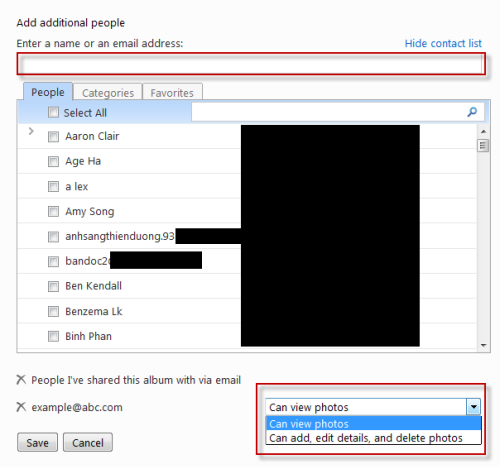
6. Hit the Save button.


About Lê Hoàng

When not creating exciting new Android games, Lê Hoàng is here crafting tutorials, tweaks, and fixes for your enjoyment.
View more articles by Lê Hoàng

The Conversation

Follow the reactions below and share your own thoughts.

3 Responses to “Windows Skydrive: Edit folder’s permissions”

  1. October 24, 2011 at 1:26 pm, BKQc said:

    It seems that setting permissions to “Me” and then adding “additional people” (specific people) prevents Windows Phone to see these albums even though people have access.

    Reply

  2. November 10, 2011 at 9:14 am, Tina said:

    I can’t edit permissions on the albums on skydrive. I followed all the instructions from what I found from my searches but still can’t….it seems that skydrive is not saving it.

    Reply

  3. December 11, 2011 at 2:53 pm, Laura said:

    I don’t know if it’s just me but I just can’t get an (i) anywhere.
    also, no matter what I seem to try, can I get edit permissions to appear under the sharing section

    Reply

Leave a Reply

You may also like-

Windows 7: How to Map SkyDrive Folders as Network DrivesIf you use Microsoft's SkyDrive for storing or sharing files, you can create mapped network drives that are easily accessible from your applications as ...



