
Windows 7: Restore Sticky Notes’ Delete prompt window

   Posted by Lê Hoàng in Windows

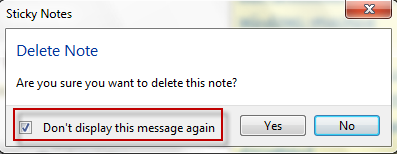
When you delete a Sticky Note in Windows 7, a small window will pop up and ask you if you are sure to delete the note. If you check the box that says “Don’t display this message again” to get rid of the window, that prompt will never appear again. If you selected this by accident, these directions will show you how to correct it via registry.

The Delete prompt window of Sticky Notes with the “Don’t display this message again” option which will likely be checked:
Here is how to restore it back:

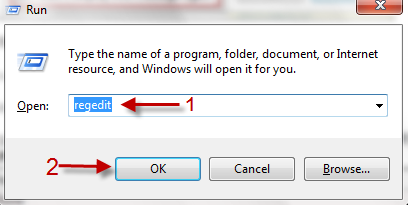
1. Press Winkey+R.

2. Type in Regedit and hit Enter to access Registry Editor.
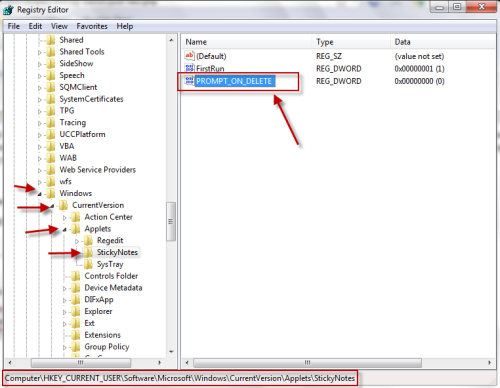
3. Nevigate to HKEY_CURRENT_USER\Software\Microsoft\Windows\CurrentVersion\Applets\StickyNotes and double click on PROMP_ON_DELETE key on the right side.
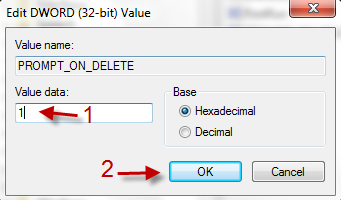
4. Change the value data from 0 to 1 and hit OK.
5. It should take effect immediately. If not, restart your computer.


 

About Lê Hoàng

When not creating exciting new Android games, Lê Hoàng is here crafting tutorials, tweaks, and fixes for your enjoyment.
View more articles by Lê Hoàng

The Conversation

Follow the reactions below and share your own thoughts.

2 Responses to “Windows 7: Restore Sticky Notes’ Delete prompt window”

  1. April 13, 2011 at 4:14 pm, fishhead said:

    How can I get sticky note completely off my computer? A blank sticky note shows up on the desktop on each start up and is most annoying.

    Fishhead

    Reply

    • April 13, 2011 at 11:42 pm, Anonymous said:

      Hi

      You don’t need to completeply remove it from your system. Just remove it from the Startup folder (Win key + R to open Run -> type in msconfig -> Switch to Startup tab -> uncheck Microsoft Windows Operating System (command C:…..System32StikyNot.exe)

      Hope this helps :)

      Reply

Leave a Reply

You may also like-

How Do I Install the Android Market on Android SDKAlthough the Android SDK is useful for developers, it lacks one important feature--the Android Market. Following these intructions, you can install Android Market. This ...


