
Facebook: How Do I Hide or Delete a Conversation from Messages?
Facebook’s messaging system can be difficult to keep neat and tidy. By archiving and deleting conversations, you can keep your Facebook inbox under better control.
To archive a conversation:
1. Log in to your Facebook account.
2. Go to Messages, find the conversation you want to archive and click the X button.
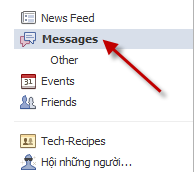
This X can be found on the far right on the list of messages.

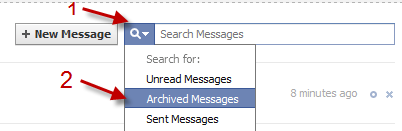
3. You can later find the conversation by clicking on the small arrow next to the magnifying glass and choose Archived Messages.
To delete a conversation:
1. Go to Messages, click on the conversation you want to delete.
2. Choose Actions->Delete…
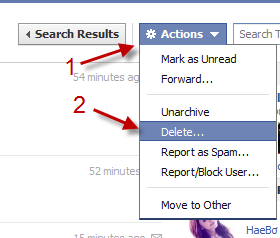
Note: Deleted conversations can not be recovered.
About Lê Hoàng
View more articles by Lê Hoàng
The Conversation
Follow the reactions below and share your own thoughts.


January 29, 2011 at 5:13 pm, Clayco said:
All I have is the “delete” function when I click the “X”
January 30, 2011 at 1:06 am, Anonymous said:
That won’t delete your conversation. You can access them by typing: is:archived in the search box and hit enter. I do mention that in the post
February 04, 2011 at 3:47 am, gohary said:
when i clicked “X”, the message was deleted and could not be recovered, i don’t have the archive option
March 12, 2011 at 2:02 pm, Cbrady1911 said:
how do I stop my chat messages from going into my inbox?
March 14, 2011 at 9:26 am, Absoluthunk Karan said:
dnt chat cos sumtimes u dnt understand wat to do…..and in it end we find we are trapped cos gf…gonna soon see the inbox…
June 17, 2011 at 8:35 pm, Anitalenor said:
Does this work with Safari/Apple?
June 17, 2011 at 8:35 pm, Anitalenor said:
Does this work with Safari/Apple?
June 17, 2011 at 8:35 pm, Anitalenor said:
I HAVE NO DELETE MENUE to choose from. I have no search menue either as your sample hows…What now? I can archive,



