How Do I Install the Android Market on Android SDK
Although the Android SDK is useful for developers, it lacks one important feature–the Android Market. Following these intructions, you can install Android Market. This will allow you to download and test free applications or games with the latest Android 2.3 SDK.
1. Download and install Android SDK. After that, set up a new emulator. (You may want to learn how to set up an Android Emulator
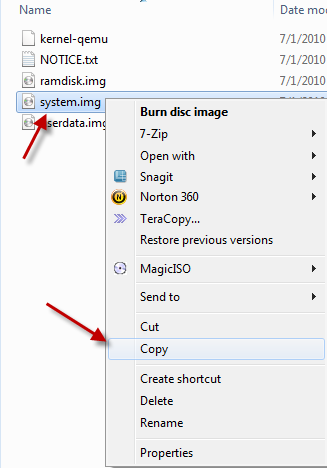
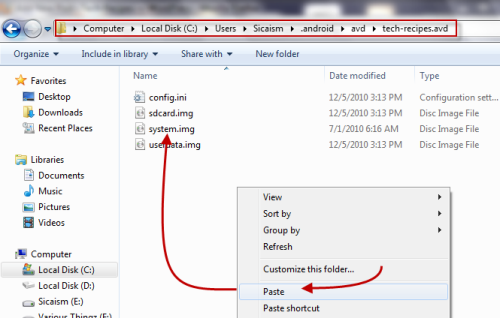
2. Go to …….\android-sdk_r08-windows\android-sdk-windows\platforms\android-9\images (this is the default folder for SDK Platform Android 2.3, API 9, revision 1), copy system.img and paste it to C:\Users\Username\.android\avd\Emulator’s name.avd
3. Download three files: Vending.apk, GoogleServicesFramework.apk and ADB.zip (unzip the file after downloaded). After that, put all these files into …….\android-sdk_r08-windows\android-sdk-windows\tools, we will need them later. (In Android 2.3 SDK, adb files have been removed so that’s why we need them. If you use Android 2.2 SDK, you may not need to download the file)
3. Press Winkey+R, type cmd and press Enter. In command prompt, change the directory to …….\android-sdk_r08-windows\android-sdk-windows\tools (I kept the default folder structure but it is recommended that you change it).
4. Type the following: emulator –avd tech-recipes –partition-size 100 and hit Enter (please replace tech-recipes with your emulator’s name). This command will launch your emulator. Please don’t try to launch it from SDK manager, otherwise, it won’t work.
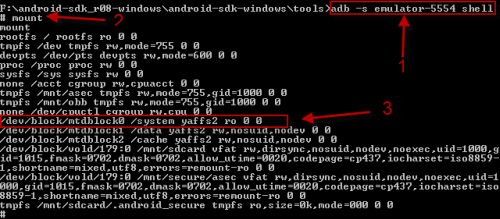
5. Launch another command prompt window, switch to …….\android-sdk_r08-windows\android-sdk-windows\tools , type in: adb -s emulator-5554 shell and hit Enter
(Please make sure that the emulator is fully loaded, and replace 5554 with your emulator’s serial code which you can find at the top of emulator’s window.) After that, type mount and hit Enter again. You will see something like below, and look for the line: /dev/block/mtdblock0 /system yaffs2 ro 00.
6. Now, type in: mount -o remount,rw -t yaffs2 /dev/block/mtdblock0 /system and hit Enter. This will remount the /system in read-write mode. Because we will copy some files to /system/app later, we must set read-write permission to that directory. To do it, type the following: chmod 777 /system/app , hit Enter. After that, you need to exit. Type exit, hit Enter again. The whole step will look like this:
7. In this step, we will copy two files: Vending.apk and GoogleServicesFramework.apk into /system/app. To do this, from the second command prompt window, type: adb -s emulator-5554 push Vending.apk /system/app/. and hit Enter. Similar to that, to copy the next file, type: adb -s emulator-5554 push GoogleServicesFramework.apk /system/app/. , hit Enter again. If sucess, it will look like this:
8. Now, you need to remove SdkSetup.apk from /system/app (if it is not removed, the SDK will be restore in next session). In the second command prompt window, type: adb shell rm /system/app/SdkSetup.apk , hit Enter.
9. Close your emulator.
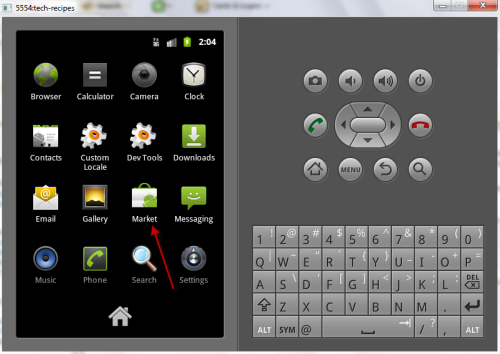
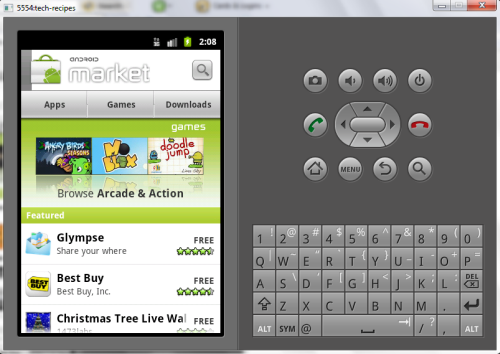
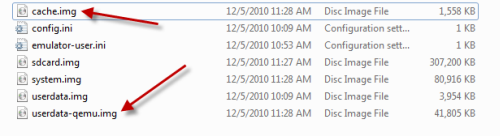
10. Go to C:\Users\Username\.android\avd\Emulator’s name.avd and delete these two files: userdata-qemu.img and cache.img. Launch your emulator in the normal way and then, you will see Android Market from the list.
Using Facebook:
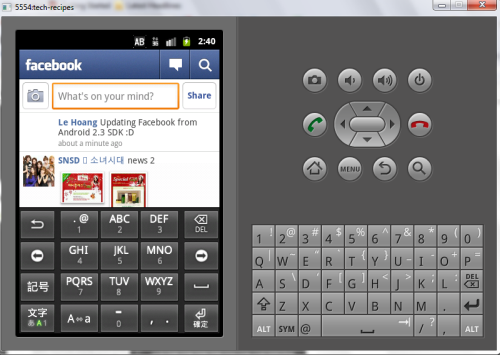
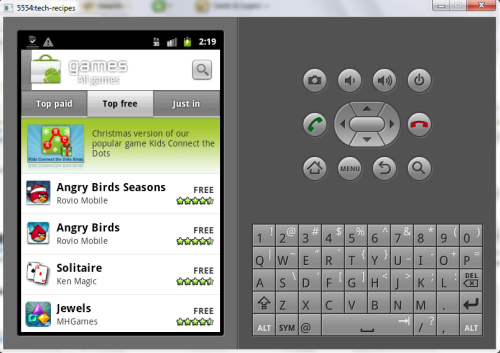
Note: Some applications and games may not work because they need real hardware. Angry Birds and Youtube are such examples. With these you can hear the sounds but not see any video.
About Lê Hoàng
View more articles by Lê Hoàng
The Conversation
Follow the reactions below and share your own thoughts.


December 10, 2010 at 6:30 pm, ya_wes said:
4. Type the following: emulator –avd tech-recipes –partition-size 100 and hit Enter –>showing error like this
invalid command-line parameter: ûavd.
Hint: use ‘@foo’ to launch a virtual device named ‘foo’.
please use -help for more information
please help
December 10, 2010 at 11:38 pm, Anonymous said:
Hi ya_wes
What is your emulator’s name?
From what you provided, i think that its name is: foo, right?
So your command should be: emulator –avd foo –partition-size 100. not emulator –avd tech-recipes –partition-size 100 (tech-recipes is my emulator’s name)
Hope this help
December 12, 2010 at 2:43 pm, ya_wes said:
no.my emulator name is tes.avd
December 12, 2010 at 3:35 pm, Anonymous said:
so it should be: emulator –avd tes –partition-size 100
Hope this help
December 12, 2010 at 8:33 pm, Jbert50021 said:
I had the same error. It was reading the – (dash) incorrectly. Try deleting the – and retyping it.
December 12, 2010 at 8:34 pm, Jbert50021 said:
FYI – It was because I copy and pasted.
December 13, 2010 at 1:21 am, Anonymous said:
December 14, 2010 at 3:55 pm, Ender said:
Even though I follow all steps and no error seems to occur, the apps menu does not have Market afterwards. When I try installing GoogleServicesFramework and Vending with “adb install GoogleServicesFramework.apk” etc instead, it fails: “Failure [INSTALL_PARSE_FAILED_NO_CERTIFICATES]“
December 15, 2010 at 1:23 am, Anonymous said:
Hi Ender.
Please re-check step 7. You don’t have to install them. You only need to copy the two files into System/app.
So the command must be: adb -s emulator-5554 push Vending.apk /system/app/. (it is /system/app/. not /system/app/ ), not adb install………….
Also make sure that you have started the emulator with this command: emulator –avd tech-recipes –partition-size 100 . If you don’t, errors will occur later.
Note: 5554 is my avd’s serial number. Tech-recipes is my avd’s name. Replace them with yours.
Hope this help
December 16, 2010 at 1:40 am, Hallaz said:
Hii tipztv
typed :
adb -s emulator-5554 push Vending.apk /system/app/.
‘failed to copy ‘Vending.apk’ to ‘/system/app/./Vending.apk’ : Read-only file system
tell me the solution please
December 16, 2010 at 2:35 am, Anonymous said:
Hi Hallaz
I guess your emulator’s number is still 5554, right?
You faced that error because you didn’t set read-write permission to /system/app/
I mentioned that in the post. Please re-check step 6. You need to execute this command: chmod 777 /system/app
Make sure you have done ealier steps first, otherwise, it won’t work too!
Hope this help
December 16, 2010 at 6:05 am, Hallaz said:
Thanks for your rep..
yes, my emulator’s number still 5554.
I did the tutorial step by step exactly. then found that trouble.
after reported to you and got your solution,
then I tried again, then found a trouble again.
# mount -o remount,rw -t yaffs2 /dev/block/mtdblock0 /system
mount -o remount,rw -t yaffs2 /dev/block/mtdblock0 /system
Usage: mount [-r] [-w] [-o option] [-t type] device directory
# chmod 777 /system/app
chmod 777 /system/app
Unable to chmod /system/app: Read only system
I hope you have a solution.
Thanks
December 16, 2010 at 10:09 am, Anonymous said:
Hi. If you can capture the screenshots and share them here, i may find the problems.
If you can’t. Try this:
Replace all step 5 and 6 with this command: adb remount (please do this in a new cmd window, you also need to switch directory to …….android-sdk_r08-windowsandroid-sdk-windowstools too!) and hit Enter. After that, continue from step 7 to the end.
I’ve uploaded the pic of that part here: http://www.tech-recipes.com/wp-content/uploads/12-16-2010-4-46-47-PM.png
Note: in that pic, i removed -s-emulator 5554 because i only have one emulator at the time.
Hope this solves the problem. Don’t forget to let me know the result
December 17, 2010 at 6:09 pm, Hallaz said:
hii Mr. Great One
yeahhh….
its work and I love it..
thank you so much
best regard Hallaz.
December 18, 2010 at 1:56 am, Anonymous said:
No problem
Glad i could help. You are welcome
December 16, 2010 at 4:54 pm, Muhammad Risyad said:
hi
I’ve do all of this step, and not found any error
but after I launch the emulator, there’s still no Android Market
I’ve do all of this step 2 times, and still same
Why??
December 16, 2010 at 11:30 pm, Anonymous said:
Hi
What is your SDK version?
I’ve faced this error before and the possible mistakes i can thing of at the moment are:
- You may have missed step 8.
- You may deleted System.img instead of userdata-qemu.img or cache.img.
Make sure you have done the steps correctly. At the first launch after the hack, did you notice that the SDK acts slow?
December 19, 2010 at 3:29 pm, Muhammad Risyad said:
i use android-sdk_r08-windows
I tried for the third times, and still the same
I do all of the step including step 8, and I just delete userdata-qemu.img and cache.img
yes, at the first launch the SDK acts slow
December 20, 2010 at 1:52 pm, Anonymous said:
That sounds like Shomy’s problem (comment below). Does step 7 appear like this: 691 KB/s (0 bytes in 619300.000s) instead of 691 KB/s (430 bytes in 619300.000s) (this is just an example).
Can you try this:
-Replace all step 5 and 6 with this command: adb remount (please do this in a new cmd window, you also need to switch directory to …….android-sdk_r08-windowsandroid-sdk-windowstools too!) and hit Enter. After that, continue from step 7 to the end.
May 03, 2012 at 3:56 am, huynit said:
chào lê hoàng !
người việt nên nói tiếng việt cho rễ hiểu .
mình làm hết các bước o trên và không có báo lỗi gì nhưng khi chay emulator thi không thấy market đâu
minh thử trên android 2.2 và 2.3(api 10) nhung đều không được bạn có thể giúp mình ?
Welcome!
Vietnamese who spoke Vietnamese to root out.
I do all the steps above and do not have anything but error when running emulator market where competition is not found
intelligence test on Android 2.2 and 2.3 (api 10) but fails you can help me?
December 19, 2010 at 8:59 am, Andrew Solmssen said:
Hi – thanks for the wonderful how-to – I was able to follow the steps and install the Market onto my 2.3 emulator – I was even able to use the new 2.2.6 Vending.apk file to get the new look Market. It works, and I can see some but not a lot of apps. It looks like Market is filtering based on some parameter and I can’t see most apps like Facebook or any Google apps. Any thoughts? is there a way to make the emulator see more apps?
December 19, 2010 at 9:47 am, Anonymous said:
Cool! I haven’t tried the 2.2.6 yet. Thanks for your feedback.
I have no idea about the apps in Market. Some of my friends faced the same problem but some didn’t.
I faced your problem before too. I couldn’t find many popular apps, but when i started to write this post, i set up a new emulator (named it Tech-recipes) and they are all there (still same apk files).
I guess the Market send the wrong GET sometimes. I will let you know if i find the solution
December 21, 2010 at 1:51 am, Andrew Solmssen said:
please do – I’ve done it twice now, and the market still only shows a very few applications.
December 21, 2010 at 12:48 pm, Anonymous said:
Hi.
I’ve uploaded my System.img here for you: http://www.mediafire.com/?s8eeph3r71ho1lz
After you have downloaded it, please create a new emulator, copy the downloaded file and put it in C:UsersUsername.androidavdEmulator’s name.avd. Launch the emulator the normal way, you will have the market ready.
Please try it and tell me if you see those popular apps in there.
Hope this solve your problem
December 22, 2010 at 9:13 pm, Andrew Solmssen said:
thanks for uploading the file – unfortunately, it didn’t seem to make a difference. I saw the Market as before, but with only a very few apps.
April 24, 2011 at 12:53 pm, Anonymous said:
Hi friend
Can you try out elcid’s suggestions? (comment below)
January 14, 2011 at 2:59 am, Sean said:
Thank you so much!
December 20, 2010 at 9:32 am, shomy said:
Hi. I tried to do this for an emulator running android 1.5 for testing purposes. Unfortunately, after I successfully completed the steps, it still doesn’t show the market in the applications menu of the emulator. After taking a closer look I noticed that at step 7, even though it works, it doesn’t copy anything to the system of my emulator, like this: 691 KB/s (0 bytes in 619300.000s).
Any idea why this might happen? Thanks
December 20, 2010 at 1:57 pm, Anonymous said:
Hi Shomy
Can you try again with these direction:
- Follow from step 1 to 4.
- Replace all step 5 and 6 with this command: adb remount (please do this in a new cmd window, you also need to switch directory to …….android-sdk_r08-windowsandroid-sdk-windowstools too!) and hit Enter. After that, continue from step 7 to the end.
I find that the remount part doesn’t work well on some computer.
December 21, 2010 at 6:44 am, Jog said:
Hi …
I have installed all the .apk with no errors …
But i am not able to find social apps in the market (like facebook,twitter,foursquare) … it is showing only limited apps not all apps
December 21, 2010 at 1:03 pm, Anonymous said:
That may because your Market sent the wrong GET to the servers.
If you can, please download my system.img: http://www.mediafire.com/?s8eeph3r71ho1lz
After you have downloaded it, please create a new emulator, copy the downloaded file and put it in C:UsersUsername.androidavdEmulator’s name.avd. Launch the emulator the normal way, you will have the market ready.
I still use that system.img file and i can access to all apps so i hope it will help you too!
Note: that system.img file is for Android SDK 2.3
December 30, 2010 at 4:49 pm, Cayspekko said:
I’m having the same problem. I used your image but can’t find angry birds… facebook… etc etc. Using that image I deleted the cache.img and userdata.img like mentioned above. The only step that was different was attempting to delete sdksetup (the file wasn’t found). I’m assuming it was already removed. Thanks for your help!
December 31, 2010 at 1:46 am, Anonymous said:
Hi
If you downloaded my img file, you only need to put it in correct folder and launch the emulator
I faced the same problem before. I created emulator many times and tested them before i wrote this post. With some emulators, i faced the same problem, but with others, i didn’t.
I thought that using my current img could fix the filter problem but i was wrong. I guess the Market device filter function doesn’t work really well.
Sorry to hear that you are facing that problem. Can i know your current OS? If you can, just create a new emulator and put my img in C:UsersUsername.androidavdEmulator’s name.avd and tell me the result
December 25, 2010 at 3:31 pm, asialove said:
Great Instruction, I can access the Android Market now
December 29, 2010 at 2:45 pm, Browser synch said:
Very nice….. Works like charm
December 31, 2010 at 5:34 am, Mario Seijo said:
any idea how to do this in Linux (Ubuntu) ? thanks for your insight
January 02, 2011 at 2:13 am, Steve123 said:
Why am i unable to push “Vending.apk” and the other .apk???
It says: “cannot stat “Vending.apk’: no such file or directory”
Those 2 apk files are already copied to “tools”-folder.
Please help!!
January 02, 2011 at 7:10 am, Anonymous said:
Hi
What system do you use?
Are you sure that you had changed directory to ……..tools before you pushed them?
If you can paste your commands here, it will be better for me to help you. Guessing the problem without your commands is very hard.
January 02, 2011 at 2:13 pm, Steve123 said:
I have followed step 1-6 correctly. Too bad I can’t push tose apk files. Thanks in advance for helping me!
Here’s a screenshot of the second command prompt window.
http://img809.imageshack.us/img809/752/51952605.png
January 02, 2011 at 2:15 pm, Steve123 said:
P.S. Change what directory???
January 02, 2011 at 3:31 pm, Anonymous said:
Hi
I will look for the solution. In the meantime, you can download my modified System.img here: http://www.mediafire.com/?s8eeph3r71ho1lz
After you have downloaded it, simply create a new emulator, go to C:UsersUsername.androidavdEmulator’s name.avd, paste it there, launch the emulator the normal way and you will have the market installed
If you have any question, feel free to ask. I’m here to help
January 02, 2011 at 7:03 pm, Steve123 said:
Can’t sign in with my google account.
Screenshot: http://oi51.tinypic.com/2lwksk8.jpg
Also, I followed step 9 and 10, but in step 8 I’m unable to delete SdkSetup.apk as it says it can’t be found. I’m using your .img and Market does appear in launcher. Can’t sign in!
HELP!!!
January 03, 2011 at 1:21 am, Anonymous said:
Hi Steve.
That is a bug on many Android phones. You can read more about Can’t establish a reliable data connection here: http://www.tech-recipes.com/rx/5343/android-cant-establish-a-reliable-data-connection-to-the-server/
But since this is only a emulator, you can restart it to solve the problem. If it still acts that way (this is Google’s fault), try to create a new one
Please follow the guide in my previous comment. If you have downloaded the file, you can go ahead and test the market, no step required.
Hope this help.
January 03, 2011 at 5:51 pm, Steve123 said:
I now can access the Market. But why am I unable to browse all those apps? I see only a limited number of apps. Some catergories don’t show any app. Also, search button is extremely inaccurate. Know what the problem is???
January 04, 2011 at 6:31 am, Anonymous said:
Hi
About the search button: this depends on your computer specs. There is nothing wrong with the apk files and the img file (i guess your emulator is configured well too).
About the apps in market: Some readers also faced that problem before (you can check previous comments). The reason for that is the device filter function in Market doesn’t work well. I did face it but when i created a new emulator (i tested many emulators before this post), i could access all contents. I thought if they used my current img file, the problem would be solved, but i was wrong. There is nothing to do with the img file. All of them are the same because i only use the same apk files. Sorry about that, but i can’t help to solve this problem because this depends on Google side
I faced it when i created emulator on Windows 7. When i switched to XP and created a new one, it worked really well. After that, i switched to 7 to write post, created a new one and all apps are there, i have no idea
May 23, 2011 at 10:26 pm, chris corfman said:
Awesome! This worked for me. Thank you for putting in the time and effort
January 06, 2011 at 8:17 am, Nospam said:
I found that adding
hw.ramSize=256
to the AVD config.ini helped with connections. This raised the available ram in the emulator from the default 96M to 256M
January 06, 2011 at 10:40 am, Anonymous said:
Thanks for your information
January 06, 2011 at 9:29 pm, Ericbouer said:
I’m also not getting all applications in the search.
I’m keep getting this error in the logs and I wonder if it has to do with the problem.
E/vending ( 600): [19] CarrierProvisioningAction$1.run(): Error while trying to retrieve provisioning
E/vending ( 600): java.io.IOException: Cannot establish route to androidapi.t-mobile.com/66.94.27.110 for http://androidapi.t-mobile.com/billingadapter/getprovisioning
It seems that the vending is trying to access t-mobile site for billing/provisoning API and it’s blocked by their servers.
January 12, 2011 at 8:18 pm, LSY said:
Any chance someone has figured out how to get Market working on emulator for OS X? The ADB executable won’t work for OS X and I’m stuck.
January 19, 2011 at 3:04 am, aChipmunk said:
you dont not need the adb thingy
it is already in the platform-tools folder cd to that instead of tools
works great for me on Mac android 2.3 market 2.2.7
January 12, 2011 at 8:37 pm, lsy said:
Strike whatever I posted earlier: all I needed to do to get the Market was copy the system.img to two locations:
~lsyandroidplatformsandroid-9images
~.androidavd[vd1].avd * [vd1] is the name of an avd I had already created earlier
I then found a tip on another board to use terminal to launch the emulator — using the executable program won’t work
lsy$ cd androidtools
lsy$ ./emulator -avd [vd1] -partition-size 100
Replace [vd1] with an emulator that already exists
This launches emulator and you should have Market in your apps.
January 13, 2011 at 2:49 am, Figofuture said:
if you delete SdkSetup.apk from emulator’s system.img, some functions can not work, like HOME key(both short and long press),lock screen,simulate to receive incoming call, etc. do you have any idea to resolve there problems?
January 24, 2011 at 10:59 am, Eyalg said:
Hi tired your thing
everything worked smoothly, however when trying to luanch the market i get white screen and then get thrown out, authentication issue… don’t you need to create a google account first ?
January 25, 2011 at 5:46 am, Anonymous said:
No, when i launch Android Market, Google will ask you to provide your Google account.
If you followed all the steps, just restart your emulator and try to relaunch market, it should work.
I haven’t faced any authentication issue so far..
January 25, 2011 at 3:19 pm, Eyalg said:
i followed the instructions carefully, i restarted the emulator (2.3 emulator) and walla, the market appeared, but i couldn’t lunch it… i’ll try again at home to see if i succeed with another emulator. a question i have for you is why do i need to copy the system.img to my .avd directory ?
January 25, 2011 at 3:45 pm, Anonymous said:
We have to push the apk files into the system. After you have done the
steps, all apk files will be stored in system.img. That is why we need
to put it in .avd directory
May 20, 2011 at 8:41 am, Larsp777se said:
Hi! I have the same problem. Did you solve it?
January 28, 2011 at 11:54 pm, Anonymous said:
This batch file is a bit easier. Just find some properly signed gapps
@ECHO OFF
SET ADB_TRACE=0
D:
CD NookColor
REM Before running this batch file:
REM Edit android-sdk-windowsplatformsandroid-9skinsskin-of-choicehardware.ini
REM maybe change some or all of these
REM hw.lcd.density=160
REM vm.heapSize=96
REM hw.ramSize=256
REM “android list”, choose target. 10 (2.3) is below
REM Edit android-sdk-windowsplatformsandroid-9build.prop
REM Change fingerprint
REM ro.build.description=voles-user 2.3 FRG83D 50454 release-keys
REM ro.build.fingerprint=verizon/voles/sholes/sholes:2.2/FRG83D/50454:user/release-keys
ECHO.
ECHO Create and mount AVD
ECHO.
CALL android create avd –force –path D:NookColorGinger –skin “GalaxyTab” –name Ginger –target 10 –sdcard 1000M
START /B emulator.exe -partition-size 100 -memory 1024 -no-audio -no-boot-anim -avd Ginger -scale .78
TIMEOUT /T 150
REM (40 minimum)
ECHO Installing apps…
adb -s emulator-5554 install D:NookColorGingerVGoogleServicesFramework.apk
adb -s emulator-5554 install D:NookColorGingerVGmail.apk
adb -s emulator-5554 install D:NookColorGingerV4Vending.apk
ECHO Rebooting…
powershell -command “&Get-Process | Where { $_.Name -match ‘emulator’ } | Kill”
TIMEOUT /T 1
START /B emulator.exe -partition-size 100 -memory 1024 -no-audio -no-boot-anim -avd Ginger -scale .78
ECHO.
ECHO Run Market, it will prompt for a new account
January 30, 2011 at 6:38 pm, Carlos said:
Great, thx for this. Its working OK.I can see Market, and download apps & more…
(Step 8 wasn’t neccesary for me)
January 31, 2011 at 6:13 am, Ibel said:
i can’t install twitter for android, “installation error, missing shared library” ???
January 31, 2011 at 11:36 am, Anonymous said:
Some apps can only work on real device. I do warn at the end of the post
January 31, 2011 at 10:38 am, Walsh Stephen said:
worked a treat, thnak you
February 05, 2011 at 4:03 pm, Zaza said:
no solution for the few applications that is the market?
I too with my system I found very few applications: (
February 08, 2011 at 8:14 am, elcid said:
The way I solved the problem of not getting all the apps is running the emulator several times until I get all the apps shown after launching the Market. Here is how:
(1) Run the Market and go through the registration process.
(2) If you see all the apps shown, done!! you are O.K.
(3) Otherwise, finish the Market and close the emulator.
(4) Run the emulator again using SDK Manager. The important thing is to make sure “Wipe user data” is check marked before pushing “Launch” button.
(5) When the emulator is up, go to step (1)
This is better and faster than going through setting the new emulator several times. And don’t forget not to check mark “Wipe user data” box once your Market shows all apps.
>
If there are some apps you cannot install, the problem might be related to the Google API. If that is the case try this:
(1) Set up a new emulator using the Target “Google APIs (Google Inc.) – API Level 9″
(2) Replace step (2) as follows.
Instead of copying the system.img from ‘android-sdk_r08-windowsandroid-sdk-windowsplatformsandroid-9images’,
copy from ‘android-sdk_r08-windowsandroid-sdk-windowsadd-onsaddon_google_apis_google_inc_9images’
Hope this helps!!!
February 08, 2011 at 2:32 pm, rd said:
I’m trying to install the Android Market on a development board running Android 2.1. I tried it using the apk’s in this article and it did not work (no market icon). I’m assuming that is has to do with the fact that I’m running 2.1 not 2.3. So does anyone have apk’s for 2.1?
February 08, 2011 at 3:28 pm, Anonymous said:
I haven’t tested the apk file on 2.1, but it is the apk file for 2.2 and i did see my friend run the same apk file on 1.6.
Make sure you follow all the steps carefully, especially step 8 and 10.
February 08, 2011 at 5:49 pm, rd said:
I just want to emphasize that I am working on an ARM9 department board, but seems like it should still work (let me know if I should be right). So on that board many of the steps don’t apply.. everything is rw and the system partition is physical and I believe is part of rootfs partition.. I include an ‘ls’ of my /system/app directory after a reboot and you can see my installed apk’s are still there. Is there another apk on this development system that might be missing that is causing this not to work (no market icon)? Is there anything I should look for in an ‘adb logcat’ that might give some more information?
# ls -l
ls -l
-rwxrwxrwx root root 20853 2010-09-17 07:40 TtsService.apk
-rwxrwxrwx root root 12279 2010-09-17 07:40 Calibrate.apk
-rwxrwxrwx root root 16639 2010-09-17 07:40 ApplicationsProvider.apk
-rwxrwxrwx root root 91169 2010-09-17 07:40 DownloadProvider.apk
-rwxrwxrwx root root 7640 2010-09-17 07:40 PicoTts.apk
-rwxrwxrwx root root 33431 2010-09-17 07:40 SettingsProvider.apk
-rwxrwxrwx root root 780456 2011-02-07 21:35 Vending.apk
-rwxrwxrwx root root 60052 2010-09-17 07:40 GoogleSearch.apk
-rwxrwxrwx root root 695777 2010-09-17 07:40 Browser.apk
-rwxrwxrwx root root 274526 2010-09-17 07:45 LatinIME.apk
-rwxrwxrwx root root 21508 2010-09-17 07:40 SpareParts.apk
-rwxrwxrwx root root 109162 2010-09-17 07:40 GlobalSearch.apk
-rwxrwxrwx root root 525211 2010-09-17 07:40 Music.apk
-rwxrwxrwx root root 42713 2010-09-17 07:40 Term.apk
-rwxrwxrwx root root 26986 2010-09-17 07:40 VpnServices.apk
-rwxrwxrwx root root 22231 2010-09-17 07:40 DrmProvider.apk
-rwxrwxrwx root root 2457247 2010-09-17 07:41 Settings.apk
-rwxrwxrwx root root 82605 2010-09-17 07:40 Calculator.apk
-rwxrwxrwx root root 93281 2010-09-17 07:40 PackageInstaller.apk
-rwxrwxrwx root root 148947 2010-09-17 07:40 ContactsProvider.apk
-rwxrwxrwx root root 294135 2010-09-17 07:40 AlarmClock.apk
-rwxrwxrwx root root 845170 2010-09-17 07:40 Launcher.apk
-rwxrwxrwx root root 76790 2010-09-17 07:40 CertInstaller.apk
-rwxrwxrwx root root 1480009 2010-09-17 07:41 Phone.apk
-rwxrwxrwx root root 46337 2010-09-17 07:40 MediaProvider.apk
-rwxrwxrwx root root 171169 2010-09-17 07:40 AccountAndSyncSettings.ap
k
-rwxrwxrwx root root 1138709 2010-09-17 07:40 Contacts.apk
-rwxrwxrwx root root 43760 2010-09-17 07:40 TelephonyProvider.apk
-rwxrwxrwx root root 124917 2010-09-17 07:44 Development.apk
-rwxrwxrwx root root 9797 2010-09-17 07:40 AtmelLogo.apk
-rwxrwxrwx root root 704257 2010-09-17 07:40 Camera.apk
-rwxrwxrwx root root 13863 2010-09-17 07:40 HTMLViewer.apk
-rwxrwxrwx root root 47183 2010-09-17 07:40 Ethernet.apk
-rwxrwxrwx root root 10200 2010-09-17 07:40 UserDictionaryProvider.ap
k
-rwxrwxrwx root root 619300 2011-02-07 21:36 GoogleServicesFramework.a
pk
-rwxrwxrwx root root 703793 2010-09-17 07:40 Gallery.apk
#
# mount
mount
rootfs / rootfs rw 0 0
/dev/root / jffs2 rw,relatime 0 0
tmpfs /dev tmpfs rw,relatime,mode=755 0 0
devpts /dev/pts devpts rw,relatime,mode=600 0 0
proc /proc proc rw,relatime 0 0
sysfs /sys sysfs rw,relatime 0 0
tmpfs /sqlite_stmt_journals tmpfs rw,relatime,size=4096k 0 0
/dev/block/mtdblock2 /data yaffs2 rw,nosuid,nodev,relatime 0 0
/dev/block/mtdblock3 /cache yaffs2 rw,nosuid,nodev,relatime 0 0
#
February 08, 2011 at 5:57 pm, rd said:
Well I may have answered my own question… I found this in the logcat (see below). Since I can’t rebuild the image for this SDK is there any other way to deal with this.. (my boards image is sdk #7 and the apks require #8)
W/PackageParser( 743): /system/app/Vending.apk (at Binary XML file line #4): Requires newer sdk version #8 (current version is #7)
D/dalvikvm( 743): GC freed 4732 objects / 269352 bytes in 117ms
W/PackageParser( 743): /system/app/GoogleServicesFramework.apk (at Binary XML file line #0): Requires newer sdk version #8 (current version is #7)
February 14, 2011 at 8:20 pm, Caribe4321 said:
One question, when you say, “Launch your emulator in the normal way and then, you will see Android Market from the list.” Its from the SDK Manager, or by following step 4?
February 15, 2011 at 12:15 am, Anonymous said:
I mean launching the emulator from the SDK manager
That is how we usually launch the emulator.
February 15, 2011 at 7:03 pm, Jobna said:
i got mine to work but the emulator is VERY VERY SLOW….
Here are my computer resources..
Intel Core 2 Duo 3.17GHz
4GB RAM
Windows 7×64
anyone knows how i can speed it up? i tried to lower the CPU Delay when i run the emulator and turn of boot animation but still slow..
February 22, 2011 at 1:22 pm, Summaira Zafar said:
I have installed google market by following above mentioned steps and got market on my emulator. Unfortunately, when I start market, on adding the new google account i got this error:
Can’t establish a reliable data connection to the server. This could be a temporary problem or your phone may not be provisioned for data services.
I have tried to login with the existing account but got the same error. Can anyone help me out?
PS. I am using android emulator for winXP, AVD has platform 2.3 & API level 9.
February 23, 2011 at 3:21 am, Anonymous said:
Just restart your emulator and it should work fine
February 28, 2011 at 9:39 am, Lisvid com said:
very very nice bro. keep posting
February 28, 2011 at 9:59 am, mul14 said:
In Android 2.3 SDK, the adb file not removed. It’s moved to platform-tools Please read “adb_has_moved.txt” in ….android-sdk_r08-windowsandroid-sdk-windowstools
February 28, 2011 at 11:42 am, Anonymous said:
Yeah. I noticed that. Thanks for the input
March 08, 2011 at 6:23 am, agnes said:
Hi, I ve followed those steps and everything looked fine, I got market: but I still have a problem: wehn I try download it says “sttrating download” forever. I have the same problem on my Chinese device, and wehn trying Market on a 1.5 emulator (all over a wifi connection but I dont think it is wrong as it worked here once).
I also tried to change ‘ro.config.nocheckin=yes’ or to ’1′ in the build.prop
What I can do? Thanks
Agnes
March 08, 2011 at 10:36 am, Anonymous said:
Try restarting the emulator and it should work fine
April 29, 2011 at 1:08 am, Steve Jensen said:
I followed this tutorial about 9 times and each time it worked, but only once. After doing the instructions above and restarting the emulator the market icon was there and I was able to use it.
However, after a second/third/etc restart of the emulator the market icon was gone. Although, the Vending.apk and GoogleServicesFramework.apk were still present in the /system/app/ directory.
I’ve still not successfully been able to make the market persist on the emulator after more than 1 restart…anyone have any ideas?
April 29, 2011 at 6:21 am, Anonymous said:
Did you remove SdkSetup.apk?
April 29, 2011 at 1:48 pm, Steve Jensen said:
Yes, the SdkSetup.apk file was removed the first time I did the walk through and I confirmed on each subsequent one that its removal was persistent.
April 29, 2011 at 3:18 pm, Anonymous said:
Your problem is really strange. There should be something wrong with your system. I haven’t heard anyone has the same problem before.
Can you download this one: http://www.mediafire.com/?s8eeph3r71ho1lz
That is my img file. I uploaded it months ago for some readers. Give it a try and see if it solves your problem.
After you have downloaded it, please create a new emulator, copy the downloaded file and put it in C:UsersUsername.androidavdEmulator’s name.avd. Launch the emulator the normal way, you will have the market ready.
Hope this helps
PS: If you don’t see many apps on the Market, read elcid’s comment
May 18, 2011 at 2:34 am, Steve Jensen said:
I’ll give it a try, thanks.
March 15, 2011 at 10:32 pm, sandra said:
Any chance to change the market place settings for the virtual device? Market recognizes the device as “T-Mobile Phone” and unfortunately most of the current apps in the market won’t work with this device.
Can we somehow fake the device name?
Thank you!
March 16, 2011 at 6:59 pm, CoolManCool said:
thank you for this tutorial! helped me a lot!
March 25, 2011 at 1:09 am, Maurogg84 said:
after trying to push vending.apk in step 7 i get this ” failed to copy out of memory”, can you help plz?
May 01, 2011 at 10:01 pm, Randy Hunt said:
Your computer is likely out of physical memory. I had my emulator’s “Device ram size” set to 1024 when I got the error you are describing. I set the emulators ram size to 512, and step 7 worked fine for me.
March 26, 2011 at 1:34 pm, Cameron said:
Excellent How-to! Thank you so much for the work you put into this!
May 09, 2011 at 9:57 am, Sunke Premsagar said:
hello everyone. when
i run my .apk file on android emulator.it works fine.but on android
device streaming problem occurs.my .apk file size is 1257KB…so how can we reduce this?
May 15, 2011 at 9:29 am, Rnkantan said:
hi
i find the system file (system.img) is in the “F:androidandroid-sdk-windowsplatformsandroid 2.2images” (F is mydrive and android2.2 is the folder where tools are extracted); thus in 2.2 the system file is not in avd directory but moved.
this is brought out by config.ini
image.sysdir.1=platformsandroid 2.2images
and this image is not changed when i write the market, the market appears after step-7 but after deleting the user-data and cache file when i restart the emulator the system file is reverted to this image and it goes back to no-market emulation
any solution other than cut and paste the system.img?
neelakantan
May 20, 2011 at 3:11 pm, Rockymtnbri said:
Any hope of modifying this for the newest (r11) release? Still having problems with copying the .apk files to the virtual device – getting an out of memory error.
May 23, 2011 at 12:56 pm, ffxx68 said:
Hi, First of all, thanks a lot for this detailed tutorial.
While the Emulator is publicly available, the Vending.apk and
GoogleServicesFramework.apk packages aren’t. I guess the one shared here
have been ripped off some real phone… Any hope to get them in a more
“controlled” fashion, instead of downloading from an unknown source?
Also, I’m experiencing the problem many reported here too, that is not
all applications are shown on the market. I guess that depends on the
emulator settings, which make some applications (actually most) “not
compatible”. Does anyone here know what device parameter Google Market
checks to establish App/Device compatibility?
May 24, 2011 at 12:22 am, Anonymous said:
Hi
You can read elcid’s comment and try out his suggestion to see if it solves the visibility problem
May 26, 2011 at 8:36 am, ffxx68 said:
This is what I found about this, somewhere else on the net, and it indeed worked, on my emulator:
1. Open the Market and press the home button to return 2. Go to
Settings Applications Manage Running 3. Press “Market”
4. Press “Clear cache” (do not clear data) 5. Press “Force stop”
6. Return to “Settings Applications Manage Running” 7.
Press “Google Services Framework” 8. Press “Clear Data” 9.
Press “Force Stop” 10. Start Google Market, it must give an error
11. Reboot, once back Market should work, if it gives an error it
could need another minute to work
June 04, 2011 at 8:37 pm, Alex Babinin said:
If the installed Market does not show too many apps, that’s OK, just go to the web interface of the Market, that one will show everything, and should let you install, too.
June 14, 2011 at 7:36 am, Lock Zackary said:
try increasing the partition-size parameter on step 4; make it 200 or more, it worked for me at 128
June 23, 2011 at 3:21 am, Jonathan Cheng said:
Hi, Thanks for sharing this. I’m using SDK 2.3.3. I’ve tried following your instructions and am stuck on step 5. When I type the command adb -s emulator-5554 shell, I get an error message “error: device not found”. Any suggestions?
June 23, 2011 at 6:24 am, Anonymous said:
Are you sure that your device’s serial code is 5554?
June 23, 2011 at 7:16 am, Jonathan Cheng said:
Txs 4 responding. Yes, I double checked. Also tried restarting my PC.
June 23, 2011 at 3:21 am, Jonathan Cheng said:
Hi, Thanks for sharing this. I’m using SDK 2.3.3. I’ve tried following your instructions and am stuck on step 5. When I type the command adb -s emulator-5554 shell, I get an error message “error: device not found”. Any suggestions?
June 23, 2011 at 9:36 am, Jonathan Cheng said:
Managed to follow the steps all the way. Turns out that using cut and paste won’t work. It was necessary to type out the dashes. Unfortunately there’s no Market. Instead there’s an error message saying the application is not working and needs to force closed. Txs again for sharing.
June 24, 2011 at 2:51 am, Anonymous said:
It seems like the apk file is not for Android 2.3.3. This apk is probable a newer one: http://www.filesonic.vn/file/562491341
Try this one out if you have time, and don’t forget to report back if it does not work.
Thanks
June 24, 2011 at 2:51 am, Anonymous said:
It seems like the apk file is not for Android 2.3.3. This apk is probable a newer one: http://www.filesonic.vn/file/562491341
Try this one out if you have time, and don’t forget to report back if it does not work.
Thanks
June 24, 2011 at 9:32 am, Jonathan Cheng said:
Thanks so much. I gave it a shot today. No joy
.
June 24, 2011 at 2:38 pm, Anonymous said:
Oops! Sorry to hear that
Maybe you can create another emulator (android 2.2) and run the android market on it?
June 29, 2011 at 7:12 am, Wittyabhi said:
if you delete SdkSetup.apk from emulator’s system.img, some functions can not work, like HOME key(both short and long press),lock screen,simulate to receive incoming call, etc. do you have any idea to resolve there problems?
July 06, 2011 at 7:11 am, Jonathan Cheng said:
Ok I followed your advice and did so. Unfortunately still no Market … Txs again 4 ur help.
June 29, 2011 at 7:04 am, Wittyabhi said:
i am facing the same problem but i am surprised to see that no one has answered this query…
July 12, 2011 at 5:20 am, Guest said:
Are the steps supposed to work with Android 3.1? I tried and it didn’t work: it seems that Vending.apk gets removed and SdkSetup.apk gets restored after each reboot. How could I prevent this to happen to create my own system.img?
Also, I’ve tried the system.img from the above download link by tipztv, using an AVD with API level 9 and another AVD with API level 12; both seemingly work ok; Market would show. However, when I do a search (e.g., “angry birds”), Market doesn’t show any search result although it says “1343 results for angry birds”. For other searches (e.g., “photo”), Market would show the result list just fine. Any idea what may be the problem?
July 25, 2011 at 9:27 pm, tjames said:
Tried the following with no success. (sorry for posting here)
Using an emulator at SDK 2.3.3 API level 10
adb shell ls -l /system/app # use to validate presence of files and permissions
adb remount # remounts all file systems as read/write
# chmod wasn’t necessary as root permissions were rw already
adb push Vending.apk /system/app
# transfer shows 0 bytes in 7890456.13 seconds, but ls -l command shows
# /system/app/Vendor.apk filesize of 780456 bytes
adb push GoogleServicesFramework.apk /system/app
# transfer shows 0 bytes in 619300.000 seconds, but
ls -l command shows
# /system/app/Vendor.apk filesize of 619300bytes
adb shell rm /system/app/SdkSetup.apk
I only have one emulator, so “-s ” option for adb commands isn’t required
Before stopping and starting emulator, MarketPlace shows up and seems to work (but not connecting yet).
However, after stopping the emulator, removing the cache.img and userdata-qemu.img files, then restarting the emulator, MarketPlace has disappeared, and “ls -l” shows both the .apk files gone and the SdkSetup.apk file restored.
BTW is there a “proper” way to shut down the emulator other than just closing the emuator window?
Out of ideas!
July 14, 2011 at 4:49 pm, mitesh koradia said:
Bingo…Its works…!! Great Article.. I tried with android 2.2…
July 17, 2011 at 9:41 am, Navjot Singh said:
For me this command worked: mount -o rw,remount -t yaffs2 /dev/block/mtdblock0 /system
The command you have mentioned gives error saying Device is busy.
July 17, 2011 at 9:42 am, Navjot Singh said:
Ok, after going through all the steps, Market icon still fails to appear.
July 17, 2011 at 9:42 am, Navjot Singh said:
Ok, after going through all the steps, Market icon still fails to appear.
July 31, 2011 at 11:09 pm, hammy said:
I performed all the steps….all goes fine but NO market place icon
I tried on 2.2 and 2.3 !!
when i copy vending.apk and press enter, it doesnt show any progress, just shows the prompt again !
August 16, 2011 at 1:46 pm, ZZ said:
D:>D:android-sdktoolsemulator.exe -avd ZZ -partition-size 96
D:>D:android-sdktoolsadb -s emulator-5554 shell
# mount
mount
rootfs / rootfs ro 0 0
tmpfs /dev tmpfs rw,mode=755 0 0
devpts /dev/pts devpts rw,mode=600 0 0
proc /proc proc rw 0 0
sysfs /sys sysfs rw 0 0
none /acct cgroup rw,cpuacct 0 0
tmpfs /mnt/asec tmpfs rw,mode=755,gid=1000 0 0
none /dev/cpuctl cgroup rw,cpu 0 0
/dev/block/mtdblock0 /system yaffs2 ro 0 0
/dev/block/mtdblock1 /data yaffs2 rw,nosuid,nodev 0 0
/dev/block/mtdblock2 /cache yaffs2 rw,nosuid,nodev 0 0
/dev/block/vold/179:0 /mnt/sdcard vfat rw,dirsync,nosuid,nodev,noexec,uid=1000,g
id=1015,fmask=0702,dmask=0702,allow_utime=0020,codepage=cp437,iocharset=iso8859-
1,shortname=mixed,utf8,errors=remount-ro 0 0
/dev/block/vold/179:0 /mnt/secure/asec vfat rw,dirsync,nosuid,nodev,noexec,uid=1
000,gid=1015,fmask=0702,dmask=0702,allow_utime=0020,codepage=cp437,iocharset=iso
8859-1,shortname=mixed,utf8,errors=remount-ro 0 0
tmpfs /mnt/sdcard/.android_secure tmpfs ro,size=0k,mode=000 0 0
# mount -o remount,rw -t yaffs2 /dev/block/mtdblock0 /system
mount -o remount,rw -t yaffs2 /dev/block/mtdblock0 /system
# chmod 777 /system/app
chmod 777 /system/app
# exit
exit
D:>D:android-sdktoolsadb -s emulator-5554 push Vending.apk /system/app/.
cannot stat ‘Vending.apk’: No such file or directory
Can you help me?
D:>
August 27, 2011 at 1:12 pm, jg said:
I’m on a Mac (Lion)
Have Android 2.3 installed.
I followed these instructions…
“HiI will look for the solution. In the meantime, you can download my modified System.img here: http://www.mediafire.com/?s8eeph3r71ho1lzAfter you have downloaded it, simply create a new emulator, go to C:UsersUsername.androidavdEmulator’s name.avd, paste it there, launch the emulator the normal way and you will have the market installed
If you have any question, feel free to ask. I’m here to help
”
And I have the marketplace on my emulator.
THANKS!
August 29, 2011 at 12:11 am, Thanh Hai Lee said:
Hi,
After going through all the steps, all steps are success but when i delete cache.img and userdata-qemu.img then start emulator from eclipse, two files are recreated. And no Market icon are showed…
Thanks a lots
August 30, 2011 at 5:02 am, Aditya said:
hi! i have 1 problem when i type the code chmod 777 /system/app i get an error saying read-only file…. can you please help me on this situation please
September 04, 2011 at 4:42 am, John Rose said:
When I try starting the emulator with the partition -size option, I get:
john@JohnLaptop:~/Android$ tools/emulator @avdMyPhone –partition-size 100
PANIC: Could not open: /home/john/.android/avd/avdMyPhone.inijohn@JohnLaptop:~/Android$
(where I am using Android SDK 2.3.3).
I used @avd rather than -avd because otherwise I get:
invalid command-line parameter: –partition-size.
Hint: use ‘@foo’ to launch a virtual device named ‘foo’.
please use -help for more information
What’s the solution to the PANIC bug?
September 05, 2011 at 3:27 am, John Rose said:
The PANIC problem was due to there being different types of hyphen: I had 2 types in the ‘tools/emulator @avdMyPhone -partition-size 100′ command. I’ve done the rest of the instructions (including the above command). Market icon now appears. Clicking it gives a screen asking for Signup/login to Google account. I enter my existing gmail account details but this eventually results in “Can’t establish a reliable data connection to the server”. I am able to use the internet browser OK. Googling: I’ve opened port 5228 and I’ve disabled wireless.
September 06, 2011 at 8:52 am, Mark Edwards said:
This worked really well for me and I used it to create modified add-ons.
But….
Now it doesn’t ever work any more!!
Always the image is reset, I’ve done it maybe 20 times in a row and the system.img is never altered, the last modified doesn’t change.
My only conclusion is this has been “fixed” in later versions of the SDK/ADB/emulator or something.
Anyone else seen this or am I going mad?
thanks
September 07, 2011 at 2:17 am, kuriak said:
How to install market?
I performed all the steps….all goes fine but NO market place icon
i am using android-sdk_r12-windows. android2.2
September 07, 2011 at 10:34 am, Mark Edwards said:
I have confirmed the above, if you are fully up-to-date this no longer works.
I’ve run up a VM with an older (r10) version and it’s fine again, I’m going to upgrade gradually till it stops working. Hopefully we can replace a file or two to get this functional again, its pretty vital for me.
I know SDK tools rev 10 is OK with platform tools rev 6.
I suspect SDK tools rev 12 is the culprit, You MUST have rev 12 to install SDK 3.1 tho, I’m hoping replacing the tools folder with the rev 10 files will get it back up (on a VM of course
ymmv
September 08, 2011 at 10:39 am, rizvanfawk said:
all step works for me, but market icon still didn’t appear. help ?
September 11, 2011 at 1:45 pm, Pagla said:
Tried your methods without any error for:
Platform 1.5 API 3 revision 4
Platform 2.2 API 8 revision 3
Platform 2.3.3 API 10 revision 2
In all the above cases, the App market icon failed to appear.
Thanks
September 14, 2011 at 6:23 am, HHR said:
Thanks man. It’s Work for me perfectly.
October 02, 2011 at 1:50 pm, farkmeil said:
“all step works for me, but market icon still didn’t appear. help ?”
Same here. All worked well, but still no market. I used rev10.
October 11, 2011 at 12:57 am, Anonymous said:
it seems that the emulator does not write back to system.img. So after reboot all changes disappear… even if you run though all steps successfully
October 13, 2011 at 5:40 am, SamDroid said:
“it seems that the emulator does not write back to system.img. So after reboot all changes disappear… even if you run though all steps successfully”
Yes, I had the same problem. It didn’t work after several tries. It turns out that the emulator creates a temporary copy of the system.img file at C:\Users\UserName\AppData\Local\Temp\AndroidEmulator\
So after following the steps I copied the tmp file from that folder to C:\Users\UserName\.android\avd\EmulatorName.avd and renamed it system.img. After restarting the emulator market works. The tmp file is deleted on closing the emulator so it must be copied before shutting down the emulator.
October 16, 2011 at 1:09 am, Myke said:
I met the same problem : whatever the method to install the market, it disappears straight after the reboot.
SamDroid, do you know where is the temp system.img in a linux system ?
Thanx in advance
October 18, 2011 at 7:29 am, Donni said:
thats works on Android 2.3
but its can works on EDK 1.1 (Sony Ericsson mobile bla-bla-bla) ? I download thats package at third party add-ons >> Sony Ericsson
plz try it, I don’t want somethink happenned
(Sorry for my English, I am from Indonesian
)
October 19, 2011 at 5:33 am, SamDroid said:
“SamDroid, do you know where is the temp system.img in a linux system ?”
/tmp/android-username/
You should find the file in that folder
Even though I was able to get the market installed and running. I can’t download anything. It just gets stuck at starting download. I’m using the system image for android 1.6 from http://techdroid.kbeanie.com/2009/11/android-market-on-emulator.html The market is working fine on it so I’m using it in the meantime till I can find a way to download stuff on 2.3
October 21, 2011 at 5:00 am, strontium said:
i tried this on android 2.3 and it runs without any problem
now i want to do this on android 4.0
everything is fine upto step 6, and in step 7 when i try to copy vending.apk it says:
“failed to copy ‘Vending.apk’ to ‘/system/app/Vending.apk’ :Out of memory”
and same for another file
i tried increasing/decreasing ram without any luck
so is there any way i could make it to run on ICS (may be the vending.apk and GoogleServicesFramework.apk needs to be updated)
any help…….
October 21, 2011 at 9:09 am, Chrison said:
I tried the above mentioned steps. But when i launched the emulator, i didn’t find the android market there.
please help
October 21, 2011 at 3:45 pm, Myke said:
i tried another approach, a vmware and a virtualbox image of Android 2.3.
The result : much faster, games are playable, more memory available, a virtual SD card available too (2Gb), market can be installed but still disapeares at reboot.
And i can’t have any sound but it seems that it’s just me…
Good luck for you (and for me)
October 22, 2011 at 12:56 am, Humpie said:
I followed every step, everything worked. But when i open my emulator there’s no market! I’m Using Android ICS 4.0.
October 22, 2011 at 10:59 am, dulshi989 said:
John Rose,
I’m having the same problem as you. I get the PANIC message saying ‘Could Not Open’
How did you solve the issue of two different types of hyphens?
Please help:)
October 22, 2011 at 12:39 pm, dulshi989 said:
Sorry for the mis communication. I get the same message as
PANIC: Could not open: C:\Users\DELL\.android/avd/avd.ini
My hyphens are the same.
What can be the problem?
October 23, 2011 at 4:39 am, Newbie: Help needed with App Market for Emulator - Android Forums said:
[...] version 4.0 sorry: 1.Everything About Tablets | Hacking Android Market into the Android Emulator 2.How Do I Install the Android Market on Android SDK – Tech-Recipes 3.How Do I Install the Android Market on Android SDK – [...]
October 25, 2011 at 2:06 am, Rajesh G said:
PANIC was caused probebly due to lack of admin rights for the cmd window … Try running cmd with adminstrator rights … worked for me !!
Still i’m getting the out of memory problem for ICS emulator
October 25, 2011 at 2:17 am, Rajesh G said:
Worked in ICS 4.0 !! Hurray !!
NOTE : CHANGED -PARTITION-SIZE TO 200 INSTEAD OF 100 !!
out of memory problem [solved] !!! Enjoy guys !!
October 26, 2011 at 12:45 am, strontium said:
@ Rajesh G
thanks….. it wroked !!
October 27, 2011 at 12:28 am, strontium said:
hey you can even get the new android market (3.2.0)… just download it from anywhere and rename it to Vending.apk…
have fun….
November 20, 2011 at 11:49 pm, Deepak said:
Hi,
I have repeated 10 times all these steps in all of the android version from android 2.2 to android 4.0 but still i dont get the market app in my emulator. I m not facing any error during all these process. please help me. the soon responce will be appriciated . please help me friend. i need to do this within one day.
November 21, 2011 at 10:30 am, yush said:
hey I tried all the steps with no error but nothing happened, cant c any market in the emulator
November 21, 2011 at 6:36 pm, Lê Hoàng said:
@Deepak and @Yush: It is really hard for me to help when the information is too general. Can you guys try this img out: http://www.mediafire.com/?s8eeph3r71ho1lz ?
November 23, 2011 at 2:21 am, Infam0us said:
i to followed everything and everything went without a single error but i didn’t see the market place in the list, what do i do with the img you provided Lê Hoàng?
November 25, 2011 at 5:16 am, TheUnlockStore said:
100% working… provided sdk should be r09 and 2.2 froyo
November 29, 2011 at 9:03 am, Rodney Beede said:
The adb command can be found in the platform-tools directory. It has simply moved so no need to download it.
November 29, 2011 at 9:45 am, Rodney Beede said:
So I copied the tmp file from my temporary directory to system.img. Now my emulator just sits at the A N D R O I D _ screen forever. Any recommendations?
December 02, 2011 at 3:58 am, aye said:
other mirror for the image please?..
December 04, 2011 at 9:30 am, Mike said:
Hi, I did everything as explained in the tutorial + the fix of copying the tmp file to the correct place and changing its name to system.img. Market is there in the emulator screen, it can be selected, however, when I try to download, it goes into start downloading state, and does nothing.
Nothing is downloaded.
(it is Android 2.3).
Please help.
10x,
Mike
December 04, 2011 at 12:53 pm, Mo said:
I’ve done the steps carefully several time and but I when I launched the emulator I still can not the market icon.
I don’t know what’s the problem, I also read the comments here but I couldn’t solve my problem with them
I need Market to get voice search engine for my voicerecognition app. do you have any suggestion to get at least voice search engine without Market
I’m looking forward to hearing from you soon
Thanks a million
December 11, 2011 at 7:17 pm, Emerson said:
Didn’t work
Could you just upload a pre-configured Android emulator with android market and let us download it?
December 17, 2011 at 7:52 pm, Sugihartono said:
Very nice tutorial, thanks. It’s work for my PC
December 22, 2011 at 2:49 am, Tony said:
I’ve done the steps carefully several times with different versions but when I launched the emulator I still don’t see the market icon.
Please help.
December 22, 2011 at 9:33 am, Nigel said:
Same thing, I’ve done the steps multiple times and no market icon.
Is it possible you send us a link to download the configured 2.3 emulator?
December 24, 2011 at 3:25 am, dancy said:
Tony, just as above comment said, you need to copy the temp file in C:\Users\UserName\AppData\Local\Temp\AndroidEmulator\xxx.tmp to replace the original system.img after step 8. Please have a try and the market icon should be there.
December 25, 2011 at 3:50 am, Tony said:
Thank you for the help, the market icon works now but it just gets stuck at “Starting download….” it is also impossible to sync my contacts with gmail-contacts.
December 28, 2011 at 1:03 pm, Andyroidem said:
Awesome work like a charm on ICS
December 30, 2011 at 2:03 am, Tony said:
Is it posssible to root such an Android Emulator.
The market icon works now but it just gets stuck at “Starting download….”
I’ts impossible to sync my contacts with gmail-contacts.
Please help
December 30, 2011 at 11:44 am, Matthew said:
Thank you so much, it works…You’ll are awesome!!
January 02, 2012 at 9:57 pm, casey said:
Hi, I am the most technologically handicapped person on the planet. I was wondering if this can be done on a mac? And if so how? And please assume that I know nothing when giving directions.
Thank you very much.
Happy 2012
January 04, 2012 at 11:13 pm, madukp said:
Hi,
I am stuck in the step,
adb push Vending.apk /system/app
giving the results
failed to copy ‘Vending.apk’ to ‘/system/app/Vending.apk’: Out of memory
I have tried different partition sizes, 100 – 1024 even, no success.
Can you guys help me?
Thanks.
January 09, 2012 at 10:55 pm, Jitesh Dalsaniya said:
hi
I have Done all of the step that you show but still it wasn’t installed in my emulator. I am using Google API emulator. Is this My Problem ? Plz tell Me how can i resolve this.
thanx
January 10, 2012 at 5:45 am, Jitesh Dalsaniya said:
hi
When i push Vending.apk & GoogleservicesFramework.apk then its show
this error : 60 KB/s (0 bytes in 619300.009s)
plz give solution of this.
thanx
January 11, 2012 at 12:04 am, DKD said:
nice tutorial but hard to done !!
January 13, 2012 at 1:52 am, nivoevch said:
Hi
when I try to create a AVD for Android 4.0, Eclipse tells me ‘Unable to find a ‘userdata.img’ file for ABI armeabi to copy into the AVD folder
I found d:\android-sdk-windows\platforms\android-14 missing the ‘images’ folder which other versions have. This folder may have ‘userdata.img’ that create an AVD should have.
Where should I to get ‘userdata.img’ ?
thanks.
January 13, 2012 at 2:45 am, Android 開發手冊 | 開發文章管理系統 said:
[...] Android2.3 安裝 Market [...]
January 14, 2012 at 11:39 pm, Manikandan S said:
Hi,
I have tried to install the android market in my emulator, but when i try to install the Vending.apk into my /system.app folder it shows ” failed to copy ‘Vending.apk’ to ‘/system/app/Vending.apk’: Out of memory ” . But i started the emulator with partition size is 100 also.how to resolve this.Help me.
Thanks.
January 15, 2012 at 6:47 am, yash said:
this is very use full. but emulator is did not restart
what is problam that?
i want to switch off it cant.!!!
please give me solution.
thanks for idea
January 18, 2012 at 4:31 am, Pushpendra Pal said:
I followed all the steps and succeeded except 8th one. “adb shell rm /system/app/SdkSetup.apk , hit Enter.” It shows error that more then one device and Emulator are running.
When I close emulator and then again tried this command, it shows, ‘rm failed for …. file system’
Where I was wrong.
Also, How can I enable Market on Android 4?
Thanks in advance …
January 18, 2012 at 8:16 am, Saber Chebka said:
I followed all steps carefully, all was Ok,
Started the Emulator, and market appears. I can download games from Android market !!!
Billions of thanks for this great job !
January 18, 2012 at 11:28 pm, Chandra Sekhar Nayak said:
Hi, I followed all the steps what you have written and I succeeded without getting any error, but when I opened my emulator, it is not showing the market in that.
So what should I do? Please help me.
January 27, 2012 at 10:15 am, Tasy said:
stuck in 4th step
my emulator name is foo (not sure this what cmd says)
cmd give hints:use @foo to launch virtual device named foo
i am not sure about my device name…i dont know where to find emulator(device) name
then i used >emulator –avd @foo –partition-size 100 after that i press enter
then this PANIC:c:\user\tauseef khan\.android/avd/foo.ini………
so what 2 do help plz plz…………
January 27, 2012 at 7:23 pm, Lê Hoàng said:
@Tasy: I’m sure that your emulator name is not foo. You can find your emulator’s name by looking at the end of this location:
C:\Users\Username\.android\avd\Emulator’s name.avd (step 3)
Hope that helps!
January 28, 2012 at 7:33 am, Tasy said:
thanx le hoang for your reply…but i m stuck on 7th step every time i write this (adb -s emulator-5554 push Vending.apk /system/app) and enter it says – faild to copy ‘vending.apk’ to ‘/system/app/vending.apk’ : out of memory………
help plz
February 05, 2012 at 9:43 am, alex said:
the out of memory problem can be solved by the emulator like this:
emulator -avd android -partition-size 100
February 05, 2012 at 10:07 am, Bilal said:
i have tried these instruction for almost now 1 week but it does not work with my 2.3.3 emulator
kindly help me out
i am just stuck in no where
February 05, 2012 at 10:27 am, Bilal said:
I want to install official twitter client that just has been announced for android.
Kindly please help me
first of i can not install market even i tried you tutorial for more than a week. secondly the image that has been provided, i used it and i have seen Android market but the problem is twitter is not listed in those provided application. What should i do?
February 05, 2012 at 9:53 pm, Lê Hoàng said:
@Bilal: Please read elcid’s comment. That may solve your problem :”)
February 09, 2012 at 2:01 pm, serge said:
is there a tutorial for the new api 10 or higher?
That tut does not work with api 10 (2.3.3)
Thanks!
February 10, 2012 at 1:28 am, sanghati said:
hi,
After following your steps, I didn’t find any error and everything was okay but I am not able to find market aap inside the menu. please help me regarding this.
February 16, 2012 at 12:43 am, Miro said:
Hi,
After launch my emulator in the normal way and there is not Android Market in the list.
please help.
February 23, 2012 at 4:37 am, Tester said:
I used the steps mentiones above to install market on android-4.0.3.The procedure completed without errors but i do not see market on my emulator.Why is that?
February 25, 2012 at 5:57 am, Tester said:
The emulator is stuck at starting download.Why is that?
February 25, 2012 at 6:07 am, Tester said:
I finally got the market icon but it is stuck at starting download.
February 25, 2012 at 6:54 am, Lê Hoàng said:
@Tester: Please relaunch the emulator
February 25, 2012 at 7:42 am, Tester said:
Have restarted it and even used wipe user data .Still does not seem to work.
March 04, 2012 at 4:08 am, Pradeep said:
How can i remove sdksetup.Apk i did all steps but this one
March 07, 2012 at 3:57 pm, Alex said:
on 2.3 i can go thru the end but restarting the normal way the market is not there
only when i push the apps i can see them and actually launch, but google framework can’t authenticate me. so still no market
March 11, 2012 at 7:25 am, Abhishek JAin said:
Hi,
I did upto Steps10. After reluanching Market application is not showing.
I removed the SdkSetup.apk , userdata-qemu.img and cache.img.
But Relaunching the app does not show market and Gmail application.
Please suggest what i did wrong.
March 11, 2012 at 7:29 am, Abhishek JAin said:
Hi,
I did upto Steps10. After Relaunching the emulator, Market application was not showing.
I removed the SdkSetup.apk , userdata-qemu.img and cache.img.
But Relaunching the emulator, market and Gmail application was not present.
Then I rechecked SdkSetup.apk in /system/app/ . I found that SdkSetup.apk was present.
Please suggest what i did wrong.
March 20, 2012 at 4:14 am, aneesh said:
if the market is not showing then you can do this:
before moving onto step 9 (Close your emulator)
“” important (because after you close the emulator the temp file will be deleted) “”
go to this folder
“C:\Users\[username]\AppData\Local\Temp\AndroidEmulator”
copy the temporary file present there rename it to system.img and replace the one from step 2.
then run the emulator and the market should be present now…..
enjoy….
April 01, 2012 at 5:27 am, Anonyme-64 said:
Moi j’ai suivi toutes les étapes et tout a marché mais al la fin il n’y a pas le market parmi les applications. aidez moi svp !!!!!
April 02, 2012 at 9:17 am, abdou said:
hi aneesh.
how temporary file you speak? because he exists several file. tmp ! thank you in advance
April 03, 2012 at 7:46 am, aneesh said:
@ abdou
inside this folder
“C:\Users\[username]\AppData\Local\Temp\AndroidEmulator\”
there will be the required file.
if there is more than one then select the one with biggest file size….
i have done this lots of time and in my case the was only one tmp file…
you are welcome
April 07, 2012 at 2:06 pm, sneha said:
hi. I’m using an emulator in version 2.2 where the target is Google API (platform 2.2) instead of android 2.2. In step 5, instead of “yaffs2 ro 0 0″, i see “yaffs2 rw 0 0″. Should my remount command following step 5 change? I have tried all the steps u mentioned correctly, and yet do not see a marketplace.
May 06, 2012 at 5:02 pm, Suhas said:
Hello if i delete userdata-qemu.img all the data in sdk wil be gone please give me a solution