I love podcasts. I listen to them during my commute and while doing chores around the house. They are a great form of entertainment for times when your hands and eyes are busy but your brain has nothing to do. Apple has a built-in Podcasts app that makes it easy to play podcasts on iPhone, iPad, iPod Touch, or Apple TV.
Facebook’s Messenger app has some hidden tips and tricks that are just waiting to be discovered. If you are a fan of chess, then we have some good news for you. You can unlock and play a secret chess game in Facebook Messenger and play head-on with a friend. The game is played through the Messenger app and moves are made through commands. If this feature interests you, then read on. This tutorial describes everything that you need to know in order to play the secret chess game in Facebook Messenger.
I belong to a large email group for my extended family. While the group is great for getting news from all my relatives, I occasionally get caught in a never-ending conversation about something I do not want to see such as a Halloween party that I will not be able to attend. My phone keeps buzzing with notifications from everyone chiming in about who can come and what they are bringing, sometimes even when I am trying to sleep. Fortunately, there is a way to mute or ignore responses to an email thread in Gmail. Muted email threads are not shown your your inbox, but they do not get deleted and will show up if you search for them. This is a really handy feature that I wish I had learned about ages ago.
The Samsung Gear S2 is one of the best examples of “wearable” tech for Samsung and for the general smartwatch market. The Gear S2 has a lot of features that focus on health monitoring, health data storage and retrieval, and analysis of historical health data. Part of the S Health general app is the ability to monitor your heart rate on the Samsung Gear S2. Using the heart rate sensor at the back of your device, you can monitor your heart rate on the Gear S2. If you are interested in learning more about the feature, then read on.
Microsoft Outlook is one of the best mail applications for Windows. The more you use it, the more comfortable and intuitive it becomes. However, over the course of a few months, you may notice that your mailbox piles up and your Outlook’s processes start to slow down. You may also experience email corruption and data loss. You are at risk for these issues if you do not archive your mail items in Microsoft Outlook. Archiving is the process of removing old files from your current Outlook data file so that only current ones will remain. This will use fewer resources on your computer whenever you need to perform Outlook tasks and functions. The archived data can still be accessed anytime when you need it.
For most people, having a phone with a long battery life is essential. The Galaxy S7’s 3600 mAh battery capacity may be Samsung’s biggest battery to date, but saving your battery power is still a good idea. Though you can extend your phone’s battery life by enabling Power Saving Mode for your Android device, Samsung has raised the bar by allowing users to set up battery optimization for individual apps on the Galaxy S7. Battery optimization for apps saves power by limiting or disabling the background data and refreshing processes and by turning off notifications for applications that you select. This tutorial will guide you through the process.
In a previous post, I demonstrated how to highlight, underline, and strikethrough text in a PDF file using Mac’s built-in Preview app. This article will go a step farther and show you how to add text boxes to your PDFs, which is helpful if you want to add a bold note to a page or leave a note to future readers. Are you studying a PDF document for school or work? Put text boxes with key words in the margins so that you can refer back to important sections later. You can control the color of the text box background and border to make it stand out as boldly as you would like.
We have long been able to get directions to multiple destinations at once using Google Maps on our computers, but the mobile version has limited users to one destination at a time until recently. Newer versions of the Google Maps app allow users to add a stop to their navigation. Unfortunately, we are currently limited to one stop at a time, so we still need to use the web version of Google Maps to find routes with more than two destinations.
The addition of stops in the mobile app is mostly geared towards finding a gas station or a place to eat along your way, not planning extended road trips. I would like to see more of the desktop functionality added to the app, but for now, the single stop is a step in the right direction. Here’s how to use it.
Browser extensions, sometimes known as “add-ons,” integrate with your web browser to give you additional features and integrate with services you use. Extensions can block advertisements, let you record your screen, add pages straight to your Evernote or Pintrest account, block time-wasting websites, tell you when an item you are shopping for is cheaper on on another major retail site, and more.
Extensions can really enhance your internet experience, but keep in mind that too many of them can bog things down and make your browser run slower. You should keep your list of installed extensions relatively short.
Google offers a wide range of calendars from national and religious holidays to international sports schedules to phases of the moon. Let’s take a look.
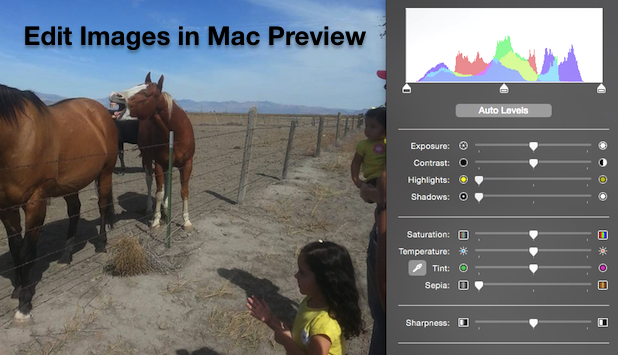
Preview is the default application for opening images on Mac computers. You may be surprised to learn that Preview comes with some hidden photo editing tools. These are not as powerful as what you would find in Photoshop or other paid programs, but they are all that the average photo editor needs to tune up their photos or add black and white/sepia effects.
Excel is the go-to software for organizing and analyzing data. There are many ways that you can access and use Excel sort abilities. This tutorial will walk you through beginner to advanced methods for quickly sorting your data.
1...200201202...528Page 201 of 528
error: Content is protected !!