iPad / iPhone : Setup Gmail as an Exchange Account / Full Calendar, Email, Contact Syncing and Push Support

Contributor Icon Contributed by Jimmy Selix  
Tag Icon Tagged: Apple iPhone Entertainment iPod  

This recipe will explain how to setup your iPad or iPhone to use Gmail as an Exchange Account and in turn allow you to sync your Google Calendar, Gmail Email and Contacts to Google over Exchange (Push email).  Google has been gracious enough to allow full Exchange and Push support for the iPad and iPhone.

Setting up your Gmail / Google Exchange account.

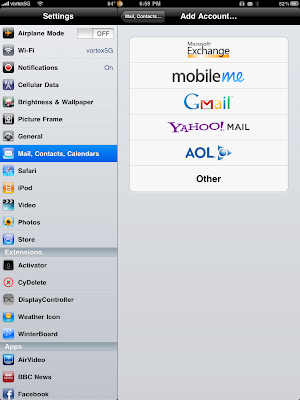
1. Go to Settings > Mail, Contacts Calendars > Add Account

2. Choose Microsoft Exchange

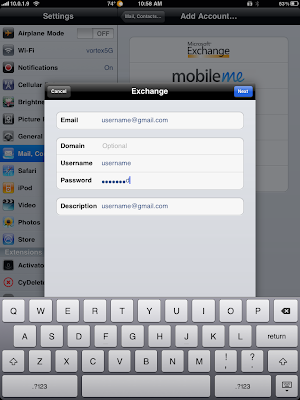
Fill in the form as such.

  • Email: your gmail address
  • Username: gmail user name
  • Password: gmail password
  • Description: anything you like (by default does your username)

Tap Next

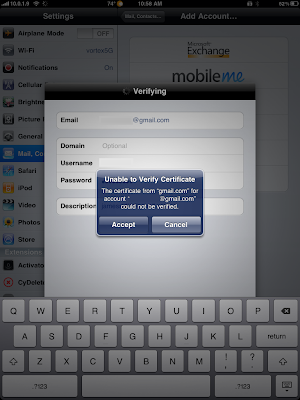
3.  It will prompt to accept a Certificate, tap on Accept.  (if you do not get this prompt, just continue to Step 4)
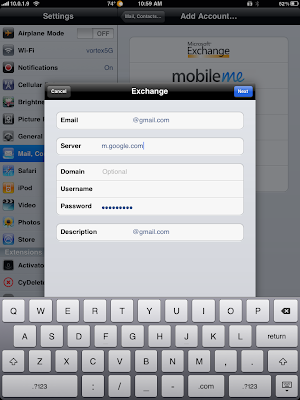
4. Next, it will then ask you for the Server address.

We will enter:  m.google.com

Tap Next once we have this filled in.
5. Lastly we will be asked for what items we want to sync.  By default Calendar, Contacts, and Email should be ON.  Tap Save when your done.  The account should now be all setup.
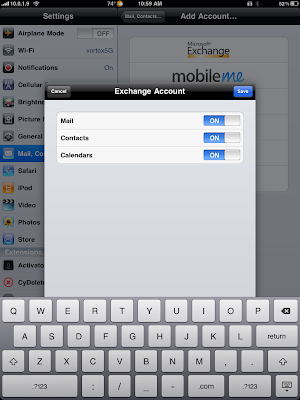
To configure your Sync options, once your done; go back to Settings > Mail, Contacts, Calendars and then Tap on the Account we just made to change the Days to Sync options, etc.

However, if your like me and have multiple calendars; only your main default one will show.  We can allow syncing of multiple calendars via a Google Sync page.

6. On your iPad / iPhone, open Safari and go to m.google.com/sync

7. Click on your Device and then choose the Calendars you want to sync.  Click on Save and your other Calendars will start syncing.

NOTES:

  • -To get a grip on your Contacts in Gmail, go to your Gmail account and click on Contacts.  I would recommend using Groups and then adding common Contacts to the appropriate Group.  By default, Gmail will not add any of your contacts to this Contacts list; but will keep them in the Global Address List (GAL) so you can still search ALL of your Gmail Contacts
  • -Gmail by default will add anyone you send an email to to the “Other Contacts” list. Again, you have to move contacts to your “My Contacts” list to get them to show in the Address Book.
 

40 Comments -


  1. Marco said on July 24, 2010

    This does not work on my iPad. It says Invalid Exchange password (I retype the password, which is the correct one, but it still does not accept it). Thanks

  2. Harry Parry said on July 24, 2010

    This does not work, as the exchange setting has more options than are reflected in this article . What a horrible website.

  3. jimmyselix said on July 24, 2010

    Hi Harry

    Sorry about the confusion, the guide has been fully revamped with exact step by step screenshots for the process. Again, sorry about the initial error.

  4. jimmyselix said on July 24, 2010

    are you using your gmail username and password? i’ve tried my 2 google accounts on my iPad 3G+Wifi without any problems.

  5. Marco said on July 25, 2010

    Hi seamonkey420, thank you for the update, it works fine now and it is a great feature!

  6. Marco said on July 25, 2010

    Harry Parry, it is not nice to write “What a horrible website”…
    The author of this post just made a little mistake and he promptly corrected it and posted a revised post that works perfectly. It’s too little to say this is a horrible website :-) I’ve always found this blog very interesting and useful.
    My 2 cents.

  7. Marco said on July 25, 2010

    Don’t worry seamonkey420 :-)
    What matters is that it works perfectly now! And I was not even aware that you could set up a Gmail account as an Exchange server, with all the benefits of this fact. Again, thanks. I will but this post in my favourites so that I can reference to it if needed.

  8. jimmyselix said on July 25, 2010

    thank you marco for visiting and your kind words. i am glad the updates resolved the missing details.

  9. Eric said on July 28, 2010

    I’m on my iPhone4 (iOS v4.0.1) … after completing step 2 and tapping “Next” the status bar says “Verifying …” but never prompts me to accept a certificate as shown in Step 3.

    Is this happening to anyone else? Thanks.

  10. Eric said on July 28, 2010

    I figured it out after visiting Google’s site (http://www.google.com/support/mobile/bin/answer.py?hl=en&answer=138740).

    Step 3 may not happen. If you are not prompted about the certificate, you simply skip to Step 4.

  11. jimmyselix said on July 28, 2010

    i will make a note and update for those of us not using SSL

    Thanks for the find :)

  12. Holas said on July 31, 2010

    jejeje

  13. Blfaubel said on August 26, 2010

    keep getting error message that my “exchange acct. password is incorrect.

  14. jimmyselix said on August 28, 2010

    are you using your Gmail password? or do you have a google apps hosted exchange account?

  15. Ian said on September 15, 2010

    What’s the story regarding the sync of specific fields in contacts?
    It seems, for example, with phone numbers only those titled Work, Home, Mobile sync. Also if I have a contact with 2 mobile numbers only the 1st is visible in the iPhone.

  16. jimmyselix said on September 22, 2010

    i’ll check into this later tonight and post back :) i’ve noticed some weird field mappings myself vs on my nexus one.

  17. Ur2prosper said on October 30, 2010

    This is not working for me… asking for the password and once I give it, it says it is incorrect. any guidence would be helpful.

  18. 123rosemount said on November 12, 2010

    goog job mate. i had to get an iphone 4 working and after using the data you provided that bloke who called me was happy as a child after x-mas when he did receive all mail and calendar and contacts

  19. Sammy said on November 23, 2010

    great clue thank youuu :-)

  20. Bill said on November 24, 2010

    Does this work in desktop Outlook?

  21. Jack said on December 26, 2010

    you are a savior. just bought an ipad for my wife for christmas and wasted 2 hours trying to get her gmail account to work. used your exchange configuration and worked immediately.

  22. Nat said on December 29, 2010

    worked perfectly for me. Love the new ipad OS update as I can now have two exchange accounts (so I have my work Exchange account, and my Gmail account) and now I have all contacts and calendar entries on my ipad.

  23. Pennyalbertella said on February 9, 2011

    My I-pad and I-phone were syncing perfectly to my googlemail account. Now it is asking for my exchange password on both devices and refuses to accept my googlemail password even though this is the one entered under exchange device. Help?!

  24. jimmyselix said on February 15, 2011

    are you able to get to your gmail on your pc or mac? it could be your account got locked possibly.

  25. Kasdaq said on February 17, 2011

    Seamonkey420, thank you for all your information. You have been extremely helpful. I do have one question. I would like to be able to manage my contacts both on Google contacts and the iphone. For example if I update a number on the iphone or delete a contact on the iphone, I would like for it to reflect on the google contacts as well. This is currently not happening. I am only good if I update or delete from the google contacts site. Is there a way to make this work both ways? Thank you

  26. jimmyselix said on February 17, 2011

    hmm, i will load up my iPhone 3GS and test this. i know with android devices, the syncing occurs across all devices instantly if you have your contacts setup to sync.

    again, i’ll do some testing this week and post back some notes on what i see happening and if there is a way around that :) thanks for visiting!

  27. Kasdaq said on February 17, 2011

    Thank you so much. I am wondering if this is an issue just with this particular phone. Last night, I tested my ipad and things are working both ways on that. I am planning a hard reset today and see if it will help. I will keep you posted. Please let me know if you have any thoughts…

  28. Kasdaq said on February 17, 2011

    I figured it out! Somehow the exchange configuration was not loaded correctly the first time. I did the hard reset and went thorugh the entire process again by setting up the account through General Setting>mail, contacts, calendar>exchange…
    This time things are sinking both ways :)

  29. Bill_C said on February 25, 2011

    I have use these instructions with no problem on my iPhone 3GS but on my wife’s iPhone 4 Verizon, i get ” Enter the password for the Exchange account “Exchange”" and when I do it comes back incorrect. Any help?

  30. Mary_C said on February 25, 2011

    Sorry for above post. Re-did and it works. Must have been cockpit error.
    Thanks for you blog.

  31. Elysemalinowski said on March 11, 2011

    Okay. I have been to multiple websites and have tried to sync my phone with google countless times. I have no clue what i am doing wrong. I have tried cdl…whatever. Microsoft exchange. No matter what i do it keeps asking for an exchange password, and no matter what i put in there it keeps coming back “incorrect.” Someone please help me……

  32. Max said on March 15, 2011

    thinks it’s working for me

  33. Larryp said on March 23, 2011

    I do not use Google Aps. but having same problem

  34. Younes said on May 28, 2011

    same here; password incorrect!!

    (and I am sure it is correct as I am using it in iphone and pc!)
    any help please?

  35. Younes said on May 28, 2011

    the incorrect password is only for ipad2

  36. S93778440 said on June 22, 2011

    I use IPad 2. I have follow your steps, but the password for exchange with my syn account is alway saying wrong. Can you help me fix it?
    Pat

  37. S93778440 said on June 22, 2011

    I use IPad 2. I have follow your steps, but the password for exchange with my syn account is alway saying wrong. Can you help me fix it?
    Pat

  38. Cyndy W said on November 6, 2011

    My iPhone has already been configured to receive my Gmail. All of a sudden I am getting a pop-up about an Exchange Account. Why has this come about now when I’ve had my iPhone 3GS 16G for a couple of years now? Also, will synching the iPhone to the Gmail account back up all my iPhone contacts? Respectfully, Cyndy W.

  39. chandra said on November 28, 2011

    for those having trouble with password, if you have 2-step verification, you will have to turn that off on your computer and then you shouldn’t have the problem with the password notification. This is what I figured out. hope it helps.

  40. tunji said on January 4, 2012

    hi, pls how can i set up exchange account on my andriod powered tablet(airpadx) thanks. pls send details to ttkareem@yahoo.com


RSS feed for comments on this post. TrackBack URL

Leave a comment -