


Is your Google Chrome causing a conflict while attempting to load a web page? Isn’t your browser functioning properly? Perhaps, it is the time to clear cookies in Chrome pc. Now some of you might be thinking what are these. Right?
For those who don’t know, cookies are small packets of data sent to your Chrome browser from the websites you visit. Usually, this data contains a piece of text that is stored in a browser’s directory or data folder. This text can be either user ID, session ID or any other text. The role of browser cookies is to keep you logged into a website as it writes ID information to a cookie file.
Websites you visit place cookies on your browser so that they can retain your login credentials, recognize you, and offer you a customized internet surfing experience on the basis of your previous Google searches.
How Cookies Work
When you log into some website. Let’s say Facebook, your Google Chrome sends it a message with your login credentials (username and password). As soon as this login request gets successful, it commands your browser to set a cookie. Now Facebook will be able to know and trusts who you are for subsequent visits even without asking you for login credentials again.
Two Major Functions of Cookies
-It makes browsing the internet faster and reliable. After all, it lets a website know who you are? On the basis of which, a website can tailor your browser experience. (For website owner).
-Cookies help users know on which websites they have been to (For browser user).
When and Why Should You Delete Cookies?
When cookies have a plenty of benefits why users need to delete individual cookies.
Although cookies operate in the background and usually don’t cause any significant trouble yet there are some examples where you would like to delete them. Such as:
-Sometimes, cached data in cookies conflict with the website, especially if the page you are visiting has been updated. It may result in error while attempting to load that page.
-In addition to this, since cookies are files on your computer’s hard drive, they always take some additional space. Though each file is of a few KB only yet gradually they may add up and take a significant amount of space if you don’t delete them on a regular interval.
-As we mentioned above, cookies store users data and keep the record of your online activities, there can be a privacy issue. So, if you want to maintain your privacy, you may choose to delete your cookies.
If you’re wondering how do I clear cookies on Chrome here is a complete guide for you.
How to Delete Individual Cookies
If you need to delete a specific cookie but don’t want to remove all of them, you can access the Cookies list and remove them one-by-one. This is helpful if you are having problems with a cookie driven site or are developing a page that utilizes cookies.
Frequently, deleting Chrome’s cookies will allow a badly behaving website to function much better. Many people just delete all cookies; however, this removes many helpful cookies from many other websites. It makes much more sense to delete the individual specific cookie of the website that is causing you the problems.
You can jump directly to the correct Chrome settings area by entering this text into the Chrome address bar:
chrome://chrome/settings/cookies
Alternatively, here are the text and pictures to walk you through the process.
1. Open Google Chrome.
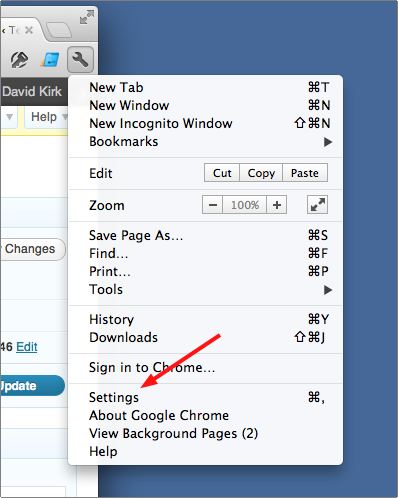
2. Click the wrench icon in the upper-right corner of the toolbar and select Settings.
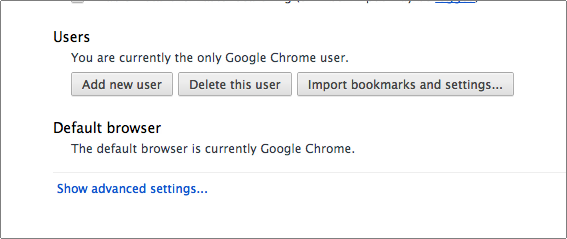
3. Select the Show advanced settings link at the bottom
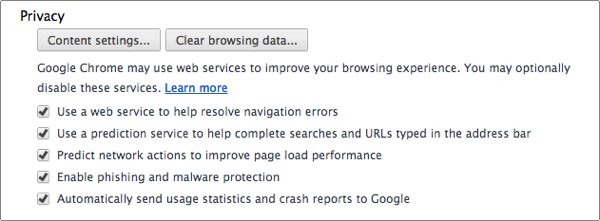
4. Select Content settings button under the Privacy area.
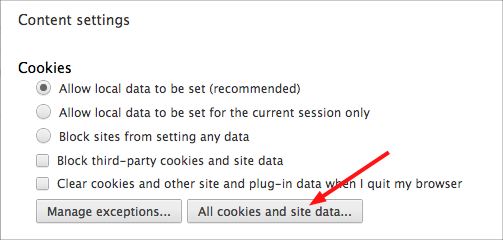
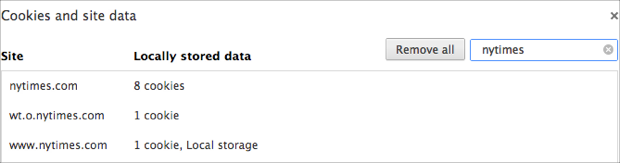
5. Click the All cookies and site data button.
6. Search for and delete the cookies you would like to remove.
How to Delete Cookies From a Period of Time
And if you want to delete cookies from a period of time, follow the steps given below.
- Open the Google Chrome browser on your computer system.
- Click on More at the top right
- Next, click on More Tools and then Clear browsing data.
- At the top, click on the drop-down, available next to option ‘Clear the following items from’.
- Now you can choose a time period like the Last hour or the Last day.
- Check the option “Cookies and other site data.” and uncheck rest of the items.
- Now click on Clear browsing data option.
How to Manage Cookies in Chrome
Managing cookies in a browser is quite crucial. And the very first reason for the same is that the higher risks of security. As incidents of data & information misuse are increasing at a rapid pace, website security is essential for every online business.
So, if you take managing cookies backseat, most probably your security is on risk. Anytime a hacker can enter into your computer system and cause the damage to your privacy. Therefore, it is advisable to manage your cookies on a regular interval. You can manage cookies in Chrome by enabling, disabling and removing them.
Let’s find out how you can view, delete and block cookies in Chrome.
Step 1: Open your browser.
Step 2: Click on the three-dot symbol available on the upper right corner of your browser to customize the Chrome.
Step 3: Next, hit the Settings option and then Advanced Setting, available at the end of the menu.
Step 4: You will be taken to the next window where you will see Privacy and Security. Here you will need to click on ‘Content Settings’.
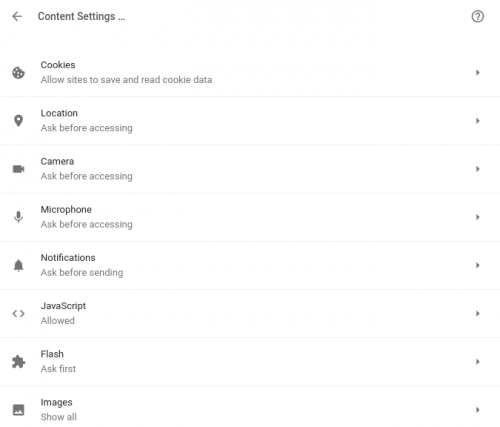
Step 5: Next, you will see a list of options out of which you have to click on Cookies available on top. A new page will open in front of you where you can see the options given below.
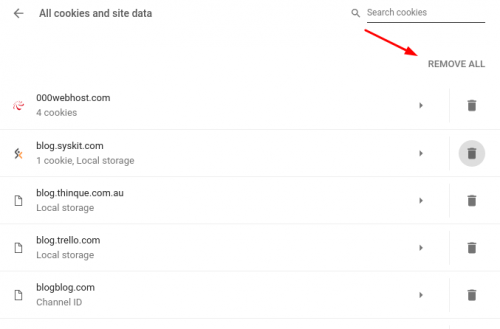
Step 6: Click on All cookies and site data to see the list of websites you have visited along with the cookies. You may choose to remove all or some of them according to your choice.
That’s all, it is as simple as that.
This article has been updated for the most recent version of Google’s Chrome browser. However, as Chrome is frequently updated, please let us know if the article becomes out of date in the comments below. I’ll be glad to update it as needed.





