
PS3 – How to convert movie DVDs to MP4 for playback on Playstation3

Contributor Icon Contributed by Jimmy Selix  
Tag Icon Tagged: Games  

Updated 3/4/08 w/Handbrake recommendation. This recipe will explain how to convert your personal purchased DVDs to MP4 format for playback on your Playstation3. By doing this, you can in turn have a digital movie jukebox on your PS3! This recipe requires two main ingredients, DVD Decrypter and Handbrake or PS3 Video 9 by Red Kawa.


1. Getting the tools. You will need following ingredients for this recipe:

-Playstation3
-Original Movie/DVD to convert to MP4

-DVD Decrypter

-Handbrake
http://handbrake.fr

or

-PS3 Video 9
http://www.redkawa.com

-Harddrive w/40GB of Free space.

Also, be sure that the hard drive/partition you are ripping your movie/.vob files to is an NTFS drive not a FAT32. FAT32 has a 4GB max file size limit and most movies will be larger than that when ripped.

2. Open DVD Decrypter and then pop in your movie. It may ask you to set your region, choose your region and click OK (this will not permantly set it, just for the software/ripping session)

Now go to Tools > Settings. We need to change a file splitting setting prior to ripping our movies to our pc’s hard drive.

Go to the IFO MODE tab and click on the File Splitting drop down. Change it to None. This will let us create one big .vob file when we rip.
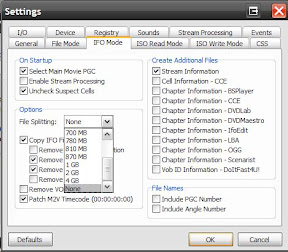
Click OK once your done w/any other setting changes.

3. In DVD Decrypter, click on Mode and then click on IFO.
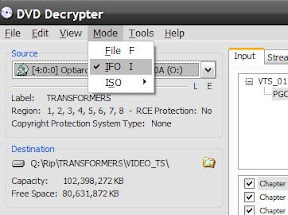
4. You will notice that the right side of the DVD Decrypter window will change. Click on the Input tab and select the main movie (you can tell by it being the longest title), and then click on the Stream Processing tab.

We will want to check the “Enable Stream Processing” and then select the Video and Audio stream we want.
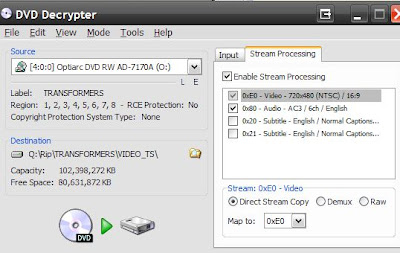
Then click on the Rip button to start. This should take about 10 mins or so depending on your system.

5. Once you have your movie on your harddrive as one big .VOB file, we can convert it to MP4 AVC using Handbrake or PS3 Video 9.

Handbrake method (super easy, recommended):

Open Handbrake.

Click the File radio box under Source and then click the Browse button. Find the .vob file we copied in the previous steps.

Now under Destination, click Browse then give your mp4 file a name and click Ok.

Finally, on the right side, choose the PS3 preset profile, it will adjust a few settings and you should now be good to go. Just click on Start to start or if you want to do a batch job, click add to queue and then go through the same steps for the other movies.

————– or —————-

PS3 Video Method (older):

Open PS3 Video 9.

You can modify or edit a profile if you want right away or you can use the default encoding profiles (recommended if this is your first time, you can tweak after you see how it turns out!).

Click on the Convert link at the top.. Then choose the Current Conversion tab. Yes, you can use the Wizard but i prefer seeing what profile i’m using.

Click on the Convert Video button.

Find our .VOB file we ripped previously and click open.

Now on the right side, you can name your movie and also choose your profile. I prefer to use AVC since the video turns out pretty smooth and w/little pixelization and good filesizes. Lately i’ve been using a profile with these specs:
MP4 AVC 2072kbps, profile 4.0 video, Stereo AAC 160kbps sound, upconvert to 720P w/autoframerate options.

Click Start and let PS3 Video 9 do its thing!.

Just a note,this may take a while and the Time Remaining is not always right; most of my movies take about 3 hours to convert but i am also upconverting vs just converting file formats only (keeping the standard 480i/p resolution).

–Handbrake PS3 profile avg file size = 2gb for 2 hour movie. avg conversion time around 2 hours to 1 1/2 per movie (depends on pc specs of course)

–This guide/site/author does not promote piracy or bootlegging; this recipe is for educational/personal archival purposes of media the user legally owns.


 

22 Comments -


  1. shazam said on December 14, 2008

    Why can’t you just use handbrake to go straight to mp4 from the DVD? Why do you have to use DVD Decrypter to go to VOB first?

  2. Shogun said on January 1, 2009

    Because the DVD is protected by something or the other…I dont remember what but handbrake wont load the file from there i tried.

  3. RSX said on February 4, 2009

    Worked Great, Thanks !

  4. Chris Pratt said on February 11, 2009

    If you don’t rip the DVD into one big VOB file, you won’t have problems with drive formatting limitations. A traditional DVD rip results in multiple VOB files that together add up to more than 4 GB, but are each individually under the 4 GB limit for FAT32.

    Handbrake can read a VIDEO_TS folder full of VOB files with no problem, so there’s really no reason to roll them all up into one massive file.

  5. Matt said on March 25, 2009

    How do I get it from my comp to my ps3?

  6. anon said on April 2, 2009

    Mate that with handbrake is DEAD easy. With AnyDVD I can do this direct without any inbetween decoding step. W00T!!! THANKS!

  7. uhoh said on May 27, 2009

    get a flash drive with some space on it and plug it in and watch.

  8. WorkSmarterNotHarder said on June 7, 2009

    Personally, I just pop the disc in, rip it with DVDShrink to .iso, then use MagicISO to mount it, point handbrake to the virtual drive and rip to the PS3 format.

    Done and faster.

  9. Jackson said on July 16, 2009

    Why not just use DVDEncryptor as shown above…. but then just rename the extension to .MPG

    That way you weed out having to codec it again through Handbrake and as a mpg file its ready to be played through the ps3.

    Although that’s having your ps3 hard wired from a NAS….. works like a charm

  10. jimmyselix said on August 10, 2009

    or use a DVD+RW DL / DVD-RW DL and burn as a UDF dvd. this way you can reuse the dvd and get over the 4gb fat32 file limit that usb drives have when you copy to ps3 :)

    (remember, PS3 can ONLY read external hdds/usb hdds taht are formatted in FAT32. IT WILL NOT READ NTFS!)

  11. jimmyselix said on August 10, 2009

    you can but i prefer ripping to hdd and then converting from that copy. i get more reliable results this way or so it seems. :)

    and personal preference; i’m old skool (i was backing up dvds when it was a 12 hr process/remux/convert/ifoedit, hehe)

  12. JimBob said on December 27, 2009

    Hmm you people waiste time,Why not just copy to hard drive using decrypter then convert to mp4 Using nero recode or whatever you prefer,then share with windows media player to your PS3 then you can copy straight from your pc to PS3 or just watch it from PC on your PS3 ;-)

  13. Anonymous said on February 22, 2010

    I have a lot of foreign films and I like to be able to select which audio track and when to enable subtitles. If I convert to mp4 then I lose the flexibility of this.Why can’t the PS3 just deal with the .IFO and .VOB files from my NAS directly? It obviously can if I insert a DVD into the player. Why need to convert at all after ripping using DVDFab?

  14. Bill said on May 19, 2010

    Handbrake rocks! And I personally used this Ultimate DVD Converter.It can rip DVD to almost any audio/video format including Video format(H264, MP4, WMV, AVI, MOV, DivX, XviD, RM, 3GP, flv, SWF, mpeg-1, mpeg-2, VideoCD, SuperVideoCD, DVD, etc) and Audio format(AC3, AAC, MP2, MP3, MP4, RA, WMA, etc.). It works well for me too.
    Free download at http://www.ipodtocomputercopy.com/dvdconverter/cucusoft-ultimate-dvd-converter.html

    Hope it helps.

  15. L_ibon said on July 6, 2010

    if I convert 1GB VOB file into MP4. what size the MP4 will be? Larger or smaller

  16. jimmyselix said on July 9, 2010

    smaller by a few hundred mbs, but depends on level of compression/video quality.

  17. jimmyselix said on July 9, 2010

    Update 7/9/2010: I now use DVD Fab (retail but worth it) for the ripping since DVD Decrpyting won’t work on most newer movies. :)

    AnyDVD works great too I hear (its retail too)

  18. Ed123 said on July 29, 2010

    please help , on handbrake , there is no ps3 preset and i dont know what to do , help :)?

  19. OMEGASquad said on August 10, 2010

    Presets for PS3 and XBOX were removed with new versions of Handbrake. Unfortunately, the documentation is outdated and doesn’t tell you that.
    In the announcements of the handbrake homepage they say, that support for these devices is too fragile and normal settings should be sufficient.

    Cheers

  20. Car DVD Players said on September 23, 2010

    Mate that with handbrake is DEAD easy. With AnyDVD I can do this direct without any inbetween decoding step.

  21. bade lund abad said on February 15, 2011

    I use DVD decrypter to Burn my DVDs on my hard drive. Then I use Cucusoft to convert those files to one mpg file. However the movies now only play in stereo. Is there a way to play them in full Surround?

  22. DVD Video Tool said on October 12, 2011

    This works very good for me, thanks a lot for this tutorial.


RSS feed for comments on this post. TrackBack URL

Leave a comment -


