
WMP11 – Install Windows Media Player 11 without activating / bypass WGA
Posted by Jimmy Selix in Windows
This recipe will explain how to install Windows Media Player 11 without having to Activate your windows copy / bypassing the WGA. This requires Winzip or any other .zip extracting program to be installed.
Bypassing the activation when installing Windows Media Player 11 is pretty simple. Basically what we will do is download the setup file (.exe) and then extract its contents to a folder and manually run the two components needed to install and run Media Player 11.
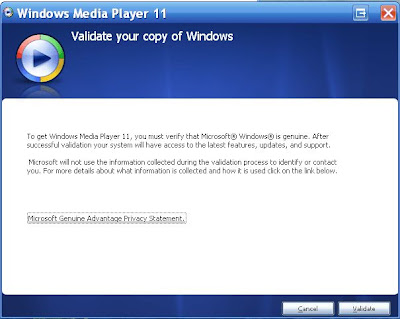
1. Download Windows Media Player 11. Go here to download.
2. After you have the file downloaded (usually named: wmp11-windowsxp-x86-enu.exe), right-click on the File.
If you have Winzip installed, go to the Winzip menu, and choose to Extract to Folder X:\…\wmp11-windowsxp-x86-enu
A lot of .exe setup files are really just a self-executing zip file so you can use this method to extract files from .exe files with other installers too (ie device driver installers, if you only want the driver files and not the other ‘fluff’ that sometimes come with the installer.)

4. Once you do this, you will see a folder called wmp11-windowsxp-x86-enu. Go into the folder and now we will manually run the two files needed for Windows Media Player 11 to install.
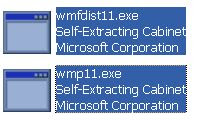
First run: wmfdist11.exe
This is the media player 11 runtime files.
Gp through the installation wizard and then run: wmp11.exe
This will in turn install Windows Media Player 11 and will bypass the activation part of the installer.

Once you finish the install, reboot and you should now have a working Windows Media Player 11 that will not require activation and in turn allow you to install on a non-activated XP install.
About Jimmy Selix
View more articles by Jimmy Selix
The Conversation
Follow the reactions below and share your own thoughts.
October 05, 2008 at 12:31 pm, isaac said:
tnx…
it really worx; awesome
tnk u very much mua mua
December 14, 2010 at 7:47 am, Ryan said:
it says not enough memory????
May 03, 2012 at 4:51 pm, Barsalma Tureep said:
> Do it make for the grinding noise also? I get that and have to get rid of PC. No good directions for this
October 14, 2008 at 8:57 pm, karmen said:
tnx a lot!!!
October 21, 2008 at 5:04 pm, Bob's your uncle said:
Thanks a million, was looking for a way round this
October 28, 2008 at 11:31 pm, Tikuru said:
Thanx but… Yes Thanx
Not now that my peny should go to the richest guy in planet
November 14, 2008 at 1:30 pm, herhrehrdthr said:
Thanks a lot!
You are genious
November 18, 2008 at 7:37 pm, DAn said:
I did exactly as your recipe instructed and after a reboot I started WMP and it’s asking me to Validate. Do I need to uninstall WMP first and then run the new installer?
November 20, 2008 at 8:40 am, drkalo said:
Dan, may be you need another restart after installing the runtimes I guess. I followed these steps and it worked perfectly for me (they are pretty much the same as seamonkey’s except step #4
1. Download WMP11.
2. Extract (unrar or unzip) wmp11-windowsxp-x86-enu.exe by using extraction tool such as WinRAR.
3. Go to the extracted folder, and execute (run) wmfdist11.exe.
4. Restart the computer.
5. Execute wmp11.exe from the extracted folder.
6. Restart the computer.
7. Start using Windows Media Player 11.
I am using a x86 XPsp3 copy of ms windows which appeared not to be genuine but this method really bypasses activation by the wga tool.
January 06, 2009 at 11:11 pm, A W said:
I am using XP 64 and this doesn’t work. I’m now lumped with a validation notice instead of the ability to play media files.
June 27, 2012 at 12:02 am, Jay said:
Thank you very much
November 21, 2008 at 8:21 pm, Mr. expert said:
Wonderful. It really did work. I was aiming at installing WMP 11 For the last six months but could not succeed until i reached this page.
November 27, 2008 at 6:50 pm, exex said:
thanx
December 10, 2008 at 1:12 pm, jabastin said:
thanxxxxxx a lot buddy
i was tryin to install windows media player 11 for past 8 mon but u made it happen
December 10, 2008 at 3:56 pm, hari said:
thanx dude
January 19, 2009 at 6:32 pm, El said:
TERIMA-KASIH ….Thanks a million….muah…muah…!!!
January 30, 2009 at 3:37 pm, gm said:
Thank you thank you thank you
))
February 02, 2009 at 5:39 am, fsdfsdf said:
Thanks
February 07, 2009 at 4:14 pm, Richard Cranium said:
Or you could just go into the Windows Media Player folder in programs folder and delete LegitLibM.dll and delete it. Start WMP11 which bypasses WGA check once activated I undid the delete and it works just fine.
March 27, 2010 at 7:16 pm, Anonymous said:
Thx, none of the other worked, but this did! Thx alot!
November 15, 2010 at 11:49 am, Allan said:
Richard Cranium, you are a STAR! I’ve tried all of the other stuff but THIS is the only one that worked for me. Many many thank you’s.
February 21, 2009 at 9:45 am, Ady said:
THAnXXXXXXXXXXXXXXXXXXXXXXx alot dude….. the bypassing trick is awesome
March 06, 2009 at 1:33 pm, RJ said:
you rock…………………………!!!!!!
March 14, 2009 at 6:09 am, Heather said:
You are THE BOMB!!!! After 3 friggin’ evenings of working on this to bypass the stupid Windows validation (that I should not have to do with my LEGAL and PAID copy of Windows), I came across this website and it worked with NO PROBLEMS!
March 17, 2009 at 4:54 pm, IT WORKS said:
Google ‘Download Media Player 11′ and download it.
Download Winrar
http://www.rarlab.com/rar/wrar380.exe
- during the install make sure you tick the ‘Intergrate Winrar into shell’ box.
Extract the Windows Media Player 11 Installation file ‘wmp11-windowsxp-x86-enu.exe’ to a folder of your choice. You can do this easily by right clicking on the file and click ‘Extract To …’
Go to the folder you just extracted everything to
Run ‘wmfdist11.exe’ Do Not Restart if it asks.
Run ‘wmp11.exe’ and restart the computer.
Now goto
C:Program FilesWindows Media Player
Look for the file named ‘LegitLibM.dll’
Right click and re-name it to ‘LegitLib.dll’.
Open Windows Media Player 11 and click the ‘Validate’ button.
Click the ‘Finish’ button.
Click the ‘Accept’ button
Chose the install type etc etc
Thankyou so much everyone. I spent hours googling ways to do this. This is the only method that worked for me.
July 19, 2009 at 3:06 pm, Anonymous said:
this worked for me when the others on this page wouldn’t
January 01, 2010 at 2:43 pm, Sujatha said:
this just excellent and wonderful..it worked for me…..great thanls
February 12, 2010 at 12:28 pm, Anonymous said:
@IT WORKS:
>> Hey thanks man!!!
April 15, 2010 at 8:36 am, BazTheRaz said:
After uninstalling, installing and rebooting many times. IT Works method worked! Many thanks.
May 05, 2010 at 12:34 am, Anonymous said:
OMG!!!! THANKS VERY MUCH!!! YOU DON”T KNOW HOW YOU MADE ME THE HAPPIEST GIRL IN THE WORLD!!! THANKS YOU THANK YOU THANK YOU!!!! I WORKED !!!!
May 25, 2010 at 7:39 am, essex said:
now its working…..tanggo mucho..
July 19, 2010 at 8:37 am, Alex said:
Thx a lot, you really helped me with that!
July 25, 2010 at 6:25 pm, Anonymous said:
you ……are the boss……i only did
went to c-programe file and find legidlibm.bill and i turned it into legidlib.dill
and it works……….thank you very much
July 25, 2010 at 9:59 pm, Goutah said:
YES!!!!! Your the man, all the other ways did not work for me. This did!!! Thanks!!
August 26, 2010 at 1:50 am, Jakee said:
you da man!
September 06, 2010 at 9:32 am, Raghavnarain said:
it worked for me xp sp2 thank you very much
September 24, 2010 at 11:17 am, Bjoy said:
jusT diD iT-gReaT
September 29, 2010 at 9:40 am, TC said:
Thanks IT WORKS, your method worked fine
October 27, 2010 at 7:11 pm, Myclipta said:
Nice Work ..Thanks for your info
November 05, 2010 at 6:45 am, Mgr. E. Kelley said:
Worked for me.. Thanx
November 06, 2010 at 6:45 am, Sudheerholla said:
hey thnks dude…tht was awesome..it really worked
November 19, 2010 at 12:16 pm, kzrockz said:
awsm.it wrked like a charm.tried a lot of methods but this 1 rcked.thnk u fr u7r valuable effort.
December 14, 2010 at 12:01 am, Zapmx said:
this one works for me very well, my os winxp with sp2
January 10, 2011 at 2:01 pm, Asherfabia said:
thanks for the very much info…
January 25, 2011 at 5:09 pm, dezo said:
good you are genius very easy ^^
January 31, 2011 at 10:07 am, Arg said:
Brilliant- yeah, works. I tried everything else, then tried this- EXACTLY as directed, FINALLY got it. Many thanks.
February 19, 2011 at 6:11 am, Fakhirinyen said:
thank a lot man…it work..u are my savior
February 25, 2011 at 8:57 pm, Suveer Kakrool said:
bro u jus awesome….. i cant thank u enough….. u rock m/
May 18, 2011 at 3:16 pm, Godfather00701 said:
thanx it worked
June 24, 2011 at 7:46 am, Samratbabanrakshit said:
Awesome! Many Many Thanks!
July 16, 2012 at 9:52 pm, daf said:
cheers ITWRKS!
March 18, 2009 at 9:03 am, Anounymous said:
Im a computer nerd and 11 and found that out last year
March 20, 2009 at 4:16 pm, Sim said:
I’m not having everyone else’s success. I somehow disinstalled my WMP and for three days now cannot open files or Cds and have lost printer use. printer will not reinstall.
This recipe seems promising and I get as far as running wmfdist11.exe ok. But there is no wmp11.exe icon in the wmp11-windowsxp-x86-enu folder. I tried the wmp11 icon but it keeps ending up failed with the message FAILED TO INSTALL CATALOG FILES. this recipe is the nearest I have come to a solution, but previously I was trying the validation and thought my problem might be ’cause I’m in Italy but running in english. I read something about that.
If anyone can help me get over these final hurdles I’d be most obliged.
March 23, 2009 at 5:22 pm, Baldomero said:
it works !!!!!! just do what ” IT WORKS “said and the fproblem its gone !!
April 19, 2009 at 2:04 pm, charly said:
great trick friend…………………….. it works for me…………..
April 22, 2009 at 8:42 am, k ali said:
It was awsome.Thanks a lot
It realy woking now after my some wary night of anxity.
April 23, 2009 at 12:13 pm, prakash said:
u r genious its work awesome.thanks
April 25, 2009 at 9:08 am, Trung Huan Nguyen said:
thx a lot
May 02, 2009 at 4:24 am, faheed said:
hi windows media player 11
May 10, 2009 at 6:04 pm, Alpina_One said:
awesome it worked! i was messing around with that legitbm/b.dll rubbish and this was by far the easiest method.
May 16, 2009 at 11:02 am, phuong said:
thax you so mux =]]
May 17, 2009 at 4:12 pm, Lidity said:
Everytime I go to my Video section of WMP 11 it shuts down in error…any ideas why?
May 23, 2009 at 12:03 am, oshman said:
Sounds good, i’ll try it. Thx
May 29, 2009 at 5:37 pm, Sakeeb said:
Dude it works!!!!
June 10, 2009 at 9:47 am, Garben said:
thanks a lot
thank you vry very much..
June 18, 2009 at 6:23 pm, ATS said:
thx a LOT…. really gr888888888888888888..
July 09, 2009 at 1:52 pm, andrew said:
thank you..it works
July 09, 2009 at 7:22 pm, njs said:
AND YES!!!!!!!!!!!!!!!!!!!!!……………IT WORKS, 10X A MILLION..
August 03, 2009 at 3:54 pm, Anonymous said:
Thank You Very Much
September 03, 2009 at 1:09 pm, Anonymous said:
Worked a treat!
September 04, 2009 at 10:36 pm, chowdary said:
its working.
thanka a lot my dear friend.
September 13, 2009 at 3:30 pm, Name said:
Thxkbai
November 15, 2009 at 12:10 pm, Anonymous said:
superb man, i like your work.
thnx
November 15, 2009 at 12:59 pm, Muhammad Adnan Hanif said:
Dear Friend;
Thanks a lot for this favor.
November 22, 2009 at 5:44 am, dale said:
thanyou it helps!!
November 25, 2009 at 7:46 pm, mehul said:
wow! that was a great help… thanks a ton
November 27, 2009 at 8:28 pm, Anonymous said:
hello. I am unable to get wmp11 to run after doing all these steps. It keeps giving me the VALIDATE YOUR COPY OF WINDOWS message, even after I deleted the WGA file. I am running XP Pro & SP3. Can someone please send me in the right direction ? I have been working on this sooo long now…..
Thanks in advance
December 06, 2009 at 2:20 pm, Anonymous said:
does this works with vista???
December 26, 2009 at 9:36 am, af said:
Works Perfectly!
awesome
December 27, 2009 at 5:51 am, yaxiri@gmail.com said:
Thanks Bro! It works!
January 01, 2010 at 10:03 am, akash said:
thanks bro its awesome!!!!!
working fine with my xp sp2 !!!!!!!!!!1
rockssssssssss
January 01, 2010 at 3:38 pm, Anonymous said:
thank you
January 05, 2010 at 10:26 am, marenette_martin said:
thanks a lot..! it works..! thanks…
January 23, 2010 at 2:08 am, Anonymous said:
I LOVES YOU MAN NOT IN GAY WAYS
January 27, 2010 at 11:18 am, Anonymous said:
Thanks a Lot. I hope this will surely Work
January 28, 2010 at 11:00 pm, Anonymous said:
It seems this method working for other than sp3 pack, I did exactly what it says, but when I try to launch wmp11 it brings the valdiation page and therefore didnt work, any body has success with sp3 for xp OS?
would appreciate successful input.
thanks
January 29, 2010 at 8:39 pm, Anonymous said:
Thanks it really works
February 17, 2010 at 12:27 pm, Bill Gates said:
sweet!
February 19, 2010 at 12:52 pm, Anonymous said:
not working not working
February 20, 2010 at 9:03 pm, Anonymous said:
Are you sure? I used Tiny XP Rev.09 and I thought it wouldn’t work. But I followed the steps and now I have the WMP11 running without any slowing process. My PC is 1Ghz and only 384MB. And web is a good source of beauties. Try again and remember shutdown after each .exe otherwise you won’t see soon.
February 27, 2010 at 7:57 am, Benny said:
why ain’t mine working then……followed each n every steps
February 27, 2010 at 7:59 am, Benny said:
no help with sp3…….Ontariooh
February 27, 2010 at 3:03 pm, Anonymous said:
thx a lot… such a cool trick!
March 03, 2010 at 9:42 am, Anonymous said:
its nice its happens cool yaar…………………..
March 08, 2010 at 4:39 am, Anonymous said:
Thanks a lot!
You are genious
:D
it really worx; awesome
March 18, 2010 at 12:18 pm, Anonymous said:
Yeah! It really works!!!
March 18, 2010 at 12:19 pm, Anonymous said:
Yeah! It Really works well!!!
April 06, 2010 at 10:27 am, Anonymous said:
Tnx a bunch. U r a Genius…
April 09, 2010 at 3:19 pm, Anonymous said:
genius! tnx,,,
April 11, 2010 at 10:40 am, Buzzer said:
It works well.Thank you
(runtime setup first,wmp11 setup second,restart,sucess:)
April 17, 2010 at 3:27 pm, benny said:
hey it works for xp sp 2 bt sp 3……………….?!?!???!??!
May 03, 2010 at 3:39 am, Anonymous said:
hey dudei ts great real work its nice tricks to use WMA without validate
May 07, 2010 at 2:48 am, KS said:
Reallly awesome
May 07, 2010 at 3:25 am, Anymous said:
You’re Genius It Working…..
But I LIKE IT !!!!!!!!!!!!!!!!!!!!!!
10000 Star
May 07, 2010 at 10:35 am, SREEDEEP said:
Thanks alot. I firsty runned all exe file which caused problem. Ok thank you
May 09, 2010 at 2:56 am, Anonymous said:
yaar it didnt work
May 15, 2010 at 5:47 am, Akbar said:
i followed ur steps dear but it didnt worked ,after restarting it is again asking for validation ,pls dear help me out in installing wmp11.
May 19, 2010 at 6:02 am, Colbi said:
Very nice, seamonkey…..it works like a charm…two thumbs up to you.
May 19, 2010 at 9:08 am, VaiBhAv said:
awesome!!!….luv it!!…..i had tried all cracks of the file LegitlbM.dll but nthing worked…thanx man!!
May 24, 2010 at 7:03 am, Dennis Roy Ojeda said:
Thank you very much
May 25, 2010 at 4:42 am, raaki said:
thank you, this is working well, who invented this solution is great.
there is a solution for a each and every problem
May 25, 2010 at 2:36 pm, deejaybb said:
Thanks So Much Man
it really works so well.
June 03, 2010 at 11:29 pm, Kartikey said:
not working !!
it automatically says after some time i run the files, that setup has been cancelled!
what to do…
June 05, 2010 at 12:13 am, johnny said:
thank you!
June 08, 2010 at 12:06 am, thuluan phannguyen said:
thank you very much
June 13, 2010 at 6:05 am, Devrajthkr said:
Thank you very much
It works and is so simple process.
June 13, 2010 at 3:03 pm, SgtMarshmellow said:
damn thnxxx sooo much man
June 13, 2010 at 7:11 pm, PIOUS_MAN90 said:
IT REALLY WORKS
THANK U
PIOUS_MAN90
June 14, 2010 at 12:07 pm, shin said:
thank you!!!!
June 20, 2010 at 12:01 am, Sweetalbe said:
YOU ARE THE BEST the # 1
thanks a lot : )
June 23, 2010 at 7:11 am, Kee_hoong said:
thank you very much!!!!
June 25, 2010 at 7:44 am, Sunny said:
wow……………………….its really working. thank you, thank you very much.
now i enjoy.———————————–SUNNY
June 26, 2010 at 7:55 pm, Aerogirl1 said:
it didn’t work for me, where did i went wrong
June 27, 2010 at 7:53 pm, tsetso said:
Does work
July 03, 2010 at 4:44 pm, spike said:
I followed the steps exactly and it did not work. Before I did this I had already tried to install the update which did not work and I had to perform a rollback to get 9 working again. I am not sure if this compromised the install butfor what ever reason I am dead in the water any other Ideas?
July 04, 2010 at 11:03 am, Ans Taha said:
thank u very much u r rock
July 05, 2010 at 6:00 am, Philphat35 said:
good one… simple and effective..thanx mate.
July 05, 2010 at 1:56 pm, stondy walker said:
Thanks,
it is working
July 06, 2010 at 10:12 am, ReApEr said:
Thank Seamonkey this realy works!
July 07, 2010 at 12:03 pm, Gnambeni said:
guys thank you so much it work like a magic.
July 13, 2010 at 11:26 am, Denish92 said:
not working
July 15, 2010 at 4:38 am, Ankitpathak05 said:
thanx buddy it really works
July 19, 2010 at 4:39 pm, Joan said:
thanks its work
really awesome…
July 27, 2010 at 11:08 am, Staher1190 said:
thanx really its works
July 28, 2010 at 12:59 pm, Sajeeb said:
it works.thanks
August 02, 2010 at 9:30 pm, Dasd- said:
August 03, 2010 at 2:11 pm, Jackexcell said:
haha so simple yet effective. Thanks for this.
August 04, 2010 at 4:13 am, Kurosaki_ichigo14 said:
thank you.. very much..
August 09, 2010 at 2:58 pm, Anuj_4u_me said:
It works but still am not able to play WMV3 format movie?? plz help
August 13, 2010 at 4:27 am, Egezy11 said:
thank you man you saved my life
August 27, 2010 at 7:07 am, good work said:
I updated my media player 9 to 11 and both doesn’t worked.i was gone crazy.but now i can use media player 11. THANK U SO MUCH!!!!
August 27, 2010 at 11:34 am, Prjwlpnd3 said:
it does not play all formats
August 28, 2010 at 7:22 pm, Karan Sanas said:
Man u rock!!!
September 06, 2010 at 5:01 am, Deepak Agarwal said:
Didn’t work for me! I have XP SP3. I did exactly as instructed but it still comes up with validation requirement. What am I doing wrong?
Deepak
September 08, 2010 at 4:24 am, jimmyselix said:
let me take a look again with SP3 and let you know what i find out.
September 07, 2010 at 1:26 pm, Wayne said:
how do i download it at my library. without having to deal with banned extentions
September 08, 2010 at 10:58 am, Www Vishalsurati2000 said:
i am trying for installing wmplayer 11w/o activating for few days but not succeed,but here from your site it`s simple and superb; great job !
September 18, 2010 at 5:05 am, Varun9687 said:
Thanxx for ur precious advice…
it really works………..
September 18, 2010 at 10:27 am, Streetstyles said:
man ! you’re a bloody genius !!!
the world needs people like you ! mwaaaahzz !
September 19, 2010 at 6:29 am, Mustu_courageous said:
AWesome Yaaar… Keep it UP
September 27, 2010 at 4:46 pm, Brian78456 said:
Thanks
September 27, 2010 at 5:02 pm, Brian78456 said:
I LUV IT!!!!!!!!!! it looks good
October 03, 2010 at 9:08 am, Vikrantme said:
thanks for this. can u please tell me how to install wmp12 on xp?
October 17, 2010 at 1:07 pm, pet said:
great, absolutely working thanks.
October 19, 2010 at 10:01 am, Sheharyar said:
thanks alot buddy, was looking for this for a long time…..
btw when are we getting wmp12 ?
October 20, 2010 at 1:54 pm, GIGI said:
TNX ALOT MAN U RULE!
October 29, 2010 at 5:58 pm, Mustafa Shahid said:
thanx ….
November 04, 2010 at 11:10 am, Ramalingam 63 said:
thanks for the useful information. it works well.
November 16, 2010 at 2:05 am, pras said:
top markotop… cak
November 29, 2010 at 7:25 pm, Cat said:
It works great!! tks!
December 01, 2010 at 2:52 pm, rUImIGUEL said:
THANKSSSSSSSSSSSSSSSSSSSS ))))))
December 04, 2010 at 4:28 pm, FLINT said:
yeah man !!
ca marche aussi avec la version FR !
December 15, 2010 at 3:08 am, RG said:
WGA is now required to download from that link. Any alternate download locations?
December 31, 2010 at 5:39 pm, Chad said:
http://www.filehippo.com/download_windows_media_player/
December 31, 2010 at 5:37 pm, Chad said:
for those who still didnt get it activated…. locate LegitLibM.dll in below path.
c:program filesWindows media playerLegitLibM.dll
once you locate it, rename it to legitlib.dll
now run wmp 11 and validate… it shows unable to validate… then just proceed to next step and install your wmp.
December 31, 2010 at 5:40 pm, Chad said:
@SeaMonkey
Thanks a lot
January 05, 2011 at 1:12 pm, rahuldogra said:
thx it working i love it
January 10, 2011 at 9:12 am, Dhruvkapoor said:
I really worked.
Thanks a lot
January 10, 2011 at 12:09 pm, ShanGurung said:
Dats !!Amazing!! Thnx man, it’s really work
January 23, 2011 at 1:56 am, copeman said:
Legend!!! worked a treat thanks alot
January 24, 2011 at 4:48 pm, Brondi said:
I was desperate, because although I’ve done everything as written, it still didn’t work. Then I found the advise here from Chad of 3 weeks ago, and now my WMP is up and running! Wonderful and thanks a fortune! Keep up the good work! DB
January 25, 2011 at 12:49 pm, Ron026 said:
Thank you. It was very helpful.
February 07, 2011 at 5:54 pm, nikola said:
work but advise from Chad. Dont forget restart end work!
February 10, 2011 at 3:21 pm, Khawaja waqas ahmed said:
thankx men u r too gud=)
February 11, 2011 at 12:51 am, Tammy said:
Awesome receipe buddy….thank you so much. I recently downloaded iMesh, and it requires the lastest version of WMP. Worked like a charm thank you so much.
February 26, 2011 at 3:34 pm, bitla said:
you are JEM
February 28, 2011 at 5:02 am, Tim Scriggins said:
Shot Bro, Lovin It
March 16, 2011 at 5:38 am, Ranjay_17 said:
it this work in sp3…..
April 02, 2011 at 10:57 pm, Asookie said:
Thanks! Very elegant fix.
Despite running legit XP, I HATE WGA snoop-ware & this
avoided having to install WGA & then running WGA-Spoof
(Google “RemoveWGA” – for those who are WGA-afflicted!)
April 03, 2011 at 6:46 am, shiraz said:
wow!!!!!!! it really works and easy method. thanks a lot!!!!!!!!!
April 27, 2011 at 7:19 am, soumya dasgupta said:
many many thanxxx
…works fine
June 06, 2011 at 5:41 pm, Almkinfl said:
I guess I am the only person in the world who couldn’t get this to work. When I try to download Player it puts me on a validation page then I put in the code and the page jumps to a W7 ad.
Must I uninstall my current Player11??
Al
June 11, 2011 at 11:07 am, Kishore_1123 said:
This is just awesome. It worked for me with your suggested option. I had been trying the usual steps mentioned above without any success.
Thanks a lot.
June 21, 2011 at 8:49 am, b'joy said:
i did it. with your help.
June 22, 2011 at 7:28 am, Matin Mahmood said:
!!!!!!THX WORKS FINE FOR ME !!!!!!!
July 12, 2011 at 12:09 pm, Craig said:
finally got it lost my origenal player from you tube wont be doing that again thanks who ever you are
July 13, 2011 at 2:40 pm, Hardik said:
this is bloody cool man.. thanks a lot this is helped me
July 18, 2011 at 12:38 am, aberico said:
I also followed the procedure and deleted the LegitLibM.dll and believe me it worked so easily. Good Job
July 22, 2011 at 8:23 am, Nandha_jyo said:
thanks… can you tell me the way to install ie 9 on win7 without wga test…..
September 12, 2011 at 10:22 am, Kiran said:
Thanx it worked !!!!!!!! So easy and simple Please tell me how to crack windows essentials ?
September 15, 2011 at 7:39 am, kingston said:
it worked real good me i love ya
October 15, 2011 at 8:21 am, Shashank said:
gr8 thanxxx
its really works
October 17, 2011 at 2:07 pm, T.Rex said:
It tells me I have to validate Windows before you can even download Media Player
November 01, 2011 at 4:40 am, Henrik Lund said:
Just wanted to say THX allot!!! Windows Genunie really is a pain in the #”!. I’m preparing a image which will be installed on 50 machines. All of these 50 machines has a license and is genunie, but nooo – I cant install media player. Thx, you just fixed my problem and made my day better.
November 09, 2011 at 10:45 am, Bobberino said:
Seems to be working perfectly, and it was all very easy to follow.
November 13, 2011 at 12:15 am, rohit jain said:
dude , you rocj . works wonderfully on windows xp sp3………awesome ……… kick msft validation tool . thanks …………. good wishes for ya !!
November 20, 2011 at 8:06 pm, pasban said:
mashallah ..it wonderfully works i was very afraid about the problem of installation of wmp 11……
thanks alot
November 22, 2011 at 1:48 am, happykid.Ems said:
tnx men.. !!you’re the best!!
November 28, 2011 at 6:46 pm, hacklover said:
Wow YOU ARE AWESOME MAN —-The method worked like a charm —:)
i hve sp3—- main thing is RESTART after instaliing wmfdist11.exe n then restart again after installing wmp11.exe. Keep internet shut off if u can. Enjoy wmp11!!!!!!!!!
January 21, 2012 at 3:51 am, Ahmad Raza said:
Many Thanks
January 22, 2012 at 3:34 am, Siddharth said:
Thax. it was AWESOME now I PLay wmp 11
March 14, 2012 at 5:23 am, Navya said:
tanx a lot its Awesome………………great work really
March 20, 2012 at 5:28 am, burg said:
Your instructions are the best on the web many thanks
April 04, 2012 at 7:51 am, Linda said:
To ITWORKED…. Thank you dor your further comment on this tip… I had did what the post said… But did not know about the renaming of the dll file… So that helped the most… So thank you soooooooo much. After months of frustrations, wmp11 finally works!
April 06, 2012 at 10:56 am, Dharit said:
Thanx a million dude!!! u rock… IT worked …. thanx again!
April 12, 2012 at 11:22 am, xubiii said:
thnks alot dear!!!
April 24, 2012 at 4:13 pm, Stjepan said:
FANTASTIC!! tnx a lot i lose 2 houres till i find this!!!
May 06, 2012 at 5:53 pm, Keith said:
that was quick, I just hope I can find the download.
If my son can do his school work and learn with it,
I will be forever grateful.
May 06, 2012 at 5:58 pm, Keith said:
> If my son can use it to do his school work and play his
games now, I’ll be forever grateful.
thank you!
May 23, 2012 at 10:34 am, adam said:
Thanks very much, worked 100%
Bloody windows lol
May 29, 2012 at 2:41 am, Raj Kapoor said:
Thanks dude you are great man you tought me to install this.
Okay dude bye.
June 04, 2012 at 10:04 am, beginner said:
Damn cool! It worked! Thanks a lot buddy.
June 24, 2012 at 3:35 pm, dewcansam said:
You can also use a cracked version of “LegitLibM.dll” ( Just google “LegitLibM.dll hacked”, there are alot of sites that have it.) Follow the above steps of extracting “wmp11-windowsxp-x86-enu.exe” and then replace the copy of “LegitLibM.dll” with the cracked one and then run “setup_wm.exe”.
For techies: All the cracked version of “LegitLibM.dll” is that the caller functions return true upon asking if computer is validated.
June 24, 2012 at 4:21 pm, dewcansam said:
P.S. Be forewarned that there are also alot of virus sites that try to push this file as well. So make sure that you practice safe browsing and use a anti-virus.
June 24, 2012 at 4:25 pm, dewcansam said:
P.S. last post sorry. The md5 for the correct “LegitLibM.dll” should be:
d10013b58cb44eafae193909cc4fc6cd *LegitLibM.dll
July 03, 2012 at 11:00 am, parth said:
tnx budyits rocks….
July 24, 2012 at 6:05 pm, Pradee said:
Awesome.. Being a tech here its good to know
July 24, 2012 at 7:25 pm, Pradee said:
xzx wow , Nice
September 13, 2012 at 8:37 am, Bankznarak said:
Cool ! Thx very much!
October 26, 2012 at 12:12 pm, hi said:
hi thanks
November 14, 2012 at 5:30 pm, Sef said:
Thank you very much!
Greetings from Kosovo
Respect!
November 15, 2012 at 8:52 pm, Mojiz Mehdi said:
Thanks alot man you are awsome ♥♥♥
November 21, 2012 at 11:02 am, Nicholas said:
Thanx a lot dude. It worked just fine. thanx again
December 14, 2012 at 6:10 pm, SAM said:
Is there a better way? There’s way too many steps for a guy like me with a grade 2 education, just one or two clicks will do. Thankx.
January 22, 2013 at 9:35 pm, Justin Patil said:
Thank You
It Worked………
January 26, 2013 at 10:51 pm, Rishabh said:
thannk u buddy realy u r a genius
February 07, 2013 at 3:31 am, Varia Santos said:
actually i dont hv any comments but i hv a question that i wanted to ask, certain media files of mine only work when i use windows media player, so now as i use an android phone i’m unable to find the right media player to work those files that only work on WMP ….plz help



