
Get Latitude and Longitude Values from Google Maps
Posted by Aaron St. Clair in Google
Google Maps will display latitude and longitude values, and there are several methods to obtain these numbers. These techniques will provide the latitude and longitude coordinates for any location on the map. This article has been revised for the latest version of Google Maps.
Previously, users had to paste custom JavaScript into the URL box of Google Maps to be able to display the latitude and longitude of an address. With the latest version of Google Maps, this is no longer required.
Finding Latitude and Longitude Directly
1To begin with, search for your desired location as you normally would.
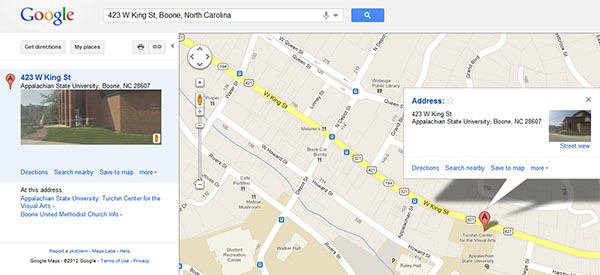
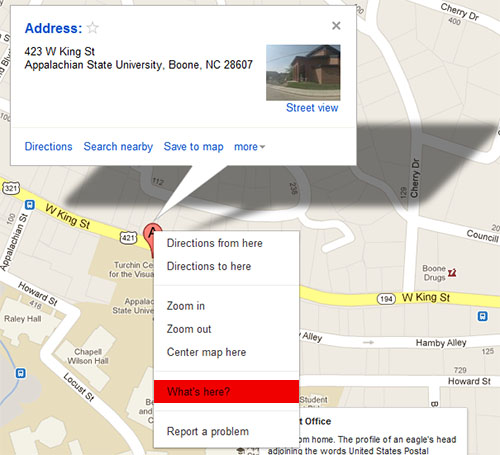
2Next, right click the red “A” pin displayed on the map. Select What’s here?
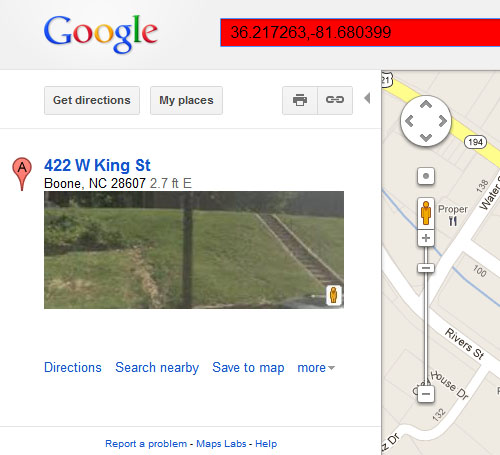
3Once you’ve clicked What’s here?, Google Maps will automatically display the (latitude, longitude) pair in the Address search bar at the top of the Google Maps page.
Previous Javascript Method
Looking up an address in Google Maps will center the map on that address if it was found. Because this trick provides the latitude and longitude of the center of the map, moving the map around manually after that will change the center position and this technique will not work accurately.
When the location you want is in the center of the map, copy and paste this code into the location bar of your browser and press enter:
javascript:void(prompt('',gApplication.getMap().getCenter()));
A little dialog box will pop up displaying the coordinates which can be copied and pasted for use elsewhere. This code can be bookmarked and then used in the future by selecting the bookmark.
If these methods don’t help you with all, we also have other methods for finding latitude and longitude.
About Aaron St. Clair
View more articles by Aaron St. Clair
The Conversation
Follow the reactions below and share your own thoughts.


October 02, 2008 at 1:53 am, Anonymous said:
I have been looking for this forever! Thank you So much for posting this. You have just made my life so much easier!
October 03, 2008 at 5:00 pm, fred said:
very nice tip, cheers
October 04, 2008 at 8:58 pm, Gary said:
Works nicely. Thanks.
October 15, 2008 at 7:11 am, test said:
Grate dude
October 28, 2008 at 5:14 pm, Kyle said:
nice, thank you
November 12, 2008 at 6:15 pm, Mike said:
So, I centered the Google map and then copied and pasted some kind of code into my browser. I started with Morse code. Since I had nothing but time, I actually wrote out “dot” and “dash” as I entered the code. I encounted one problem. I do not know Morse code. Anyway, I entered ” javascript:void(prompt(”,gApplication.getMap().getCenter())); ” into my browser. At first there was this slight odor of melting plastic. Then I noticed smoke. So I shut off my computer. Then I thought, Hey Mike, why not go out and by a GPS system. I figured that had to be easier than trying to figure this out, though probably more difficult than advanced Geometry. So that’s what I did. And I was right, it was easier.
January 19, 2011 at 3:17 pm, Vancler2000 said:
If you think that going out, spending time and money, and getting a GPS is easier than typing a line of code into your web browser address, than… actually I’m at a loss for words on this one. Works perfectly and it’s more accurate, cheap and faster than buying a GPS.
February 08, 2011 at 2:31 pm, BillybobWilliamRoberts said:
Do you think he cares….2 years later?
November 16, 2008 at 3:59 pm, Debbie said:
Great tip! Did exactly what I needed! Not easy getting some locations to map into the Google maps plug-in for WordPress.
December 08, 2008 at 6:37 am, Timothy Bowers said:
Amazing and yet so simple, thanks for this tip!
I’m surprised Google don’t just display this in an easy to see location for people.
December 14, 2008 at 11:30 pm, Adam said:
Thanks a lot. Been trying to find the exact location of my house.
December 15, 2008 at 8:54 am, Cristian Palmas said:
Hi.
I tried to use the code but I failed. Perhaps I misunderstood what is “the location bar of your browser”. Can you explain further what “location bar” is?
Thanks.
December 15, 2008 at 5:55 pm, bRo said:
The location bar is the area up at the top of the browser where you can type in the location of a web address. For example, when you visit http://www.yahoo.com, you will notice an area up at the top that displays “http://www.yahoo.com”. That area is the location bar.
December 18, 2008 at 8:30 pm, FreakEROS said:
Thank you very much!!! =]
December 26, 2008 at 4:43 pm, Prasad said:
Thank you very much for this. It works and really helpful. I have been looking for this from long time. Earlier, Google maps used to display the GPS position if you drag the location marker off the requested location on the map. I don’t know why one fine day Google stopped displaying the GPS position on the map. It only displays the street name now.
January 19, 2009 at 8:23 pm, johan said:
sorry to dissapoint you all, but it does not display degrees, minutes and seconds, it displays degrees and decimal fractions of degrees….
June 22, 2010 at 8:03 pm, Kevin Morrison said:
The whole units of degrees will remain the same (i.e. in 121.135° longitude, start with 121°).
Multiply the decimal by 60 (i.e. .135 * 60 = 8.1).
The whole number becomes the minutes (8′).
Take the remaining decimal and multiply by 60. (i.e. .1 * 60 = 6).
The resulting number becomes the seconds (6″). Seconds can remain as a decimal.
Take your three sets of numbers and put them together, using the symbols for degrees (°), minutes (‘), and seconds (“) (i.e. 121°8’6″ longitude)
February 19, 2009 at 8:33 am, lanes said:
yup, it does work for me.
thanks man
February 24, 2009 at 6:52 pm, Peter said:
“the location bar of your browser”… is the place on your web browser where you type the web address, web link, URL, or URI. It’s >not
February 28, 2009 at 1:45 pm, waqas said:
just one word – awesome……..and not just cheers… also beers lol
March 04, 2009 at 9:23 pm, Miguel said:
Excellent tip, I am using it now, my work is easier.
Thank you.
April 16, 2009 at 5:38 pm, Ankur said:
Awesome man…this trick really worked n helped me a lot.
Thanx
April 18, 2009 at 1:44 am, Fei Chen said:
It helps, thanks a lot!
April 19, 2009 at 12:36 pm, Joe said:
Very nice tool. This came in very handy. Thanks.
April 20, 2009 at 8:12 am, Tobes said:
great, thanks for that. T
May 19, 2009 at 4:30 am, Lester said:
Good jobs! Help me a lots….
May 19, 2009 at 4:40 pm, divayouknow said:
worked like a charm- thanks!
May 22, 2009 at 11:13 am, Sameer said:
Thansk Working for me
May 22, 2009 at 11:13 am, Sameer said:
Thanks
June 16, 2009 at 5:19 am, Irawan said:
Doesnt work for me…. so when I got my location in centre it was :
http://maps.google.com.au/maps?hl=en&tab=wl
And dis you mean I just add that code at the end of the address or should I do something prior?
June 17, 2009 at 3:02 pm, sfsdf said:
doesn’t work
June 19, 2009 at 1:37 am, apps said:
Works
June 24, 2009 at 2:10 pm, Frank said:
works perfectly.
June 24, 2009 at 2:48 pm, Robert said:
Location bar? WTH?
Can you paste an example for us???
August 01, 2009 at 5:16 pm, Anonymous said:
But why doesnt it work with windows vista? is there a different version for that?
August 05, 2009 at 3:35 pm, tucsonjhall said:
This all works very nicely but you can also search an address in Google then right click on the pin and choose What’s Here? and it will display the lat and long in the query input field. Nice because you can cut and paste that into another app.
October 21, 2009 at 2:28 pm, Joseph Elfelt said:
Actually right-click on the pin does not get you the center of the map except by mere chance. Instead, it gives you the coords where you right-clicked. You can confirm this by clicking different parts of the pin and comparing the results to the javascript method that is the subject of this thread.
August 13, 2009 at 1:46 pm, Paul said:
Great very useful for plotting routes with a GPS
August 15, 2009 at 7:28 pm, Anonymous said:
cool…thx a lot
August 17, 2009 at 8:08 pm, nick said:
you rule!!!!!!!!!!!!!!!!!!!!!!!
works “just fine”(perfect to be exact ; ) !!!
i wonder why is it so freakin’ hard for google to provide this info anyway…could it be $ issues ; ( ?
a big thanks!!!
August 18, 2009 at 1:27 pm, Anonymous said:
Thanks foe the informatiom
September 12, 2009 at 10:21 pm, Anonymous said:
Thanks for this hint it was very useful.
November 01, 2009 at 4:46 am, SpyBlogger said:
Wow I needed it a lot!
December 02, 2009 at 1:10 am, Anonymous said:
Great, thanks! Anyone know how to get it to display UTM rather than lat/long?
For those struggling to make this tip/recipe work, try this: copy the javascript snippet. Open bookmarks -> organize bookmarks (in firefox – not sure how to do it in other browsers). Click ‘organize’ -> ‘new bookmark’. In ‘name’ type whatever you want. In ‘location’ paste the javascript. Click ‘ok’. Close the bookmark organizer. Go back to google maps, centre the map wherever you want, then go to your bookmark menu and select the bookmark you just created. A popup window will appear with the latitude and longitude of the centre of the map.
December 03, 2009 at 8:58 am, Shripad Lale said:
Amazing! Very simple and works great! Thanks for the great tip.
regards,
Shripad
======
December 15, 2009 at 11:13 am, Ajay said:
wow kool, I didn’t know it was so easy to find long and lat. I used to read them from the embed code.
December 30, 2009 at 7:12 am, Sergio said:
Works fine for Internet Explorer 8. Thank you, thank you, thank you!
January 04, 2010 at 1:15 pm, Anonymous said:
Thanks, works for me
February 16, 2010 at 7:29 pm, Michael McGinnis said:
Yes, tucsonjhall’s idea is easier now. Right-click on the spot, choose “What’s Here?” and you’ll be given the coordinates, as well as what name Google associates with the place. For example, clicking on my university building gives the name of surrounding streets, depending on what part of the building you click, since the building isn’t in their database.
February 24, 2010 at 9:22 am, Dominique Guinard said:
Thanks bunch! Worked fine for me as well. Wondering why google does not provide that as a feature…
February 25, 2010 at 2:46 pm, anand said:
The only problem is this may not be accurate.
Try to resize the window and run this script again. See that the values are different. The values seem to be dependent on the size of the browser window, which is bizarre.
March 19, 2010 at 1:44 am, Anonymous said:
How do I turn longitude and latitude off with google maps?
Thanks for your assistance
April 06, 2010 at 9:14 pm, jones1618 said:
This is really handy. Suggested improvement: Turn the above code into a link so readers can drag-and-drop it as a bookmarklet into their toolbars.
May 17, 2010 at 7:24 pm, Anonymous said:
awesome tip, thanks.
J
June 19, 2010 at 10:32 am, Best Desi said:
Thanks for this!
June 21, 2010 at 3:54 am, Steve said:
thanks, nice trick!
August 23, 2010 at 7:56 am, flo_sb said:
just go to desired location , right click it and then select “what’s here?”
mouseover and read coords
September 04, 2010 at 7:38 am, Sherif Halim said:
very smart! thanks
September 11, 2010 at 11:15 pm, Pjwannys said:
It works…but only if you FIRST pull down the google bar “pop-up blocker” tab and select “always allow popups from Google Mpas.” Very useful, but ultimately, for my purposes (sending to my android navigation via email to myself) it is better to click the “link” tab and cut & paste this into the email.
Then, when out in the field, no need to search for a spot – merely open the gmail with the link embeded and click on it and – off you go…
September 11, 2010 at 11:17 pm, Pjwannys said:
That should read Google Maps” rather than “Mpas” anyway, thanks for this nifty tip. Very useful when helping my 6th grader do geography reports, etc.
September 17, 2010 at 10:28 pm, warley996 said:
thnks man!,
October 05, 2010 at 5:13 pm, José Andrés Martínez said:
Works perfect| beautiful trick / thanks for sharing it
October 08, 2010 at 3:32 am, butik online baju import said:
Wow, I tried it and it really work for me.. Thx a lots
October 09, 2010 at 6:03 pm, Paul Abarge said:
does not work. forget it.
October 09, 2010 at 6:23 pm, David Kirk - Founder/Editor said:
I just tested it. Still working.
October 18, 2010 at 1:41 am, Cailean Babcock said:
Not very precise (ironically), if you try to do the math to convert this to minutes and seconds. I wound up wildly off from the original location. Use with caution.
November 12, 2010 at 12:49 am, Raj R said:
Works great thanks!
November 25, 2010 at 2:13 pm, Mira said:
Works for me. Thanks!
December 25, 2010 at 9:57 am, LarryRules2010 said:
TYVM
January 18, 2011 at 10:07 am, Nizam Sp said:
Great one.. If I want to automate it. (For example, given a search word, I need lat long). Any Idea guys??
January 31, 2011 at 3:38 pm, Ivan said:
Wow, I did not expect this to work. I had no idea you could pass javascript through the address/location field that way and have it “interact” with the website. I plan on using this to add geotagging to some content on my personal site.
March 13, 2011 at 5:34 pm, Researcher said:
Thanks! Is it possible for a bash or python script to query Google maps and get the returned values? That would be very helpful for our work, and save a lot of time.
March 13, 2011 at 6:05 pm, Researcher said:
Thanks again for pointing out this feature.
Found the Google maps api page!
http://code.google.com/apis/maps/
December 26, 2011 at 11:20 pm, Chathura Asanga said:
You can do this very easier than this.
1) Right click on the required point of the google map
2) select “What’s here?” from the pop up menu.
3) Focus the mouse pointer to that point again
You can see both Latitude and Longitude as a tooltip!!!
Also you can see the coordinates on the title bar of the browser!!!
January 25, 2012 at 1:17 pm, Shahroon said:
i have used the map in my website,now i want it to be pointed on my city when the page loads for the first time..the map is centred on australia’s some location as done in the tutorial given at google’s developer section.Is latlng the function,by changing the values i can get to my own city whenever i open it…do i need to specify that in the code? tell me any easy way..thanks
March 27, 2012 at 10:59 am, Jivan said:
Fantastic, Chathura Asanga!!! Thanks!
April 26, 2012 at 5:24 am, Trevor said:
Thank you! I knew there had to be a better way to do this than squinting at the link url, but it has been elusive.
May 09, 2012 at 12:55 pm, diwan-site-web said:
thank you very much for this tuto
May 26, 2012 at 10:49 am, lagat said:
I would like to change long and lat into api address, eg http://maps.google.com/maps/place?cid=13650872081071813922
any help?
May 26, 2012 at 1:32 pm, Aaron St. Clair said:
I’m not sure what you’re asking. An API Address? Google Maps no longer requires an API Key.
May 26, 2012 at 10:53 am, lagat said:
I want to change a google map into an excel datasheet/access datasheet format, how should i go about it? thanks
June 14, 2012 at 4:52 am, Sam said:
Awesome…excellent tip. the map labs: LatLng Marke doesnt work. #fail
June 30, 2012 at 7:56 am, Giggantic said:
I didn’t realize that it is this simple.. what a noob I am
hahaha
thanks anyway! you rock!
July 06, 2012 at 9:32 am, table top displays said:
I enjoy, cause I found exactly what I was taking a look for. You’ve ended my four day lengthy hunt! God Bless you man. Have a nice day. Bye
August 01, 2012 at 10:02 am, Shiju said:
Thank u for all ur tip, it has helped me a lot…
December 03, 2012 at 4:32 pm, Escalate SEO said:
Well, I did not know it was that easy. Thanks a lot for posting this information.
January 11, 2013 at 5:18 am, Abdul Basith said:
I want to show map in osm by passing latitude and longitude as destination and also my current location too….to using offline…..
January 11, 2013 at 3:15 pm, Aaron St. Clair said:
I’ve never used OpenStreetMap before, so I really don’t know how to do it using their system… Sorry.
April 22, 2013 at 2:20 am, DynV said:
This is a very quick and efficient method. Thanks for giving the JS snippet in case the feature is taken off.