
XP: Display Date in System Tray and Taskbar
A buddy of mine was shocked to see that I have the date, time, and day of the week in my system tray. I had forgotten that this is not standard. Here is how to do it without any additional software.
The main reason that users do not see the time in the system tray is that they have the taskbar height set too short. If you increase the height of your taskbar, the date will appear automatically.
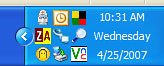
1. Right-click the taskbar
2. Uncheck Lock the Taskbar if checked
3. Mouse over the upper margin of the taskbar until the pointer changes to an up-down arrow
4. Drag the taskbar up until the date and day of the week appears.







med said on October 29, 2008
it sucks u need wide your taskbar to show date
Bee said on December 17, 2008
Thank you “davak” for this awesome tip. I have a head injury and can’t remember the date or day of the week. I need to write the date on many pieces of paper throughout the day to keep track of my day. I keep having to drag my mouse over the time to show the date and sometimes that didn’t even show. WOW! I’m excited. I’m sure it sounds silly to be thrilled to have that information showing but it is going to help me immensely. TY again!
davak said on December 21, 2008
My pleasure! Thanks for visiting tech-recipes.
jamesspratt said on March 28, 2009
It has to be possible without additional software AND without your taskbar taking up half your screen?
Anonymous said on July 24, 2009
My system tray is not showing system time. What are the ways to bring it back?
Someone said on July 26, 2010
haha! that was too easy! Not being able to see the date in the systray has been driving me nuts for months now.
Barbara Motley said on August 5, 2010
Thank so much. I wanted the date to be seen but having the day of the week is a bonus. Barbara
Barbara Motley said on August 5, 2010
Thanks for this tip. I wanted to show the date but having the day of the week showing as well is a bonus. -_-
Mihi Sinclair said on September 27, 2010
wow. that was fantastic. i have been scouring google.