

Bluetooth allows you to transfer pictures, videos, and sound files to and from your mobile phone without the use of expensive software. Read on to find out how you can start today.
I know that Motorola wants you to spend money on the its mobile phone tools. However, you can easily transfer files without them.
This tech-recipe requires that you have already established an active connection between your computer and cellular phone through Bluetooth. They need to be “paired.”
Send Files to your Mobile Phone:
- 1. Click Start.
2. Click All Programs
3. Click Accessories.
4. Click Communications .
5. Select Bluetooth File Transfer Wizard.
6. It will load. Click Next.
7. Click Send File.
8. In the Send to: box, your phone should be listed. If not, browse to find it. Click Next to advance.
9. Browse for your file, and click Open. Then select the file you want to move.
10. Click Next.
11. Accept the file transfer on your phone.
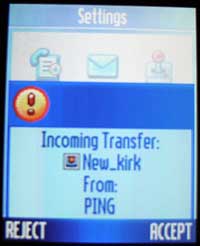
12. Save the file on your phone.
Send Files From Phone to Computer:
The following instructions describe moving a picture. Sounds and video work the same way.
- 1. Click Start.
2. Click All Programs.
3. Click Accessories.
4. Click Communications .
5. Select Bluetooth File Transfer Wizard.
6. It will load. Click Next.
7. Click Receive File.
- 8. In your phone, go to My Media.
9. Go to Pictures.
10. Select the picture you wish to send.
11. Push the menu key.
12. Select Move or Copy. (Copy will leave the picture on your device while move deletes it from your device after the copy.)
13. In the Object Exchange screen, the name of your computer should be listed. Select your computer. If it is not, then select [Look for Devices]. Then select your computer once it shows.
14. The file will be copied or moved over.
- 15. Back on your computer, name and save your file.
16. Click Next.
17. Click Finished.
These steps are easy enough and no additional software or wires are needed. If you put your bluetooth icon in your system tray, you can right click on it and start the transfer process through there as well.




