

Most power users of Windows will want to see file extensions for all files. Here is how to see file extensions when browsing in explorer. This technique works for Vista and Windows 7.
File name extensions are the characters at the end of a file name that tells Windows what application should run and open the file. The file extensions are preceeded by a period. For example, in config.sys the .sys is the file extension.
As changing file extensions can confuse Windows when trying to open the file, by default Windows hides these file extensions by default. This is an attempt to protect users from accidentally changing the file extension when renaming the file.
However, power users will always need the ability to see file extensions in order to debug or to do advanced functions. Many tutorials here on tech-recipes, for example, require the visibility of file extensions to be enabled through this technique.
Enable the Display of File Extensions in Vista or Windows 7:
1. Open a folder or open explorer
2. Click the Layout button (to the left of the Views button) as shown in the picture below.
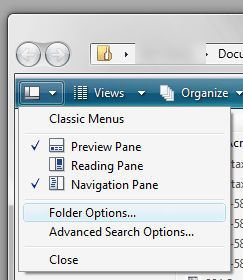
3. Click Folder Options
4. Click the View tab
5. Uncheck Hide extensions for known file types
6. Click OK
After this, the file extensions should be visible and no longer hidden.
