

Google has plugged everybody into Google Talk from the Gmail interface. However, many people who enjoy using Gmail for email, do not want Google Talk displayed within the email windows. This tech recipe describes how to turn it off.
Getting Google Talk out of Gmail is not difficult. However, Google has made it difficult to find. With new versions of Gmail, Google has moved the settings for disabling Google Talk around a bit.
Actually, there are two methods for disabling Google Talk.
From the Left Column
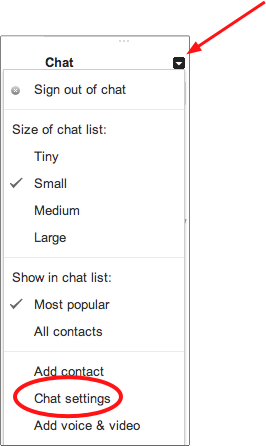
The picture on the right walks through the details.
1.Mouse over the Chat title, and click the arrow that appears.
2.Select Chat Settings.
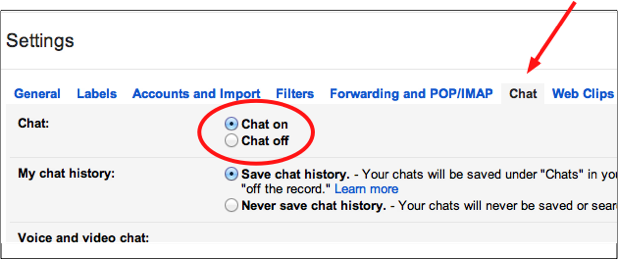
3.When the Settings window loads, select to turn Chat off.
4.Finish by clicking the Save Changes button.
From the Settings Gear
The Settings gear is ubiquitous in Google’s products now. It is an excellent design tool that allows the user to remember where to change settings in almost all of Google’s public applications.
1.Click the Settings gear on the right side of the screen, and select Settings.
2.Click the Chat heading.
3.Click the Chat off option, and select the Save Changes button to finish.
Editor’s note: This tutorial has been updated multiple times for the various versions of Gmail. If you have a problem or need additional help, please report it in the comments below.





