
iTunes 10: Show Album Art / Artwork for All Albums

Contributor Icon Contributed by David Kirk     
Tag Icon Tagged: Music  

In iTunes 10, the album view defaults to showing the album artwork only for albums that contain more than five songs. If you want to see album art for every song, these directions will show you how to do it.

I love the album art and want to see it as much as possible. Album view in iTunes 10 is designed to maximize the use of screen space. I get that. However, often I want to see all the album artwork even if it uses up more of my screen.

Here is the default view and grouping in album view:
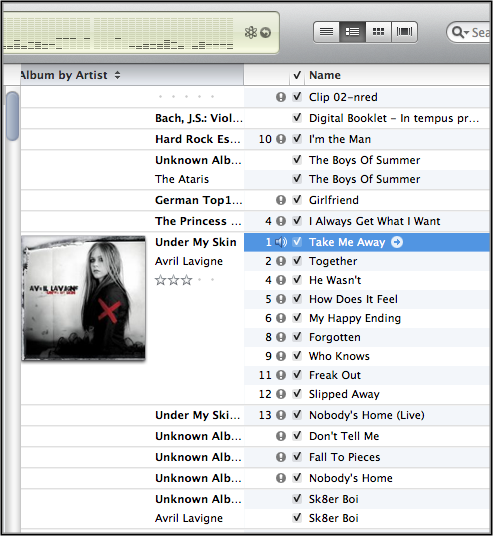
default appearance of album view

To view all the Album Artwork in Album View:

1. Click the View menu
2. Click Always Show Artwork

This picture shows how to do it on a mac and the changes that occur:
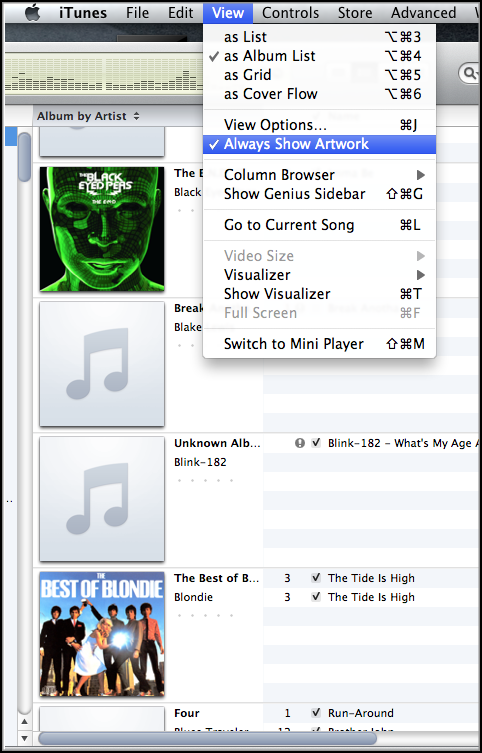
click view and then Always Show Artwork


24 Comments -


  1. Jamal Deemer said on September 2, 2010

    On the windows version, there’s no option for “always show artwork” under View. =(
    Maybe it’s located somewhere else?

  2. Jamal Deemer said on September 2, 2010

    NEVERMIND! I found it. It’s there. Thanks for the tip!

  3. Matt said on September 5, 2010

    Is there anyway to get rid of the album name in the column with the artwork?
    I do not like the way they changed that column.

  4. Otacon512 said on September 5, 2010

    Thanks, I was afraid I couldn’t change that :D

    Also, what Matt said.

  5. MacPow said on September 6, 2010

    Apple broke it… The view as list with the album art was SUPERB in the previous edition… scalable… title under the art… beautiful, especially for people like myself who like the art and go to a lot of trouble to maintain it… now it’s tiny and the column width is hoggish because the title is next to instead of under the art…. JEEZ… Apple… Thumbs DOWN… and for what??? Ping? Rental of TV shows, I wished I’d have never upgraded

  6. Chris_andrews42 said on September 6, 2010

    Change view to list view instead of album list.

  7. OrsonX said on September 7, 2010

    Thank you!!!!

    I just sent feedback to Apple complaining my artwork wasn’t showing, oops!

  8. jlewis said on September 8, 2010

    Agreed. They widened the column to acommodate the title. Not a plus. Old way worked fine, actually worked better.

  9. Konkerwonker said on September 10, 2010

    why not make it large size – its the same as before as I remember

  10. Chrisca said on September 11, 2010

    @jlewis,
    “They widened the column to acommodate the title.”
    Then make the column width smaller.

  11. Chknlomein said on September 14, 2010

    Now how do we save it? Each time I open iTunes, I now have to click View – Always Show Artwork?

  12. unhappycustomer. said on September 19, 2010

    What about when using “as cover flow”? My artwork is showing up for that either..

  13. syrup said on September 23, 2010

    Good thing your Avril Lavigne stuff is missing. Thanks for the tip though, it was bothering me.

  14. Anna said on September 26, 2010

    Thank you so much for the tip!! I was getting really frustrated about not being able to see album art.

  15. Raoul Duke Esq said on October 8, 2010

    Thanks davak!

    I’ve got another problem and I’ll use your Avril Lavigne example above. Notice how tracks 1-12 are listed as one album, but track 13 is listed as another?

    I’ve got the same problem with a bunch of my albums that have all the time ID3 tags, artwork, info, etc. Yet when I sort by “Album by Artist” tracks 1,3,7,8 & 9 are listed on one “version” of Rio and 2,4,5 & 6 are on another.

    If I sort by “Artist” 1,2 & 3 are listed as each being their own albums, 4-6 are another album and 7-9 as yet another.

    WTF???

    I’ve consolidated them via iTunes into one folder and they all show up there and reset all the ID3 tags and still it’s wonky.

    Any help would be greatly appreciated.

    TIA

  16. David Kirk - Founder/Editor said on October 8, 2010

    Yeah, I have the same problem! If I get it figured out, I’ll post here and write a new tutorial about it. If you beat me to it, drop me a line… it’s bugging me. :)

  17. Drop Of True Blood said on October 13, 2010

    Thank you so much! You saved my life with this, I am obsessive over album art.

  18. Drop Of True Blood said on October 13, 2010

    I just shortened the column completely, so all you can see is the album art. It really annoyed me that they put the album title and artist to the side on the albm art, instead of underneath it.

  19. tiffnyy said on October 19, 2010

    in iTunes, go to View>as List

  20. Sidhu1990 said on November 12, 2010

    thanks you all. after long days my album art problem ended today. i am having one strange problem. in any given album tracks are not listed in the numerical order. most of the time it is like 10, 9, 8, 7, 6, 5 …. so on or haphazardly like 10, 7, 5 2, 1, 8 like this. only when i type the specific album name in the search field so that the tracks from that album only are visible in the itunes window, i get them in the numerical order. why so? i will be very grateful if anyone share any idea regarding this. again thank you all for the above discussion.

    sidhu1990

  21. Jacksonesque said on November 25, 2010

    I have this problem sometimes too. I don’t know what causes it but I find that deleting the offending album from iTunes (keeping the the files) then dragging them straight back into iTunes fixes it.

  22. Kanser Haberleri said on January 19, 2011

    Thanks, I was afraid I couldn’t change that :D

  23. Kyooty_kiki27 said on February 16, 2011

    i have a mac. and everything looks exactly like that, but i don’t have the option in the view finder to click ‘Always Show Artwork’.

  24. Pismodude said on January 8, 2012

    Guys do this:

    Right click on any artwork in this view
    Check “Large”
    Check “Always Show Artwork”
    Drag the column width up to the edge of the artwork

    Now you have a nice big picture next to every song or group of songs in the same album w/same artist =)


RSS feed for comments on this post. TrackBack URL

Leave a comment -