Windows 7: How to Overwrite System Files
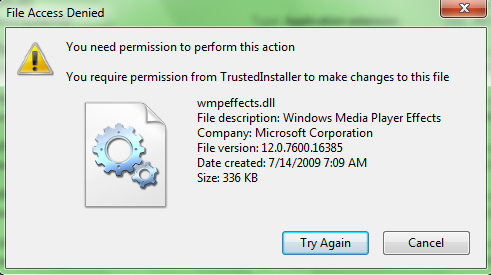
When trying to change system files, this error is commonly experienced: “Access denied: You need permission to perform this action.” System files are protected by TrustedInstaller. Even a user logged in as an Administrator does not have permission to overwrite system files. These steps will allow the user to overcome this error and overwrite system files as needed.
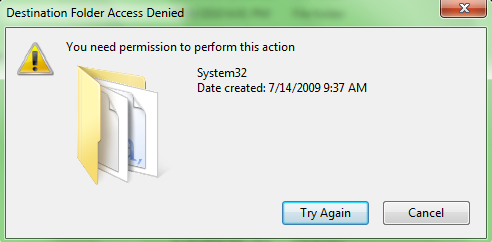
This is some screenshots about the issue(s):
How to fix it:
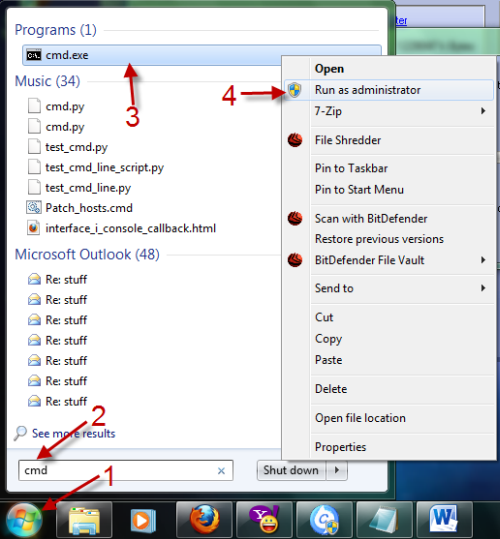
1. Click the Orb (Start menu), type in cmd, right-click on the cmd.exe and choose Run as administrator.
2. Now, you must take ownership of the file by typing the following command:
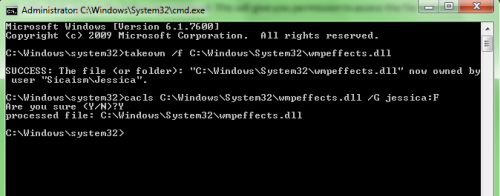
takeown /f C:\Windows\System32\wmpeffects.dll and hit Enter (replace C:\Windows\System32\wmpeffects.dll with your file)
If succeed, you will see a message like this:

3. After that, type in the following command. This will give you permission to access the file:
cacls C:\Windows\System32\wmpeffects.dll /G jessica:F (replace Jessica with your username) and hit Enter.
It will ask you whether you sure to do that? Type in Y and hit Enter again.
4. Now, you can easily overwrite system files without any problems.
About Lê Hoàng
View more articles by Lê Hoàng
The Conversation
Follow the reactions below and share your own thoughts.


September 17, 2010 at 1:57 pm, photogeezer said:
Thank you for this, but what a pain in the neck to have to do this for every file. It’s as if MS is saying ‘I don’t care who you are. You suck and I don’t trust you with your own computer and OS which you paid for.’
September 18, 2010 at 1:26 pm, Anonymous said:
I agree with you ^^
They can’t overwrite system files
But it is necessary when your computer is infected by viruses
December 14, 2010 at 2:42 pm, Lostuser said:
my problem i simply, what putton to i push to overwrite…
January 10, 2012 at 11:05 am, Teo said:
No, it DOESN’T WORK on Windows 7.
I did it in safe mode AND running cmd as administrator. I got all the expected confirmation on both operations (reassigning ownership and giving cacls) with no error message, but then, when trying to delete the file (still in safe mode and still within cmd run as admin) it says Access Denied.
Anybody knows a method that actually works?
October 15, 2012 at 10:51 pm, Bryan said:
> Tested and working. Win 7 64bit Pro
November 29, 2012 at 7:30 am, nyu said:
i have the same problem here..
i already perform this tutorial
i can overwrite it now
the file that i overwited is C:\Windows\System32\oobe\background.bmp
i have overwriten it with my custom BG size is less than 256kb
but when i change my desktop backgroud (rightclick on destop>personalise>choose theme) it gets back to its default log on bg…
i also tried the tweaks-logon software but sadly when i chance the desktop bg.. again it goes default
how can i permanently change my logon screen bg??
January 10, 2013 at 7:40 pm, Mark said:
Following your instructions, I was able to replace a .dll file in the Windows System 32 Folder.
Thank-you for that.
Is there a cmd to switch it back so that system files are once again protected?