

iTunes versions 8 and 9 contained a genius sidebar that displayed related music in the iTunes store. With iTunes version 10, this sidebar has been replaced with the Ping sidebar. Here is how to hide (or show) the sidebars related to these features.
This tutorial has now been updated for versions eight, nine, and ten.
Although I like the genius playlist creator in iTunes, the genius sidebar was just a huge advertisement. I suspect many users did not use it; and thus, with version 10, iTunes has replaced the genius sidebar with the Ping sidebar.
Not surprising, many users will not want to use the Ping Sidebar either.
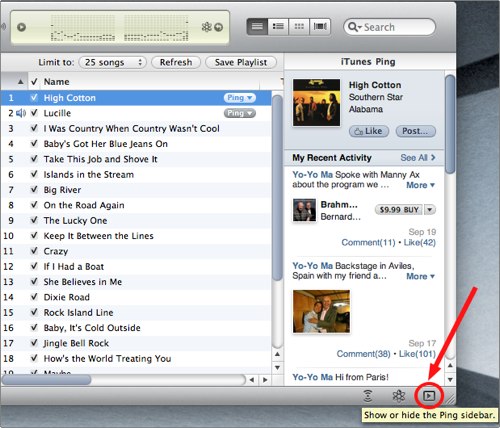
With version 10, here is how to hide (or show) the Ping sidebar:
With versions 8 or 9, this will hide (or display) the Genius sidebar:

With either one, just pressing the marked icon will either expand or contract the sidebar.




