
iPhone – How to remove an exchange email account from the iphone

Contributor Icon Contributed by Jimmy Selix  
Tag Icon Tagged: Apple iPhone  

This tutorial explains how to remove an exchange email account from the iPhone. This tech-recipe details two ways to do this since you can add the account via a profile or by manually setting it up.


Removing an exchange account/email account that was setup manually:

1. on the iPhone, go to Settings
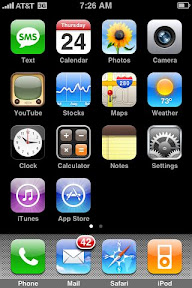
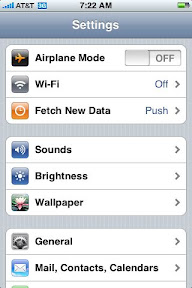
2. go to Mail, Contacts, Calendars
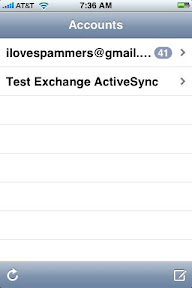
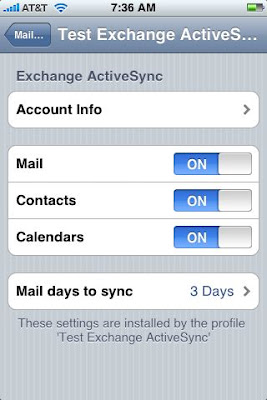
3. click on the Exchange account (mine is called Test Exchange Activesync)
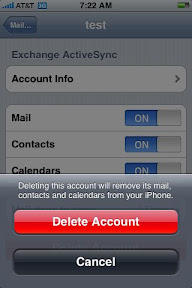
4. Scroll towards the bottom and click on “Delete Account”
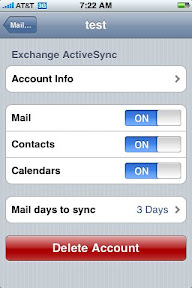
Finally, you’ll get the Delete Account warning, click Delete Account to finish.
However, if your like us in the IT world, you may have had your exchange setup via a profile/mobileconfig you will need to do this to remove your iphone’s exchange account since the Delete Account is probably not there.
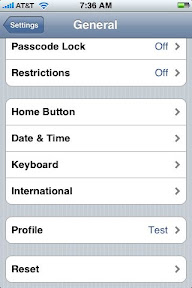
1. Go to Settings

2. Go to General

3. Go to Profile
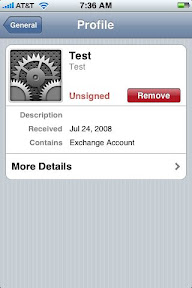
4. Click on the profile and then click on the Remove
and you will get a warning like before. ALSO, BY REMOVING THIS PROFILE YOU WILL ALSO REMOVE THE CERTIFICATES and WIFI/VPN settings that the profile may also had included.
voila! no more exchange account. very useful for those IT people that need to test the iPhone in their environment. :)


16 Comments -


  1. Cheryl said on August 7, 2009

    Wow this is great instructions. But I am still having problems. As I’ve tried to Import, my calendar on my phone is now totally ERASED…. and when I try to “Synchronize” I get the error message “DME Secure E-mail This poperty is disabled”.

    What do I need to do to fix?

    Please help!

  2. dave said on December 28, 2009

    Thanks for the tip on how to delete it in the general settings. I was going crazy wondering why there was no delete button at the bottom of the page.

  3. Anonymous said on January 26, 2010

    Okay, that was easy enough but how do I set up retrieval of my earthlink AND gmail to my iPhone? I use Outlook on my laptop and it pulls from both pop.earthlink (smtpauth.earthlink.net) AND iMAP.gmail (smtp.gmail.com).

  4. Manda said on June 18, 2010

    what if you can’t do either option? I don’t see the exchange account in the settings, nor do I get a profile option. what else can I do?

  5. sanjith said on July 22, 2010

    Thank you so much. Life saver

  6. Zac said on August 11, 2010

    I’m running into the same issue. I erased the account through my mail, calendar account settings, but didn’t find a “profile” to delete. And when I sync my mac and iphone, it reports that iSync couldn’t connect to the Exchange, which is in reference to the Outlook Exchange account from my old job that doesn’t exist anymore….
    al_zac@hotmail.com

  7. abhigyan said on October 6, 2010

    great, thanks!

  8. Ben D said on October 27, 2010

    Or just uninstall the Outlook connector!

    Go to program features etc locate the recent of outlook connector (probably installed the same time as you Ipod touch/phone and uninstall!

    Worked for me!

  9. Boarder277 said on January 7, 2011

    I have a work profile on my iPhone and just left the company today. I want to delete the email but keep the calendar and contacts currently on phone. What do I do? Thanks!

  10. Bryanlow3 said on February 16, 2011

    For some reason when I set up my exchange account, exchange froze. I can’t get e-mail because it can’t verify and i can’t turn off e-mails or delete the account. As a result the battery loses charge 3 times a day and is running hot. I think exchange is still actively running and i can’t get it off the phone. If i try and delete it crashes.

  11. Sjajal said on February 28, 2011

    I have same problem like Bryan. Any help??

  12. Bryanlow3 said on February 28, 2011

    So if you save all your apps to itunes and your contacts and calendar to outlook or google then you need to restore your iphone as new, then the exchnage will be off. The only down side is that any info you have saved in your apps will be erased and everytime you open an app you have to login and set it up again, but everything else will be as normal. its nice to have my phone working again.

  13. Carol W said on April 19, 2011

    i would like to delete an exchange account, but before i do, i want to copy the contacts to either Outlook express or Gmail. When i try to do either, it only copies the contacts i put directly on the phone, not those from the exchange server – any suggestions?

  14. Camhood said on May 5, 2011

    Does this delet email acct at home computer

  15. kimintex said on August 28, 2011

    I have having the same problem as Boarder277 and Carol W. I need to delete an Exchange account, but not the contacts. The bulk of my contacts were on my iPhone before the Exchange account was added, but they have somehow been pulled under the Exchange umbrellas because they disappear when I delete the account (thank goodness I backed up my iPhone first!).

  16. Sam said on December 19, 2011

    THANKS – My (engineering company) IT section could not get this done. GREAT instructions/solution….


RSS feed for comments on this post. TrackBack URL

Leave a comment -