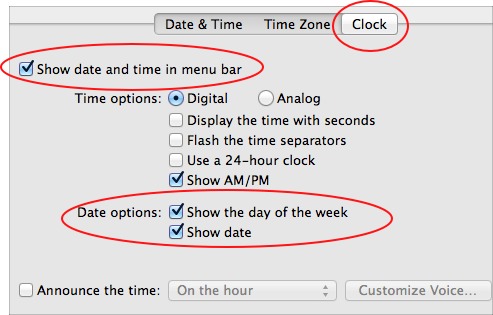
OS X: Display Date on Menu Bar

Contributor Icon Contributed by davak Date Icon March 17, 2007  
Tag Icon Tagged: Apple Mac

I never understood why OS X does not provide an easy way to place the day on the menu bar. This tech-recipe describes a work around that will display the date.


With my crazy schedule, I honestly never know what day it is. I need a data and time within eye sight at all times.

Here is how to get the date on the OS X menu bar.

Click the time in the menu bar and select Open Date & Time
(You can also find this dialog box through the System Preferences.)

With the Date & Time tab selected, click the Open International button.

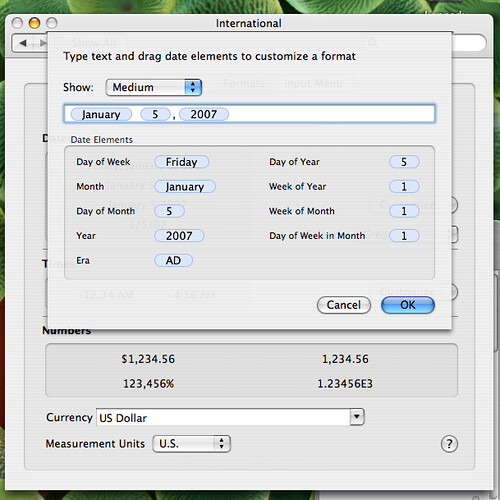
Click the Formats tab and click the Customize button in the Dates section.
osx_menu_date_1

Select the date style you wish. Highlight the blue elements and press CMD-C to copy them. Click the OK button.

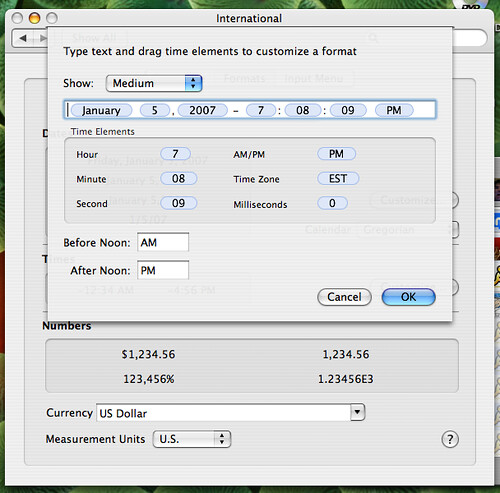
Click the Customize button in the Times section. Click Medium from the Show dropdown box. Paste the Date elements before the existing Times elements.
osx_menu_date_2

You may want to insert a text character or spaces between your date and time elements as I have done here.

Click OK and you should see your date by your time in your menu bar.

Previous recipe | Next recipe |
 
  • Anonymous
    for some reason in 10.4.9 this work around does not work. any thoughts on an update to this tip? thanks.
  • davak
    It works. I just repeated it.
  • Anonymous
    Davak,
    I installed Leopard in an IMac. I am a long time Mac user. Like you I wanted the day, date and time on screen at all times. I even went to the "genius bar" at the Mac store. They offered no solution.
    Someone sent me a link to your comments on "tech-recipes".

    I tried it. I get this result:

    Wed 10:44 CST

    I did everything you said.

    When I go back to try it again.
    It defaults back to small, instead of medium...
    Thank you very much!

    Thanks,
    Jim
  • Anonymous
    I switched it from medium to long.
    It works great!!!
    Thank you VERY much.
    Jim
  • davak
    Glad we could help. Welcome to the techrx community. Thanks for the kind comments.

    /Loved that "genius bar" was in quotation marks. I usually use air quotes when I even say it aloud. :)
  • joco324
    Mac OS 10.5.5 -- got it to work in using the "Long" format, but had to put the date after the time. Not a big deal. Thanks for a great tute. Not having the date in the menu bar was driving me batty.
  • dicky109
    Thanks so much for this information. It just seems so basic to display the date, but I guess not in Cupertino. No problem, once I actually followed the instructions, in updating my menu bar in Leopard 10.5.5 as instructed.

    Two precautions to let others know about from my own experience:
    First, make sure that the "Date & Time" dialogue is not locked, otherwise it will revert to the original.
    Second, make sure that for the "copy" portion of the task that you're working in the "Dates" Customize, and for the "paste" portion that you're working in the "Times" Customize.
  • Brent York
    Thanks a lot. That has baffled me for a while and I finally remembered this thing called "google it" and your site came right up. Well done.
  • What a great tip. As a switcher/slider, it's sometimes puzzling to me that some of these "obvious" features are not so obvious! Thanks for posting this one.
  • Anon
    Just found this having become a new Mac user and it works perfectly on 10.5.6 - THANKS :)
  • Eric P
    You rock! Another interesting tidbit...if you copy the time(s), then paste into a text editor, you get a format that is easy to manipulate in text that you can paste back in, like so:

    yy.MM.dd-h:mm:ss (which is my preferred format being a geek).

    Anywho, this is cool stuff! Thanks for sharing!
  • Well..Like you, not having the date in the menu bar was also driving me up the wall... So I Googled this, and found your site - after a few hiccups-trial-and-errors, I finally, got it to work... Thanks! Especially from a new Mac convert!
  • LIZ
    I feel like an idiot! I've tried this over & over, and I still cannot get the month & year! Any other thoughts? Maybe I have some box checked off that shouldn't be?? Anyway, thank you all very much or your help. I really appreciate it.
  • I couldn't get this to work normally under 10.5.7, so I finally went to customize the Time, and edited it like

    5<space>space>7:08 PM

    The first 5 is the date of the week, copied and pasted from the Dates customization.

    What happened to me is that the Day of the week wouldn't go away so i left it there, and threw the Date and Time in after it; so I believe what's resulted is the Day of the week from the custom Dates, and the Date/Time from custom Times, resulting in

    Tues 7 11:47 AM
blog comments powered by Disqus