
Facebook: Hide posts by Pinterest, Spotify, and social readers
Posted by David Kirk in Facebook, Internet
Many web sites have lured people into posting their reading and listening habits to their Facebook timelines and profiles. Using this technique you can easily block these applications from appearing within your Facebook news feed.
Pinterest, Spotify, and many of the online news sources are clever in finding ways to invade people’s Facebook news feed. Luckily, you can block or hide these posts pretty easily.
1. Log into Facebook
2. When you see a post type that you want to block, mouse over the post. This will make the down arrow and/or closing X appear.
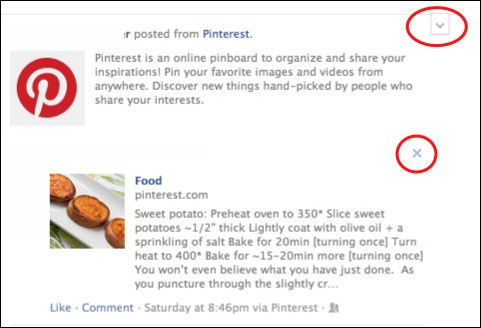
3. Clicking either the arrow or the X will bring up options to hide all the posts from that application. Sometimes the option is found in either the arrow menu or the X menu. It just depends on the application.
4. Click the Hide all option. This will hide all the posts from that application from your fb news feed.
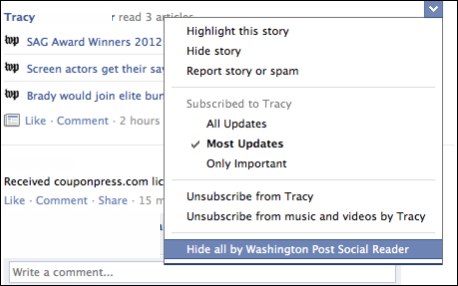
Using this technique to hide and block posts from these applications, you can hone your news feed to something you can better enjoy. If you find this helpful, let us know what applications you are blocking in the comments below.
About David Kirk
View more articles by David Kirk
The Conversation
Follow the reactions below and share your own thoughts.


March 21, 2012 at 7:08 pm, Luke said:
How Do I Unhide Pinterest and Spotify? I’ve tried everything, PLEASE HELP
September 06, 2012 at 4:13 am, sarah said:
THANK YOU!!
October 15, 2012 at 6:23 pm, Ben said:
This works for my fb newfeed, but somehow my fb mobile app newsfeed still shows the unwanted posts. Does this sound familiar? I can’t figure out how to stop it globally (i.e., newsfeeds from both Facebook web app as well as Facebook iPhone app).
November 28, 2012 at 4:14 pm, Crystal said:
I have the same problem. I’m still looking for a solution. If you find one, please post it in a reply. I’ll do the same if I do.
November 20, 2012 at 12:56 pm, Rena M. said:
Hello,
For some reason when I follow your instructions and click on the triangle in my Newsfeed or in Close Friends, there is no “hide all by” option therefore impossible for me to get rid of friends’ music nitifications by Spotify.
Also, I would love to eliminate the “music” category, or block all the music notifications that constantly flood it. However on this page, I don’t get any “triangle” or “x” in upper right hand corner at all. Perhaps it is a permanent fixture of the site?? I would really appreciate any help you can offer in this area.
Thanks so much!
Rena