Spyware: Clear the Talking Email Amus Worm (How are you? I am back.)
You clicked on an email, and now your computer is talking to you. You have the Amus worm. The following Tech-Recipes tutorial explains how to clear it from your system.
ThunderBird: Allow Windows Search to Search Messages

By default, emails in the Mozilla ThunderBird’s database are not indexed by Windows. Therefore, users can not search through their mails from the Windows Explorer or the Start menu. Luckily, users can configure ThunderBird to make the emails indexed by the Windows search tool.
Chrome: Create a Shortcut to Launch User Profile Directly
Google Chrome has an option to let users utilize multiple profiles in one browser. Profiles are excellent for allowing multiple family members to customize their Chrome experience. Typically, the switching of profiles is cumbersome and complex. This tutorial simplifies it to a clicking of a single shortcut.
Chrome: Load plugins on demand
Loading plugins as needed has many advantages. A page with too many plugins can affect the performance of the machine. Additionally, setting plugins as “click to play” has security benefits. This tutorial will show you how to do it in Google Chrome.
Opera 10: Set Gmail as the Default Email Client
If you use Gmail as your primary email client, Opera 10 makes it easy to associate any mailto links that you might encounter to use Gmail as the default email client. All you need to do is make one small modification to one of the .ini files. Instructions are included for both Windows and OS X.
Firefox: Disable the Download History

By default, Firefox keeps a history of everything that you have downloaded. While you could constantly maintain this list to keep it tidy, it is much easier to disable the download history completely. All of the files you download will usually be in your Downloads library under your User folder, unless you’ve manually changed your download folder, so disabling download history won’t cause you to lose any files.
avast!: Prevent Popup Messages from Appearing During Game Play
It is always frustrating to be in the middle of a good gaming session and to have the avast! antivirus application popup a message regarding an update. You can stop avast! (both the Home and Professional editions) from displaying popup messages while you are running a game by following these steps.
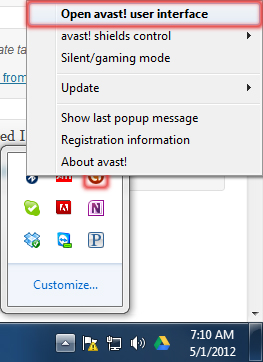
Right-click the avast! notification icon in the System Tray and select Open avast! user interface.
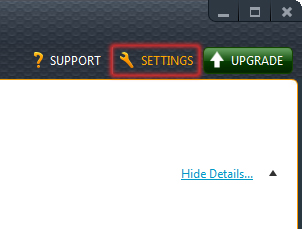
When the user interface loads, click the Settings button in the top right corner of the window.
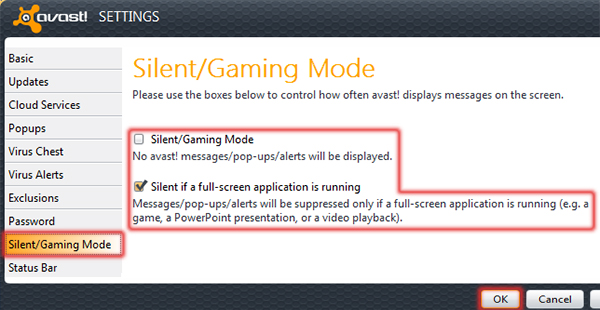
In the Settings window, click Silent/Gaming Mode. Choose between Silent/Gaming Mode and Silent if a full-screen application is running (which will usually restrict the popups only while gaming). Click the OK button once you’ve made your choice.
Time Machine: Delete Files or Folders from Backup
Time Machine does an amazing job of backing up all files on your system. However, sometimes you do not want every file saved forever and ever. Here is how you remove a backed up file or folder from the time machine.
Creating FAT32 Partition/Preparing Drive for OS Install Using Windows 98 SE Boot Disk
The following tutorial explains using the FDISK DOS application to set up a partition on a new hard drive or to delete an existing hard drive before clean-installing an operating system (OS). This is done using the Windows 98 SE boot disk.
Windows 8: Disable the Store App
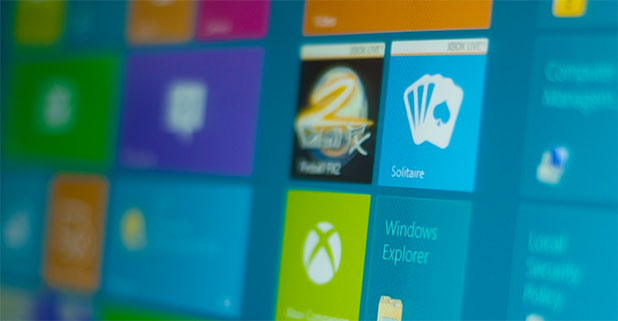
Although the Store app in Windows 8 is a wonderful place to download applications, many situations exist where blocking the Store app is prudent. For example, if the computer or tablet is open to the public, the Store app should be disabled so unwanted software cannot be installed. Likewise, systems that are used by children in an unmonitored environment will not Store app purchases possible.
Skype: Backup and Restore Your Contacts