iPad: How to pair / connect any bluetooth keyboard

Contributor Icon Contributed by Jimmy Selix  
Tag Icon Tagged: Apple Mac  

The iPad’s touchscreen keyboard isn’t bad, its actually pretty good for a touchkeyboard. However there can be times where you may need to do some major emailing or even document writing and need a keyboard. This recipe will show you how to pair any bluetooth keyboard with the iPad. You don’t just need to use the Apple one, any bluetooth keyboard will work!

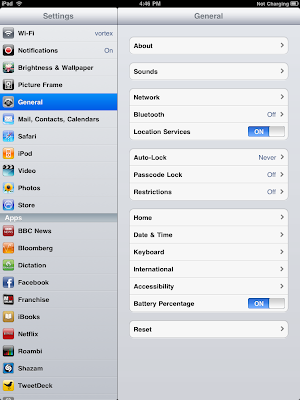
1. Go to Settings - General

2. Tap on Bluetooth, if its Off, tap on it to turn it On.

3. Now put your bluetooth keyboard in pairing mode; usually a dedicated button or by holding the power button down for 5 secs.

4. Once you do this, your keyboard will show up under Devices and say Not Paired.
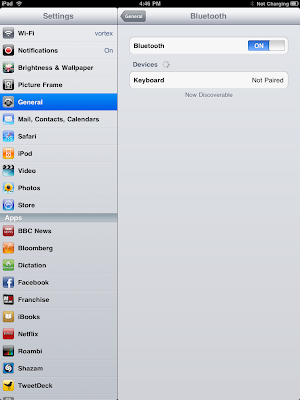
5. Tap on it, You will be prompted with a message to type a series of numbers on the bluetooth keyboard and then press Enter on the keyboard.

6. The keyboard should up under Devices and say Connected.

Tips:
–If your keyboard has a volume controls and media player controls (ie play, next, pause, prev, volume, mute), they will all map in the system and work in iPod and Videos and control the system volume. These will also work when your in an app with the music in the background (ie Safari, Pages, Mail, Calendar, any of the native apps)
–The Internet Home button on some keyboards will act like the Home button. My Dell BT Keyboard w/media/internet controls works like this.

To Unpair:

Go to Settings - General -Bluetooth, Tap on the arrow on your keyboard in the list. Tap on Forget this Device


15 Comments -


  1. sinrtb said on April 22, 2010

    Out of curiosity does anyone know of a good place to find bluetooth Keyboards? I don’t have the IPad but i am getting a new Android in a week and would love to get a keyboard for it.

  2. jimmyselix said on April 22, 2010

    what kind and form factor are you looking for? there are tons of different styles and sizes these days.

    smaller ones usually are gonna run you in the $70 range for cheaper ones.

    i’d check out a few deal sites to see if you spot one on the cheap. try:
    http://www.techbargins.com
    http://www.slickdeals.net

  3. Chris Carlyle said on June 12, 2010

    i have xema bluekeyboard that bought pocket pc
    now have ipad cannot get it to pair help

  4. jimmyselix said on June 20, 2010

    also just discovered this place too. i got the mini bt keyboard and its pretty decent for only $40 and very portable. i decided to order another one w/the media controls and use this one for my PS3. Got sick of the PS3 minikb that clips on.

    however, the kb i received had the z and enter buttons switched around so i had to rma it. customer service was pretty good too, just sent them a pic of it and they are resending me a new one. :)

    hope that helps

    USB.BRANDO.COM

    http://usb.brando.com/usb-keyboard_c034d015

  5. Plumbles said on September 29, 2010

    Thank you .thank you…thank you…….you are now my friend for life

  6. Kge Davis said on January 6, 2011

    thank you so much for this easy to read tutorial. My life is somuch easier now that I can use the keyboard with my iPad.

  7. Pepesharan said on January 12, 2011

    I recently brought iPad but am not able to transfer data,but Bluetooth is showing connected .please help me

  8. Fergusonwj said on January 14, 2011

    dose anyone have any tips for getting the vkb keyboard to pair with iPad or iPhone?

  9. Mary K Keele said on December 15, 2011

    Why will my Logitech not pair with my ipad2?

  10. Jimmy Selix said on December 16, 2011

    @Mary
    hmmm, are you able to pair your logitech with any other devices via BT?

  11. Iris said on December 17, 2011

    Hi, I bought T6062 keyboard and followed the instructions – sama as above – to the t but cannot get it to pair, it always says pairing unsuccessful. What to do?

  12. Iris said on December 17, 2011

    Hi, I bought T6062 keyboard and followed the instructions – sama as above – to the t but cannot get it t pair!

  13. Terri said on January 2, 2012

    I also bought a T6062 keyboard. It will not pair with my ipad one. Does anyone have any suggestions?

  14. Jimmy Selix said on January 5, 2012

    re: Terri and Iris and T6062

    hmm, have you tried removing the batteries from the keyboard for 1 minute and put back in, reboot your ipad and try to re-pair to the ipad?

    just a very oddball one too: do you have any cordless landline phones in your house? if so, they could be interfering too since they run on the 2.4ghz channel. again, a total oddball one. :)

  15. Bob Rogers said on January 31, 2012

    I am too dense to understand all these acronyms but hope I may setup a keyboard with my 7 year old Dell. Which keyboard do you suggest? Thanks


RSS feed for comments on this post. TrackBack URL

Leave a comment -