OS X Lion: Where did “Save As” go?
Posted by David Kirk in Apple Mac
Apple is starting to move away from the traditional file system with OS X Lion. One of the consequences of this action is that the “Save As” command is becoming obsolete. Here I will describe why this is occurring and how to accomplish the tasks that were traditionally performed with the “Save As” function.
“Save As” is dying. The Lion API establishes these changes. In fact, the Lion version of applications such as Preview, Textedit, and the iWork programs all have lost this traditional command.
With the success of iOS, Apple will hiding the file system more and more. For a long time now, OS developers such as Microsoft and Apple have realized that the majority of users do not understand file extensions and the various file types. This is why Microsoft hides the file name extensions by default in Vista and Windows 7. In iOS the user never really has to worry about file types. Each application keeps track of its own files.
Lion now incorporates the creation of Versions and the autosaving of files. Through Versions the user can not just see the most recent saved version of a file but can also see multiple previous versions. Saving multiple versions in a traditional file system would require multiple, differently named files such as vitae1.doc, vitae2.doc, vitae3.doc, etc. However, with Apple’s goal to simplify the file system, all of these versions appear as one file to the application.
Now because of these changes, the traditional “Save As” command no longer makes since. Instead, if you want to “Save As” to create a different version (maybe for backup, for example), you can just Save A Version. You can create as many versions under that same document as you wish.
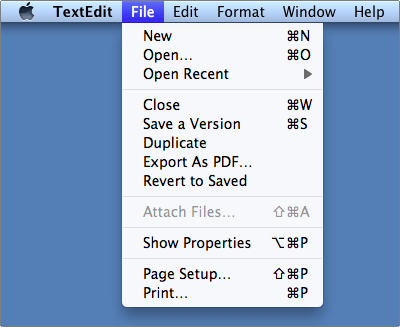
As Dusty points out in the comments below, if you looking to save the file to rename and to move to a different location, that will now require two steps. First, you will have to Duplicate you file.
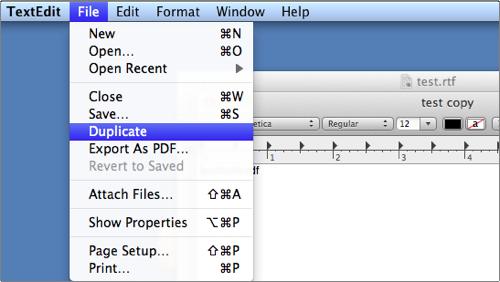
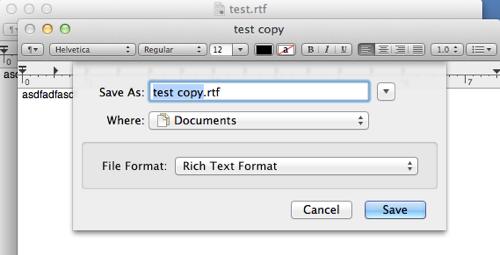
When you Save this file, you will be presented with the classic “Save As” dialog box that allows for renaming and relocating.
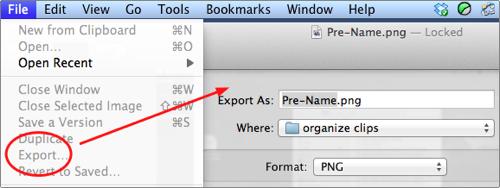
If you want to “Save As” to change formats of the document, you can Export… the document to any other available format. Here is an example of using export in Preview to change one image type to another:
Applications using pre-Lion APIs will still have the “save as” function; however, the new Versions features will not be available. As programs are updated, the majority of them will also be converted over the to new API. The “Save As” function in OS X is a dinosaur soon to be extinct.

About David Kirk
View more articles by David Kirk
The Conversation
Follow the reactions below and share your own thoughts.


July 22, 2011 at 2:37 pm, Albanyco said:
how will this affect people who share files on the network with Windows users???
July 22, 2011 at 5:15 pm, RichardFrisch said:
Another work around is to find the file in Finder and then duplicate it and rename the duplicate. More work but better/safer than Versions.
July 22, 2011 at 5:15 pm, RichardFrisch said:
Another work around is to find the file in Finder and then duplicate it and rename the duplicate. More work but better/safer than Versions.
July 23, 2011 at 12:31 am, Victoria said:
I began using lion for work yesterday and this really annoyed ne. I needed militia variations of my document. Save as was perfect for this, but instead I kept having to exit the program and duplicate in finder. I did not try the export option as I wanted it in pages format. This is very annoying
July 23, 2011 at 4:19 pm, Yazoo said:
Couldn’t you just take a snapshot of the different files?
July 23, 2011 at 4:20 pm, Phlip said:
Seems to me save a version is the same thing.
July 24, 2011 at 7:23 am, Anonymous said:
Irritating. Save As is something I do all the time. It’s a great way to take an existing presentation or document and use it’s basic information and formatting as a take off point for creating a new document.
I’m also kind of miffed about auto save. That is not a bad feature per se, but I often like to open a document and make some changes just to test things out. Then I close without saving leaving the original untouched. That will be possible now but I’ll have to keep careful track of the versions so that I don’t accidentally delete the original.
July 24, 2011 at 8:38 am, Rokewood said:
I seem to be missing something else. With ‘save as’ you could see, and adjust the file size. With Export there is no ‘file size’ description. Am I missing something?
July 24, 2011 at 2:52 pm, altazon said:
True, in Preview, when you change the picture quality, you cannot see the size in Ko anymore. So basically you have to select a “quality”, but in blind mode, like you have no more control on how big the size will be.
I guess it’s a bug.
Anyway, Lion sucks big time, I give it one more week, and then go back to SNow Leopard if nothing changes.
July 24, 2011 at 1:19 pm, Joberele said:
Save As make sense. If Mac OS is going all the way with IOS then I am walking away
July 25, 2011 at 1:42 am, dusty said:
I think this article’s advice is a bit off. “Export” does not exist in every app, and “Save a Version” doesn’t let you save a copy in a different place. The best replacement for “Save As” I have found is to pick “Duplicate” from the file menu followed by “Save” from the file menu. You will then be prompted where to save the duplicate. This seems just like the old “Save As…” command, but in two steps.
Some commenters note that you can duplicate files in the Finder, but it’s probably easier just to do it in the app.
July 25, 2011 at 5:20 pm, Anonymous said:
Export exists in Lion apps that allow changing of format.
I agree that “Duplicate” and then “Save” is essentially “Save As” requiring two steps instead of one. I’ll add this fact to the tutorial.
Apple has certainly never minded stepping on the toes of those that use the rarer functions for the good of the masses.
July 27, 2011 at 8:47 pm, Anonymous said:
In most cases, it would be three steps as you then have to close the original version of the file that is still open. Using ‘save as’ would have left you with only one file open with a new filename. ‘Duplicate’ leave you with two files now open.
July 25, 2011 at 5:20 pm, Anonymous said:
Export exists in Lion apps that allow changing of format.
I agree that “Duplicate” and then “Save” is essentially “Save As” requiring two steps instead of one. I’ll add this fact to the tutorial.
Apple has certainly never minded stepping on the toes of those that use the rarer functions for the good of the masses.
July 25, 2011 at 11:32 am, Cheffiuk said:
Am really annoyed now that there is no save as and an option to choose the file size. Think I will go back to SL pretty darn quick at this rate.
July 25, 2011 at 12:21 pm, treefield said:
This is a bone head decision, obviously made by someone who rarely uses pages. I use many documents that I have to make minor changes in each week. then I can “save as” with a new date. This is impossible with the elimination of this command. Come on Apple…stop trying to save us from ourselves. Give your users a bit of credit for at least a minimal amount of brain power.
July 26, 2011 at 11:37 pm, Rokewood said:
I’m glad I have some support here. Sometimes it can be really important to reduce a jpg file size, for example, to a precise measure (e.g. for a gallery that limits a file to say 500kb). Now you can only do this by ‘guessing’ on the quality scale. How can this be an enhancement?
July 27, 2011 at 2:38 pm, Chris said:
Instead of simpler, it seems as if each major change is more complicated.
I use ‘save as’ all the time when I have a photoshop file with many layers. I streamline them in a ‘save as copy’ to send to the client. I can pick jpg or png or tiff or psd with each ‘save as’. Will I be able to do that with ‘save a version’?
July 27, 2011 at 8:57 pm, Anonymous said:
I too use ‘save as’ loads in PSD/IND/AI, mostly for versioning that will allow me to work on all versions concurrently. Apples ‘Versions’ doesn’t allow you do do this. Luckly CS5 doesn’t use this new API so you can still ‘save as’, but I won’t be upgrading to Lion on any on my work machines for the time being, who knows how Lion will develop after user feedback. Apple do listen, then brought back the orientation lock switch on the iPad after feedback.
July 28, 2011 at 10:08 pm, BrainScanMedia said:
This is the worst release ever… The Versions do not work right. As a web designer I use BBEdit to code a lot of code. I hit save and when I went back to that file everything was reverted to the original and hours of work was gone… There was no way to check versions as it was a bug issue and its all gone. Not to mention software no longer works, OS X Server now removes the advanced features needed to run a web server… Its horrible… Linux is starting to look really good to me.
July 28, 2011 at 10:11 pm, BrainScanMedia said:
I wonder is Bill Gates was hired for this release..
July 29, 2011 at 5:55 pm, beens said:
seems like they should create a operating system for people who are happy to go along not really bothered about what is happening and an advanced one for people who want to be able to do useful things. like a kind of “simple finder” vs “finder” equivalent over the whole OS. ios is fine but it powerless when it comes to serious file management. grrr
July 31, 2011 at 5:30 am, Peterbreis said:
These rationalisations are just excuses.
Because the average use didn’t bother paying attention in school because it “wasn’t fun” they can’t spell or do basic grammar or count, so we have spell and grammar checkers and calculators that the dumb-asses don’t use either.
End result the results get worse and worse as Apple chases the lowest common denominator.
It is getting harder and harder to use a Mac, not easier, for anyone with more than 2 synapses to rub together.
We all have to save in alternate formats particularly people stuck with Apple “solutions” like Pages, Numbers , Keynote etc. Why make it diabolically difficult and then hide the method? This is the opposite of what the Mac was supposed to be, which was transparent and obvious.
August 01, 2011 at 12:07 am, John1000 said:
Am I missing something but it looks like export is the same as save as. What’s the problem? It doesn’t have a keyboard shortcut but how often do you do save as.
August 01, 2011 at 6:45 pm, Anonymous said:
Export is only going to be available when you can “Save” to a different file type.
August 05, 2011 at 10:23 pm, Greg Gazin said:
I’d often use Preview to take the TIFF from Grab and Save As as JPG. It would show a file size wit the quality slide bar, but it seems that it’s gone – or Am I missing something?
August 05, 2011 at 10:31 pm, Anonymous said:
Yeah, it’s not there. I’ve long been a fan of ImageWell which does those conversations and resizing very nicely. It’s unclear to me why they would pull this functionality out of preview.
August 05, 2011 at 10:31 pm, Anonymous said:
Yeah, it’s not there. I’ve long been a fan of ImageWell which does those conversations and resizing very nicely. It’s unclear to me why they would pull this functionality out of preview.
August 06, 2011 at 11:26 am, Wolfster said:
The Save As feature was essential for quickly converting captured TIFF files into low size JPGs for inclusion in presentations or adding to emails.3 mouse clicks to get precise file sizes.
Sure, we can now duplicate files and Save As a JPG but with ABSOLUTELY NO IDEA how big the files are . . . great! Of course, you only need to go back to where the duplicate is stored, check the info, then keep repeating the process until you get the file size you want.
August 28, 2011 at 9:21 am, Martin K said:
To kill “save as” is really dumb. Especially if you do not have a keyboard shortcut for “duplicate” now. Since years cmd-shift-s was SO intuitive, and I have been laughing at Windows (and swearing while working on a PC) for not having this simple useful shortcut.
I don’t know about versions yet, either, I still have to make some experiences with it.
But “save as” will be dearly missed!!!
August 29, 2011 at 2:49 pm, Interbloke said:
Hmmm looks like Lion = Vista. Very close to going back to Windows, I hear W7 is very good.
September 03, 2011 at 12:06 am, Thomas said:
I have some files (iWork (Numbers and Keynote) on Wuala. But it doesn’t work with Keynote, because it says I can’t save… I’m waiting for the iCloud. With MobileMe it works, but I am not very happy with MobileMe.
September 06, 2011 at 2:32 pm, Theo Olsthoorn said:
Will we see a ribbon next ? The most horrible and cripping Windows feature ever ?
October 11, 2011 at 11:20 am, James said:
In iCal Apple dumped the “little” months that used to display along with the main month being viewed. Even paper calendars can do this. Pretty much a mandatory thing but I guess someone thot it didn’t look good. They put a cool “ripped page” at the top but got rid of something useful. Ex-Microsoft Windoze developers must be infiltrating Apple.
October 13, 2011 at 1:38 pm, bob said:
I think this is symptom of a company getting to a size where every new person has to “add” something. No one ever get’s hired to “leave well enough alone”.
The difference between Wisdom and Knowledge I guess…
“Yes, my title is VP of Leave That Alone”
October 14, 2011 at 6:57 pm, CCF said:
for those who are wondering, that is because this is a “VISION” of steve job .. to dumb down and remove the file system because “many” users simple do not “get it” with the file system.
Let’s hope that now that another is at the helm, some of the bone headed decision will be reversed. If not, then welcome to iOS, because you will get to enjoy the incredible loops we have to go through to just attach multiple attachments to an email in iPad, not to even mention the sharing and access of a single file (you can’t, you need to create multiple versions in each apps) between apps.
October 14, 2011 at 7:08 pm, CCF said:
@ James,
no this just means that every company comes to a stage where they just want to add more features or to streamline some features … and the more powerful character wins. And really, this is not the first bonehead decision by steve job and gang, so don’t just blame MS, although they are so guilty of it.
October 18, 2011 at 3:46 am, Dr DJ Brown said:
I just want to add my name to the list of frustrated users.
I have a degree in computer science and VERSIONS makes NO sense to me at all. It’s clunky, bug-ridden and not at all obvious when something has changed.
Wasn’t one of the principles behind Apple’s famous interface guidelines to make it clear when something had happened? With Save a version …. then nothing changes! How does the user know? With “Save As ..” the filename changed.
I’ve started to feel negative towards Apple for the first time in 25 years …
DJ
October 26, 2011 at 6:40 am, Stewart said:
This new approach is rubbish. I don’t get save as (so I can’t save as to a USB thumb drive anymore for example). No i have to dig through the very file system they are trying to freaking hide.
Oh yeah not to mention that the damn program keeps pausing every time you task switch away from it (probably auto saving). So if im putting photos into my keynote application I have to wait 20-30 seconds while I hold the image im trying to drop in the file.
This is idiotic beyond belief.
November 06, 2011 at 7:31 pm, Rose said:
This is about the dumbest thing I have encountered. If Apple doesn’t think its users are intelligent enough to handle a filing system and file extensions I wish it would make a dumb person computer and leave the rest of us alone. Stop playing to the lowest common denominator and keep to the standards the rest of us have come to expect from Apple.
November 09, 2011 at 7:13 am, Franz said:
A lot of people are missing the fact that duplicate provides the same functionality as Save As, albeit minus the shortcut.
The thing to really complain about is the enforcement of things like versions. Time machine was never and still isn’t a reliable back-up. It’s let me down several times. Why the hell should I have to have Versions filling up my hard drive. I should at least be able to turn it off.
I’ve been a mac user for over 20 years now and I can see my future becoming linux.
I’m very tired of society paying a price for all the stupid people. We should at least be able to maintain the option to turn off the dumb!
November 10, 2011 at 9:47 pm, Doug said:
I may have missed this, but how do you open a previous version? Let’s say I’m editing a Pages doc and perform a Save A Version at 6PM, 6:15PM, 6:30PM and 7PM. Its now 10:30 PM and I need to go back to the 6:15PM version – how do I find it?
November 20, 2011 at 11:01 am, Rob said:
Can someone tell Keynote Help about this – it still thinks there is a ‘save as’ function. This is incredibly unintuitive. It wasn’t broke so why fix it? Bumping into an inexplicable change to a well known process, with no help available, feels more like Windows.
January 05, 2012 at 5:47 pm, LGgeek said:
The new text edit sucks, who was the bozo that thought this up.
Hello Apple there some things that are ok on my iphone and ipad that are not acceptable on my laptop. The move to make the desktop UI the same as the iphone/ipad is stupid and will cost apple.
January 06, 2012 at 4:13 am, taige said:
I know this is such garbage. Seriously. Not everyone uses Lion. It would be pretty convenient then and only then. But still what if I want to make a low resolution version or a crop a part and save as? This is so stupid. And Launch pad. Such crap too. I have 5 chrome + 3 safari windows open and I can’t even find the one I’m looking for because it doesn’t show them all at once. Instead it layers them so I can only see groups but takes forever to find the right window, especially across applications. They really rushed this to market. This is like the lion = cornballer…
January 08, 2012 at 10:45 am, miro said:
What the hell are Apple designers thinking?
Maybe they have too much time on their hands.
Why can’t they simply leave “Save as” in place?
This dumbing down of file systems is a step backward.
Lion and iCloud are for me mostly steps backward –
there is the forced obsolescence of needlessly killing Rosetta
the colorless, small, incomprehensible icons of Lion
the badly reordered Dock
the elimination of Save As
the elimination of iDisk and web-hosting
Apple looks more and more like Microsoft every month.
January 11, 2012 at 6:40 pm, John said:
If you have complaints about Lion please make sure you write Apple about it. I know it sounds obvious but many people don’t bother.
January 19, 2012 at 7:04 am, Airrion said:
I do a biweekly report with a template I create in Numbers. When the report is done I used save as and save the report on an external drive with the date of the report. The template remain the same since I change the name with save as, now I find the template has the pervious information and I have to delete everything to clear it, totally a waste of time….
I’M VERY DISAPPOINTED WITH APPLE
Now I’m using my old pc to get this job done.
January 29, 2012 at 3:52 pm, lauter 352 said:
One should make a petition against this, like the one made against the new Final Cut. I don’t know who is taking decisions at Apple, but really, it stinks. Duplicate kills the workflow, it is really confusing, it is not an improvement, it is a regression. Is there someone who worked on Microsoft Vista who is in charge of Apple for the moment ?
February 20, 2012 at 12:40 am, Some Guy said:
So… people don’t understand how the file system works so their solution is to make the file system more complicated?? Good job Apple!! Jobs would be proud!
March 05, 2012 at 1:26 pm, Mike said:
My to concerns are ‘Save As’ in to steps, which seems to bf a little silly, however I need to play about with it more. Also likd someone else said here I sometimes like to open a document cut a few assets out then close it without saving and paste those assets into another document, espeacially when using Adobe Illustrator. Not being prompted to ask wether you want to save and having the option to say no I think is a big issue with the new system.
March 09, 2012 at 10:53 am, Treefield said:
So, I dod a major presentation last year and have to do it again with modifications. I made a duplicate and none of my photos appeared. text is there but no pix. I have to save the original and cannot modify it, but duplicate in keynote does not work. it is from iwork 09…is thqt my problem. I am at a loss on how to do this. Versions also does not seem to copy the photos…
March 16, 2012 at 8:38 pm, pepi said:
Lion sucks, now I have to do 2 steps instead of 1, the more I use it the less I like it, they should at least leave the choice to go back tothe old version
March 27, 2012 at 8:16 am, Marilyn Henry said:
Very frustrated. I am a piano teacher who takes notes on the computer during the lesson, updating the files as I go. “Save As” was an essential part of this. The new system has been a mess. I am going back to SL. I guess I will have to miss out on the iCloud! Argh.
April 30, 2012 at 10:12 pm, Damon said:
We have seen this before from Apple. In the old days, they were arrogant and full of hubris. Everything they did was supreme. Their crappy little OS was supreme. Their clunky programming interfaces were supreme. And we payed a premium to play in the Apple space.
Then, the company had a near death experience. I remember laughing at the tragic cluster of Apple crap in the corner of the CompUSA stores. Then, I was a happy FreeBSD user, as A/UX had been finally killed for the last time, and I was forced to overcome my revulsion for x86 architecture, thereby enjoying cheap commodity pricing.
The near-death experience taught them humility. They tossed the crap OS and embraced Mach with FreeBSD personality. They got competitive on their hardware pricing, and I was happy to (temporarily) abandon the x86 architecture and go back to Apple, who now deserved my hard earned $$. Heck, they even half-admitted Jobs was an idiot when it came to the one-button/three-button issue of the mouse (although they are still trying to ram that down our throats, via the default button settings).
Sadly, they are once again becoming arrogant. You can see this in various decisions being made. “Save-As” is just one of these. Making ~/Library disappear is another. The new AirPort utility another.
I’m still willing, to some degree, to try and adapt, as most of the time, I am at the command level and/or in Emacs, but annoyances such as “Save-As” accumulate, and eventually, each individual will encounter their tipping point, but where to from there? Even Linux is beginning to look good, which shows how desperate the situation is.