
Picasa: Change the Album Cover of a Photo Albums

   Posted by Lê Hoàng in Internet

By default, when you upload a photo album to Picasa, it will set the first photo as the album cover. If the photo cover is not the one that you like, you can follow this guide to change it.

1. Go to your Picasa album page.

2. Click on the album that you want to change the cover.
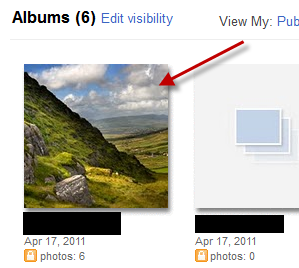
3. Click on the photo that you want to set as the cover.

4. Go to Edit->Set as album cover.
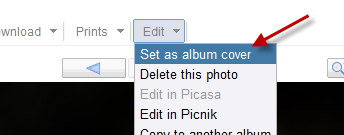
5. The album cover will be changed immediately.

 

About Lê Hoàng

When not creating exciting new Android games, Lê Hoàng is here crafting tutorials, tweaks, and fixes for your enjoyment.
View more articles by Lê Hoàng

The Conversation

Follow the reactions below and share your own thoughts.

3 Responses to “Picasa: Change the Album Cover of a Photo Albums”

  1. May 18, 2011 at 5:21 am, h2ck3r humas said:

     thanks……………

    Reply

    • May 18, 2011 at 12:10 pm, Anonymous said:

       Glad we could help “:D

      Reply

  2. May 18, 2011 at 5:22 am, h2ck3r humas said:

     thanks…………

    Reply

Leave a Reply

You may also like-

Google+ for Android: Use a photo from Google+ as your Android wallpaperGoogle+ for Android: Use a photo from Google+ as your Android wallpaperThis tech-recipe will explain how to use any photo in your stream or any of your Circles photo albums as your Android phone's wallpaper. ... Picasa: Use Google Analytics to Track Photo ViewsPicasa: Use Google Analytics to Track Photo ViewsWhen you share your Picasa albums with the public, it's fun to see how many people are viewing your pictures. Here I describe how ...