

Notepad is one of Window’s best tools. As I frequently use it with logs, here are a couple of time and date tricks I have learned over the years.
Notepad is simple and full of little tricks. I use it for creating and using log files all the time. Here are a couple of ways to use Notepad to automatically insert the time and date. These techniques work for all versions of Microsoft Windows, including XP, Vista, and Windows 7.
Automatically insert a timestamp every time a file is opened:
A simple way to record what you are doing at certain times is with a .LOG file in Notepad. Using this method, each time you open and close Notepad, a timestamp is created to time your activities more efficiently. Simply open the document, record what you did, save the file, and then close it.
1. Open Notepad.
2. On the first line of the file, type this:
.LOG
3. Hit ENTER to insert one carriage return.
4. Save the file.
By doing this, every time you open the file in Notepad, a timestamp will be inserted.
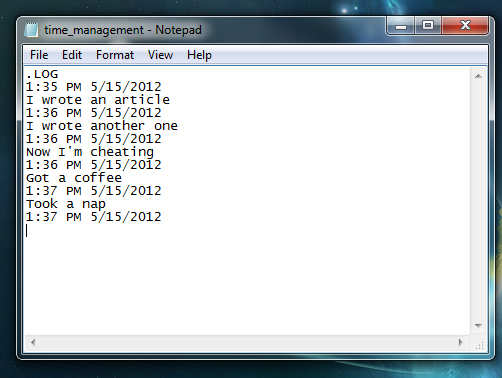
Insert Current Timestamp
If you are in any text document in Notepad and decide you need to add the current timestamp, just hit F5. The timestamp will automatically be created.




