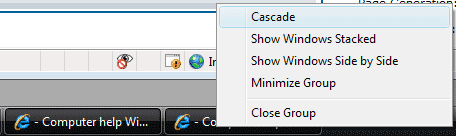
This recipe descibes the easiest way to tile and cascade windows. The CTRL key can be used to select several windows at once.
Cascading and tiling windows has been around forever. Most people know that right-clicking on the taskbar will open a menu that allows the windows to manipulated. Usually, however, this will change the view of all windows. If you are like me and have 10 windows open at all time, this is not very helpful.
We can use the CTRL key to select just the windows we want.
1. Hold the CTRL key and click each taskbar button corresponding to the windows that you want to manipulate.
– The selected taskbar buttons will be depressed
2. Right-click on one of the selected taskbar buttons which will open a pop-up window
3. Select whenever action you wish.
In XP the options will be the following: title, cascade, or close.
In Vista the options will be the following: cascade, show windows stacked, show windows side by side, minimize group, or close group.
The selected windows and only the selected windows will be affected.