
Copy Text File or Directory into Clipboard from Command Line

   Posted by David Kirk in Windows

Pushing a file, directory listing, or other text into the clipboard from the command line is very clever and useful.

In all modern versions of Windows, you can pipe information to clip to push text into the clipboard. Here are some examples:

To push a directory listing into the clipboard:

dir/w | clip
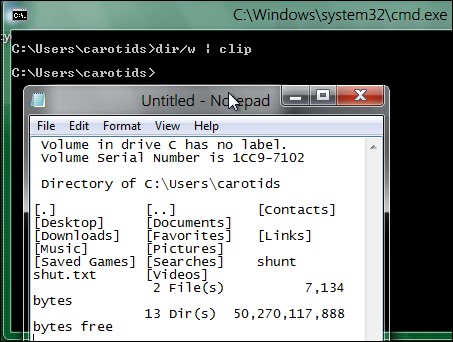
copy directory to clipboard from command line

To copy a text file into the clipboard:

type textfile.txt | clip


About David Kirk

David Kirk is one of the original founders of tech-recipes and is currently serving as editor-in-chief. Not only has he been crafting tutorials for over ten years, but in his other life he also enjoys taking care of critically ill patients as an ICU physician.
View more articles by David Kirk

The Conversation

Follow the reactions below and share your own thoughts.

5 Responses to “Copy Text File or Directory into Clipboard from Command Line”

  1. May 24, 2011 at 1:17 pm, Ashish Jain said:

    good one :)

    Reply

  2. May 24, 2011 at 3:56 pm, Rob Rogers said:

    Great tip!

    Reply

  3. May 24, 2011 at 4:10 pm, Rdp114 said:

    This does not work for Windows XP because clip is not recognized! Based on the screenshot, it works in Windows 7. Time to upgrade!

    Reply

    • May 25, 2011 at 3:23 pm, Anonymous said:

      Clip comes with XP pro and all later versions of the Windows OS.

      Reply

  4. May 25, 2011 at 1:31 pm, gbr said:

    Sorry but I’m using Windows XP and I have clip.exe version: 5.2.3790.0 from Microsoft.

    Reply

Leave a Reply

You may also like-

7-Zip: How to list contents of a folder and subfolder of zip files without extracting (Win XP,Vis ...This tech-recipe will explain how to use 7-Zip to create a text file (tab delimited) listing of the contents of a zip file.  You ...



