Wave Embassy Security : Remove all users / enrolled fingerprints

Home -> Windows -> Security

5678 views

From the computer of: seamonkey420 (130 recipes)
Created: Sep 15, 2007     Updated: Sep 16, 2007


Add a comment

Add to:
Add to stumbleuponAdd to del.icio.usDigg itAdd to FURL

This recipe explains how to remove and delete all enrolled users and fingerprints in Wave's Embassy Security Suite. This is very handy if you, like me, had enrolled fingerprints/users but then did a clean install of an OS without deleting the enrolled fingerprints/users. Usually you will get an error saying that the fingerprint is already enrolled but none show in the security center.

I had upgraded my XP Prof installation to Vista by doing a clean install. However, after reinstalling the Embassy Security suite i was unable to re-enroll my fingerprints. It appeared that the TPM/Biometric scanner thought my prints were already enrolled. This recipe will show how to reset all the users and prints.

1. Open windows explorer and go to the C:

2. Then go to Program Files > Wave Systems Corp > Dell Preboot Manager
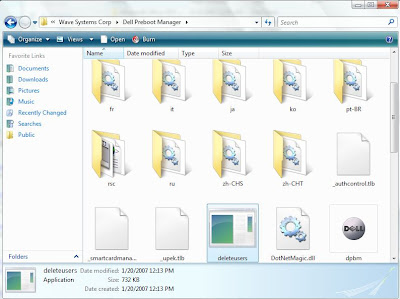


3. Double-click on the deleteusers.exe

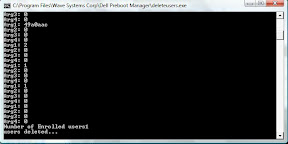
4. This will bring up a command window and a prompt asking if you want to delete all enrolled users. Choose Yes.


5. The command box window will run and then show "users deleted"


6. You should now be able to re-enroll your fingerprint.


This was tested on a Dell D430 laptop w/Wave Embassy Security.
Subscribe to the Tech-Recipes Newsletter

You can get tips like this delivered in your email every week!

Enter your Email

We will never, ever sell your email address or spam you.


Related recipes:

  How to Remove the Sony Rootkit XCP Uninstaller
  XP Pro: Howto Enable/Disable the Security Tab via a JScript
  2k/NT/XP/2003: Free Microsoft Security Analyzer
  How to setup Security/Configuration Templates / Limit Access in Windows XP Prof
  How To Prevent Windows XP Users From Writing To USB Drives
  Enable the Internet Connection Firewall Feature in Windows XP
  Remove spyware running on your PC
  Prevent Users From Installing Printer Drivers
  Microsoft Windows AntiSpyware: Critical Error 101
  AIM Virus/Trojan: How to Remove lockx.exe Rootkit


Sponsored links


Login

Nickname

Password

Don't have an account yet? You can create one. As a registered user you have some advantages like theme manager, comments configuration and post comments with your name.