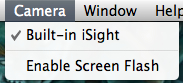
If you find that Photo Booth’s screen flash is negatively impacting your photos, you can disable this function without having to rely on the old trick of holding down the Shift key.
1. Open Photo Booth.
2. Go to the menu bar and select Camera.
3. Click Enable Screen Flash so that it removes the checkmark next to it.