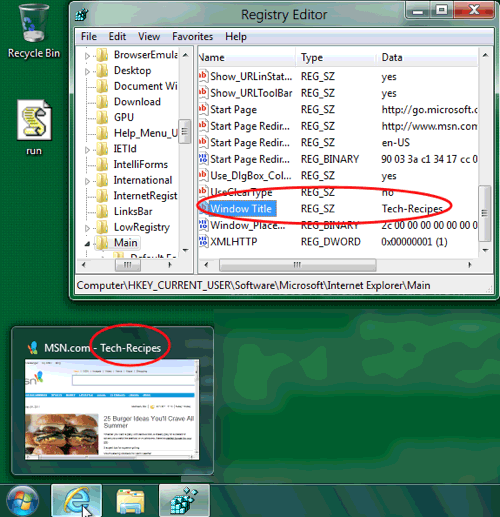
Often Internet Explorer will be tagged with extra text after the page title. AOL and other ISPs often add a indentifying message. This explains how to remove this text or add new text. This works with all current versions of IE.
On versions of IE that do not display the title text at the top of the browser, this is still very helpful in changing the text that appears over the IE thumbnail when it is moused over in the task bar.
Save your registry before making changes, of course.
If you hate the way roadrunner, AOL, or your ISP has tagged your browser, this tweak is for you.
1. Navigate the registry to:
HKEY_CURRENT_USER\Software\Microsoft\Internet Explorer\Main
2. Find Window Title and the string value attached to this should be the additional text.
3. You can delete this string and IE should default back to normal. Just pull up a new browser window and see your results.
If you are wanting to personalize your generic version of IE, do these steps:
1. Navigate the registry to:
HKEY_CURRENT_USER\Software\Microsoft\Internet Explorer\Main
2. Most likely the Window Title string will not be there, and you will need to create it. Goto the Edit menu -> New -> String Value.
3. Right click on this newly created string.
4. Rename it Window Title
5. Double click on Window Title and change the value to whatever text you wish.
Here you can see me performing this on a Windows 8 system running IE9.