

How Can I Hide My Facebook Profile Preview when People Google Me?

When people google your name, they can see a small portion of your profile on Facebook. Often it will show your friends’ names and what you “like” in this profile preview. You can prevent your profile preview from appearing in google by following these directions.

In using a social network, a difficult balance exists between what to publicly share and what to keep private. By default facebook exposes a brief profile preview of you to the public. Mine looks like this:
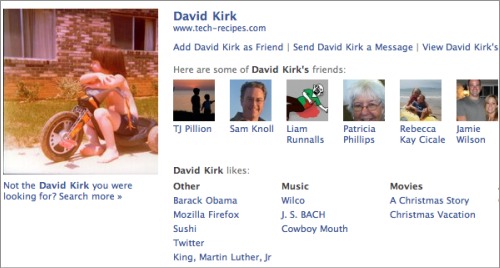
preview of a facebook profile visible on google

If you do not want this information to appear visible to the public, you can disable facebook’s preview of your profile.

In the upper right-hand corner, click Account and then Privacy Settings.
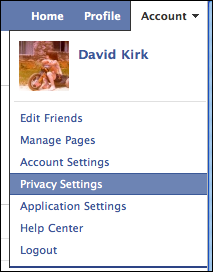
select privacy settings

Click Edit your settings under Applications and Websites
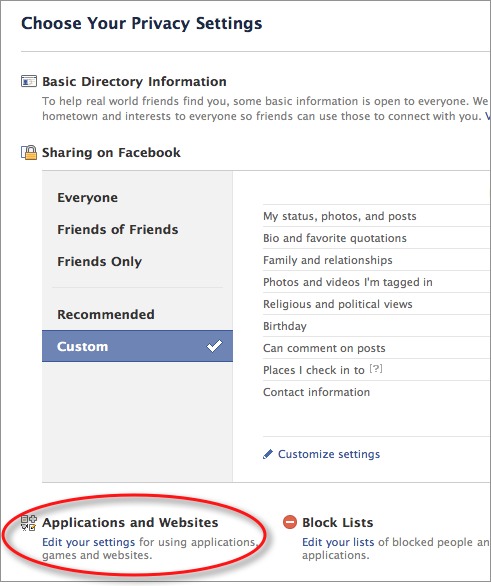
Select the Edit Settings button under Public Search

select public search

Uncheck the Enable public search box.

Be aware that google will have to respider the facebook page and clear the cache before your information will no longer be visible. This could take hours to days.


 

About David Kirk

David Kirk is one of the original founders of tech-recipes and is currently serving as editor-in-chief. Not only has he been crafting tutorials for over ten years, but in his other life he also enjoys taking care of critically ill patients as an ICU physician.
View more articles by David Kirk

The Conversation

Follow the reactions below and share your own thoughts.

3 Responses to “How Can I Hide My Facebook Profile Preview when People Google Me?”

  1. June 23, 2011 at 3:46 pm, Beryn said:

    Great advice! Thanks for sharing it!

    Reply

    • June 23, 2011 at 4:35 pm, Anonymous said:

      No problem.  Glad we could help!

      Reply

  2. June 29, 2011 at 9:26 am, Test said:

    Se isso acontecer deixamos de ser procurada no próprio facebook.

    If this happen we are no more searched in facebook search.

    Reply

Leave a Reply

You may also like-

Google+: Choose which Circles to display on your profile pageBy default, all your Google+ Circles will be displayed on your profile, and everyone on the web can see these information. If you are ...


