

Recently, a friend of mine figured out that his wife had been calling an ex-boyfriend on her BlackBerry. She had been switching out SIMs; however, she did not realize that her incoming and outgoing phone calls had been recorded within the log files of the phone. Are you curious? Here is how to filter and find this information. Additionally, we describe how to erase the logs to protect your privacy
Most users do not know that the BlackBerry phone collects a lot of private information in its log files. This information will remain on the phone even if the SIM card is removed.
To access the log files, hold ALT and press LGLG from the Home screen. This will show the debug log.
There is too much information here to read so we need to filter the information. Here is how to filter to mainly show incoming and outgoing calls:
1. Press the BlackBerry menu button
2. Select Options
3. Press and BlackBerry menu button again and select Hide all types
4. Scroll down and select CC
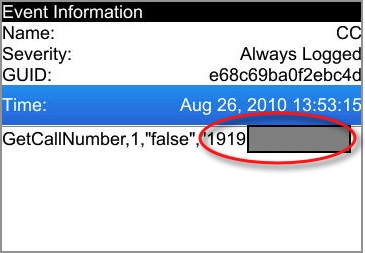
5. Press back to return to the log file. You should now be able to see incoming and outgoing numbers.
6. Click on one to see more information. Here is an example:
If you want to erase the log files:
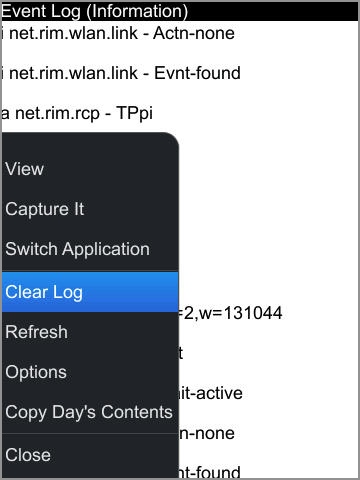
1. Open the logs by pressing ALT and LGLG
2. Press the BlackBerry menu button
3. Press Options
4. Select Clear Log
Note:
I have tested this on the BlackBerry Bold and Torch which would include OS 5 and OS 6. Different carriers and different devices may have some of these features disabled or locked.




