

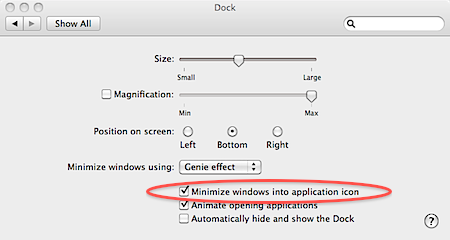
If you are tired of open windows taking up space on the Dock, you can set OS X to minimize open windows into the application icon. This feature was introduced in Snow Leopard and continues in later versions of the mac operating system
1. Go to System Preferences.
2. Select Dock.
3. Check the Minimize windows into application icon checkbox.
4. Close the Dock window.
Minimized windows will now go to their assigned application icon on the dock. Right-click the icon to select from multiple open windows. The user can see which windows have been minimized as a diamond will appear next to their names within the contextual menu.
Remember that minimized windows can be easily seen using the Application Windows shortcut F10.




