Snow Leopard started letting a user sync his or her own Google contacts and Yahoo contacts to iCal and Address Book. However, a side effect of this is that you will get a Sync Menu Bar item added. For some this is useful, for me its annoying. Removing this menu bar item is not as intuitive as one would think. This tech-recipe will explain how to remove the MobileMe / iSync menu bar item. Directions for both Snow Leopard and Lion are included.
With Apple transitioning to iCloud, this option has changed with Lion. Removing the menu bar requires different steps in Snow Leopard and Lion. The image below shows the Sync icon within the menu bar.

Snow Leopard
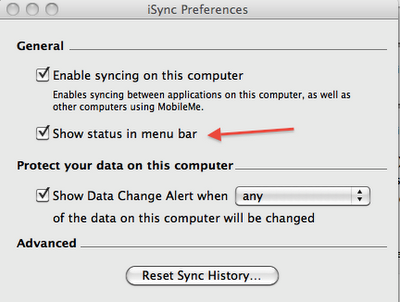
1. Open iSync via Spotlight (command + space bar) or Finder > Applications
2. Go to iSync > Preferences.
3. Uncheck the Show Status in Menu Bar. The sync item icon should be removed from the menu bar.
Lion
In Lion, everything has been moved under Mobile Me. As Apple moves away from MobileMe to iCloud, you would suspect that this will change again in later versions of OS X.
1. Open System Preferences
2. Select MobileMe
3. Uncheck Show Sync status in menu bar at the bottom of the MobileMe preferences. The sync item icon will disappear from the menu bar.