


If you have installed Windows using Boot Camp, the partition has eaten away at some valuable hard drive space. When you are done with running Windows on your Mac and want to regain that partition space, you can delete the Boot Camp partition without affecting the data on your OS X partition.
This tutorial works for Leopard, Snow Leopard, and Lion.
I have a large Windows 7 Boot Camp partition on my MBP for playing games. Boot Camp is an awesome feature but frequently users need to reclaim that space. By following these steps, a user safely can remove the Windows installation and the Boot Camp partition.
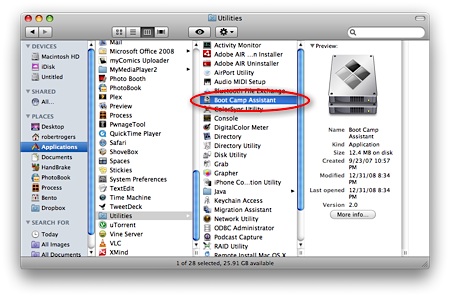
1. Go to Applications, open the Utilities directory and select Boot Camp Assistant.
2. When the Boot Camp Assistant appears, click Continue.
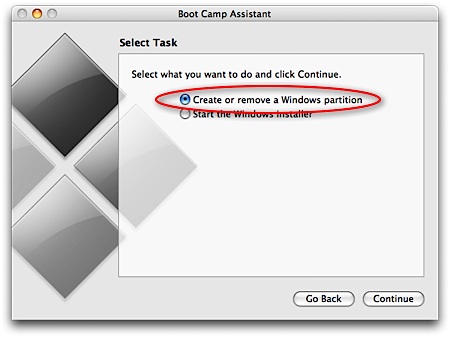
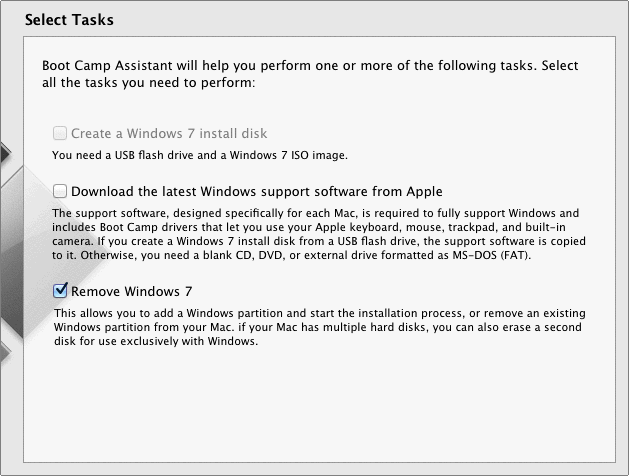
3. Depending on your installation and version of OS X, you will select the option to remove the Windows partition. The first image is of Leopard, and the second image is from Lion.
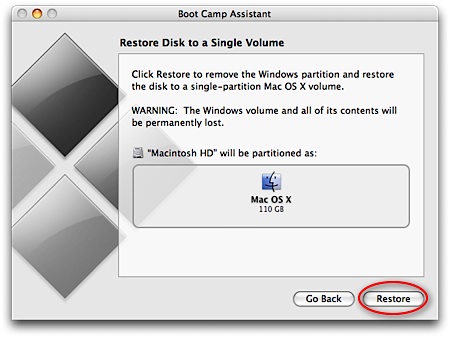
4. Click the Restore button.
5. When prompted, input your password and then click OK.
6. Boot Camp Assistant will begin restoring the disk.
7. When it has completed, it will notify you that the partition has been removed.





