


Switching the default search engine in Safari is one of the most common frequent configuration changes that iPhone and iPad users make.
Recently Cm Biggle asked the following question:
Can you help me change from bing to google on my iPad?
Google has highly paid Apple for quite a while now for the default search engine position on iOS mobile devices. This likely costs Google hundreds of millions of dollars for this privilege. However, some people would rather use Yahoo! or Bing search instead. Of course, even more often is somebody like Cm Biggle above who has accidentally changed the option instead.
1.Select the Settings icon.
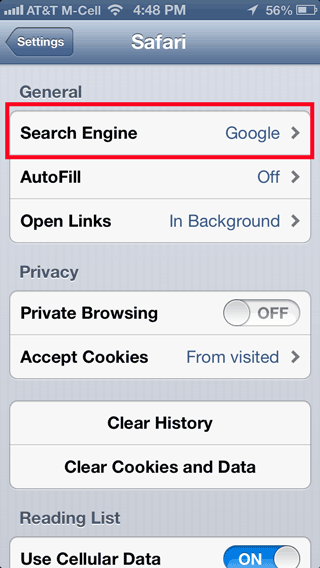
2.When all the options load, scroll down and select the Safari option.
3.Select your desired search provider from the Search Engine field.
Sadly, Bing and Yahoo! are the only two options that can be selected. DuckDuckGo and some of the other alternative search engines are not available.
These directions have been stable through multiple versions of iOS including iOS 5 and iOS 6. Switching search providers works the same way in all of Apple’s mobile devices including the iPad, the iPhone, and iPod Touch systems.





