The Preview application contains some simple image editing tools that can come in handy when you need to perform a quick fix on a photo or image. Some of the included tools allow for adjustments of black and white levels, colors, exposure, and sharpness.
The Preview application has several nifty tools that allow for editing and adjusting images. Changing the image size and resolution is available through Tools -> Adjust Size. Even better is the ability to tweak all the common aspects dealing with color and exposure.
These powerful editing options were introduced in OS X Leopard and have been continued in all future versions of OS X including Snow Leopard and Lion.
1. Open your photo or image in Preview.
2. Go to the menu, click Tools and select Adjust Color.
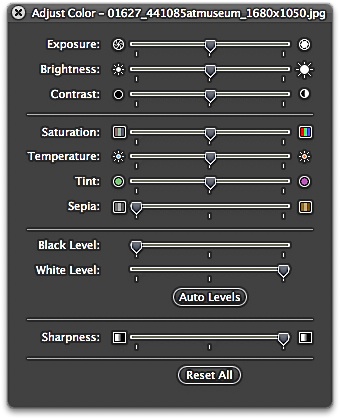
3. The Adjust Color palette window will appear. You can adjust exposure, brightness, contrast, saturation, temperature, tint, sepia as well as control the black and white levels and sharpness.
4. After you have finished editing the image, click File and select Save.