
Windows 8: Remove Control Panel Items

The Control Panel is a useful tool. From here, you can modify a number of settings. However, sometimes you will encounter useless settings that cannot be configured. It makes sense to remove these items.

For instructional purposes, I will be removing Flash. Since it has no configurable settings and just takes up extra space, removing it can make room more useful setting icons.

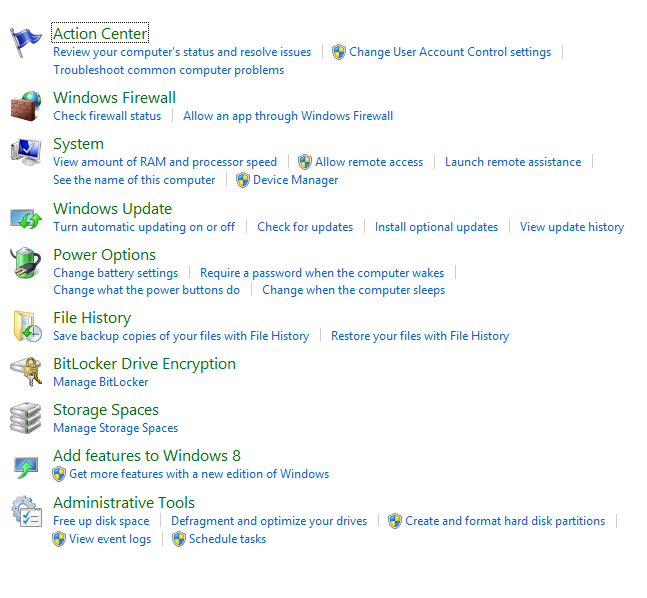
As you can see below, I have the Flash Player icon in the Control Panel, but there is nothing to be adjusted. I will show you how to get rid of it.

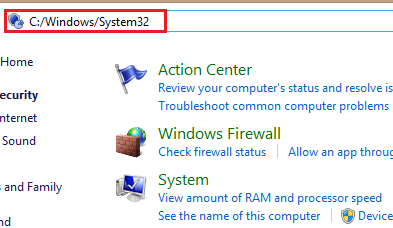
1. Navigate to System32. This can be done by typing C:\Windows\System32 in the address bar.
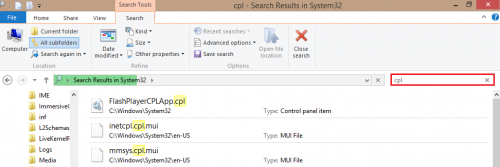
2.When you are in the System32 folder, search for cpl. This will display all control panel items that can be deleted. Please remember just because it is possible to delete an item, it does not mean you should actually delete it. If it has options that can be adjusted, you should not delete it.
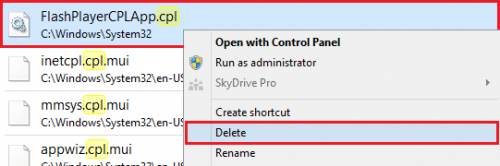
3.Now, right-click on the Control Panel item you want to remove, and click Delete. 
As you can see, Flash Player has been removed from the Control Panel list. Try this out with some of your extra, unused programs settings. 
 

About Alex Bahdanovich

Writer, author, wordsmith -- this tech enthusiast enjoys Starbucks, good reads, and golden retrievers.
View more articles by Alex Bahdanovich

The Conversation

Follow the reactions below and share your own thoughts.

2 Responses to “Windows 8: Remove Control Panel Items”

  1. January 17, 2013 at 8:37 am, Ron Newsam said:

    Thank you for a most informative article.
    I had been trying to delete DIVX from my computer for several months and had partial success but was unable to remove the icon from Control Panel until I read your comments and followed them to the letter, the icon has now gone.
    Ron.

    Reply

    • January 17, 2013 at 12:47 pm, Alex Bahdanovich said:

      You’re welcome! I’m glad you found it helpful.

      Reply

Leave a Reply

You may also like-

Windows 8: Prevent Access to the Control Panel with Group Policy EditorWindows 8: Prevent Access to the Control Panel with Group Policy EditorDisabling the Control Panel on a computer is especially useful on shared or public-facing computers. When disabling access to the Control Panel, you are ... Windows 8: Single-Click to Open FoldersWindows 8: Single-Click to Open FoldersSingle-click to open a folder has been a useful feature of Windows for quite some time now. This tutorial will show you how you ...



