If Finder is misbehaving, most people believe you must restart your computer. Usually you can fix the problem by relaunching Finder itself. This saves a lot of time since the relaunch only takes seconds to do.
Frequently a background application will cause issues and your OS X system will hang. This is demonstrated by your pointer forming the infamous spinning “beach ball.” As an emergency measure, restarting Finder may help your system to recover. Likewise, applications may throw enough errors that Finder itself will hang. When this occurs, quitting and rebooting the Finder app may be all you need.
Lion 10.7 and Later Versions
1. Click the Apple icon in the upper left hand corner of the screen.
2. Select Force Quit
3. Select Finder and press the Relaunch button
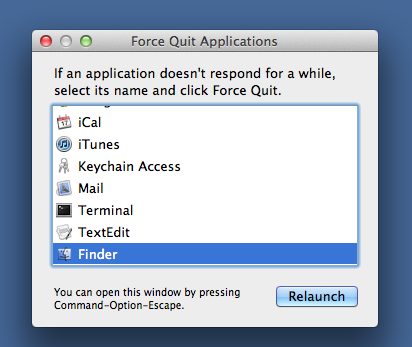
Finder will restart.
Prior Versions of OS X
1. Press and hold the Option key and click and hold the Finder icon until a menu appears.
2. Select Relaunch.
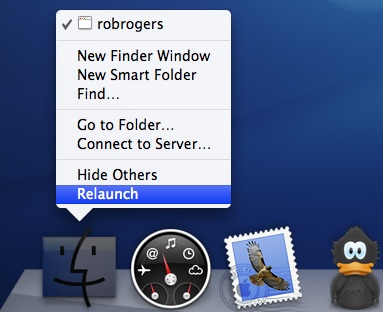
Your desktop icons will disappear for a short bit and then return. As soon as they come back, you can resume your computing tasks.