

Updated 3/4/08 w/Handbrake recommendation. This recipe will explain how to convert your personal purchased DVDs to MP4 format for playback on your Playstation3. By doing this, you can in turn have a digital movie jukebox on your PS3! This recipe requires two main ingredients, DVD Decrypter and Handbrake or PS3 Video 9 by Red Kawa.
1. Getting the tools. You will need following ingredients for this recipe:
-Playstation3
-Original Movie/DVD to convert to MP4
-DVD Decrypter
-Handbrake
http://handbrake.fr
or
-PS3 Video 9
http://www.redkawa.com
-Harddrive w/40GB of Free space.
Also, be sure that the hard drive/partition you are ripping your movie/.vob files to is an NTFS drive not a FAT32. FAT32 has a 4GB max file size limit and most movies will be larger than that when ripped.
2. Open DVD Decrypter and then pop in your movie. It may ask you to set your region, choose your region and click OK (this will not permantly set it, just for the software/ripping session)
Now go to Tools > Settings. We need to change a file splitting setting prior to ripping our movies to our pc’s hard drive.
Go to the IFO MODE tab and click on the File Splitting drop down. Change it to None. This will let us create one big .vob file when we rip.
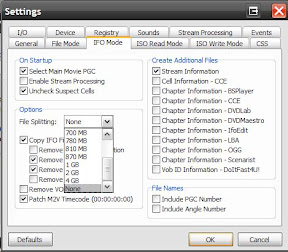
Click OK once your done w/any other setting changes.
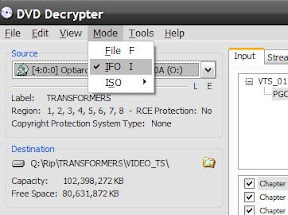
3. In DVD Decrypter, click on Mode and then click on IFO.
4. You will notice that the right side of the DVD Decrypter window will change. Click on the Input tab and select the main movie (you can tell by it being the longest title), and then click on the Stream Processing tab.
We will want to check the “Enable Stream Processing” and then select the Video and Audio stream we want.
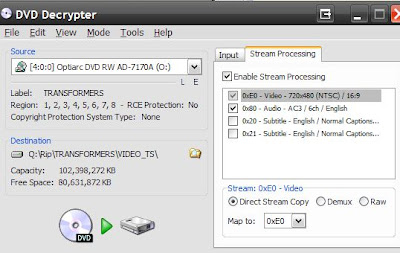
Then click on the Rip button to start. This should take about 10 mins or so depending on your system.
5. Once you have your movie on your harddrive as one big .VOB file, we can convert it to MP4 AVC using Handbrake or PS3 Video 9.
Handbrake method (super easy, recommended):
Open Handbrake.
Click the File radio box under Source and then click the Browse button. Find the .vob file we copied in the previous steps.
Now under Destination, click Browse then give your mp4 file a name and click Ok.
Finally, on the right side, choose the PS3 preset profile, it will adjust a few settings and you should now be good to go. Just click on Start to start or if you want to do a batch job, click add to queue and then go through the same steps for the other movies.
————– or —————-
PS3 Video Method (older):
Open PS3 Video 9.
You can modify or edit a profile if you want right away or you can use the default encoding profiles (recommended if this is your first time, you can tweak after you see how it turns out!).
Click on the Convert link at the top.. Then choose the Current Conversion tab. Yes, you can use the Wizard but i prefer seeing what profile i’m using.
Click on the Convert Video button.
Find our .VOB file we ripped previously and click open.
Now on the right side, you can name your movie and also choose your profile. I prefer to use AVC since the video turns out pretty smooth and w/little pixelization and good filesizes. Lately i’ve been using a profile with these specs:
MP4 AVC 2072kbps, profile 4.0 video, Stereo AAC 160kbps sound, upconvert to 720P w/autoframerate options.
Click Start and let PS3 Video 9 do its thing!.

—Just a note,this may take a while and the Time Remaining is not always right; most of my movies take about 3 hours to convert but i am also upconverting vs just converting file formats only (keeping the standard 480i/p resolution).
–Handbrake PS3 profile avg file size = 2gb for 2 hour movie. avg conversion time around 2 hours to 1 1/2 per movie (depends on pc specs of course)
–This guide/site/author does not promote piracy or bootlegging; this recipe is for educational/personal archival purposes of media the user legally owns.




