

Everybody loves friends on Facebook… until they get annoying or start spamming. Here is how to delete or remove a Facebook friend. Updated for latest Facebook version.
Oh, Facebook… my Facebook. Like most social sites, it is fun to get a huge circle of friends. However, in order to reduce the noise to signal ratio, it is often nice to narrow your friends list.
Sometimes, a friend is just no longer a friend. Here is how to dump them…
New Version:
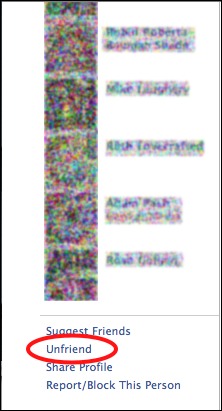
Several methods exist for removing friends in the latest version of Facebook. If you are on a friend’s profile page, then the unfriend link is at the very bottom of the left sidebar:
If you are looking to unfriend several people at once, it probably best to unfriend through your friends list.
1. Click the Friends link in the left sidebar.
2. Click the Edit Friends button
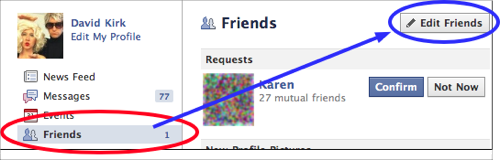
3. Find the friend you wish to remove, and click the X beside his or her name. Then you will be asked to confirm the deletion.

This is very similar to removing friends in the previous version of Facebook. Those directions are included here for historical purposes:
On Facebook, pull up your friends list.
Click the Remove Friend link
A pop-up pseudo window will open. Confirm that you really want to remove the friend.





