



Since your Contacts play in important role in the functionality of Skype, it only makes sense to back up this vital inforamation. That way, if disaster strikes, you simply restore the contacts and you’re off and going again.
Please note that Skype keeps a copy of your contacts on their servers. In theory, as long as you use Skype, you should be able to pull a backup of your contacts off their system just by logging in with the same user/pass combination. These directions will backup your contacts locally to your computer which makes importing and exporting contacts easier.
Backup Skype Contacts in Windows
Open and login to Skype.

Click Contacts, mouseover Advanced and select Backup Contacts to File.

Browse to the directory you want the backup file saved. Name your file, and click Save.

Now copy your backup file to another drive or maybe even a flash drive so that if your operating system needs to be reloaded, you still have your backup.
Restoring Skype Contacts in Windows
Open and login to Skype.
Click Contacts, mouseover Advanced and select Restore Contacts From File.
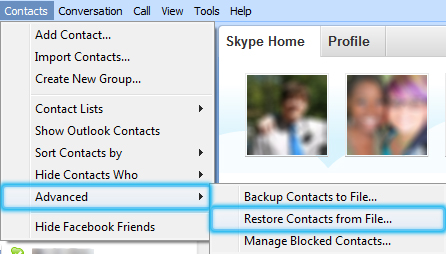
Browse to the directory containing the backup file, select it, and click Open.

Backup and Restoring Skype Contacts in OS X
Skype for OS X does not have an automated way to backup contacts to and from a local computer. However, it is still possible to do it manually. On Mac computers Skype stores all of the user’s contacts in the following directory:
~/Library/Application Support/Skype
Depending on your version of OS X, you may want to unhide your library directory to make this process easier.
To backup, just copy all the files and directories under this directory to a safe place. To restore your contacts, simply copy these files and directories back into their original positions.
If you use Time Machine, these files should be backed up automatically.





