


While most of the time, you want to narrow your search down and view only a few results for a particular search query. However, sometimes it becomes necessary to view quite a few results, especially if the topic matter is new to you and you aren’t sure how to narrow your search. By default, Google displays 10 results per page. With a broadband connection and have cookies enabled on your browser, why limit yourself to 10?
Rebekah dropped me a message today:
“Last year when researching a project for uni, I increased my google search results to help me browse a large number of results quickly. However, now the result per page slider is disabled. How do I enable it?”
When using Google to search for complex terms, it is more efficient to list a large number of searches per page. By default Google will list 10 search results; however, this can be increased to a max of 100 through these simple steps.
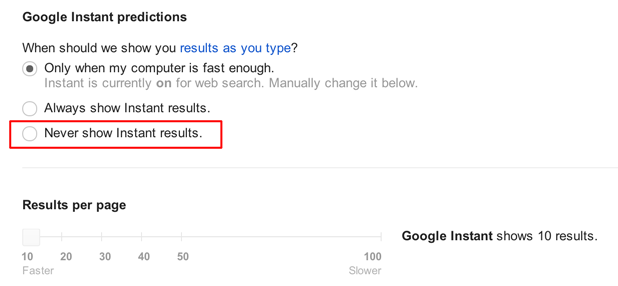
The unfortunate downside to the process is that the number of results cannot be changed if the instant predictions feature is enabled. Logically, this makes sense since the instant predictions mechanism set at 10 results is already very taxing on the search servers. Increasing instant prediction results would consume more user bandwidth and CPU cycles.
More results equals lost of instant predictions. It is your choice.
This article has been updated for the latest changes to Google’s design. Please drop a note in the comments if Google makes additional changes that outdates this article.
1. Go to Google.
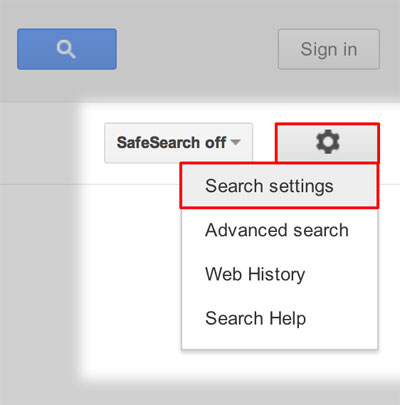
2. In the upper right-head of the webpage, click the Preferences gear. Select Search settings from the drop down list. This link to Google preferences settings will work as a shortcut.
3. Scroll down and disable instant predictions by selecting Never show Instant results. Below that, the slider to increase your Results per page will be enabled.
4. When you are done, click the Save button at the bottom of the page.





