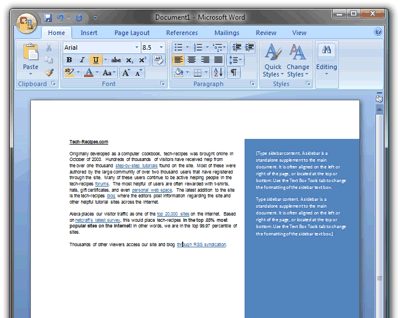
A sidebar is a standalone addition to the main document that resides on either side or on the top or bottom of the page. The sidebar is ideal for highlighting important additional information on the topic matter of the document. Due to its styling and orientation, this location really stands out to the reader.
Adding page layout to documents in Microsoft Word 2007 and MS Word 2010 will add style and flair. These versions of Word have several nice text boxes that are formatted as sidebars. Please note that Word 2011 for Mac does not have these options available.
1. Go to the page in your document that will contain the sidebar.
2. On the Ribbon, select the Insert tab.
3. In the Text section, click Text Box.
4. Select the style of sidebar for your document.
5. The sidebar will appear on the document. Click inside it to insert your text.