
IE7: Sort Favorites by Alphabetical Order

Contributor Icon Contributed by davak Date Icon February 22, 2007  
Tag Icon Tagged: Internet Explorer IE7

It is so much easier to find bookmarks when they are sorted by name. Sorting alphabetically can be done with just a couple clicks of your mouse.


ABC, 123.

The favorites are not typically sorted in alphabetical order. Here is how you do it.

1. Open IE7
2. Click the Yellow Star in the left corner
3. Click the Favorites tab
4. Right click on any of the favorites
5. Select Sort by Name from the content menu

Here is a screenshot.
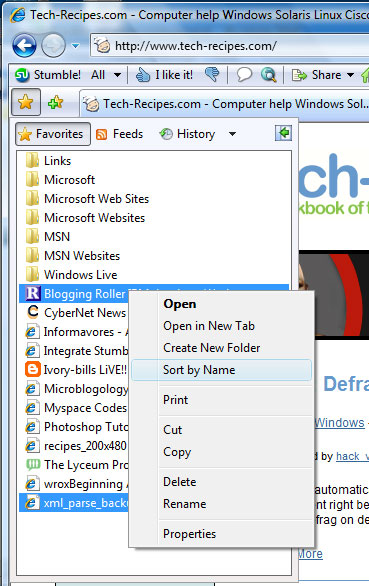
ie7_sort_by_name

Previous recipe | Next recipe |
 
  • Cathleen A. Springer
    THANK YOU so much. This is something I tried to do myself and just could not get to first base. TYTYTYTYTYTY
  • ekc
    This simply isn't working for me - I can't get my favorites within sub-folders to sort in alpha order. I've found the support articles re: if you have more than 193 shortcuts in a folder it won't work, but I've only got 85. Any suggestions?
blog comments powered by Disqus



