


If you wish to install an update that you have previously declined, you can restore it and then use the normal installation process to select and install the update. To restore the declined update, do the following…
1. Click the Start button.
2. Select Control Panel.
3. Click System And Maintenance. If you are using Classic View, then skip this step.
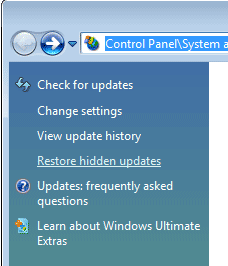
4. Select Windows Update.
5. Click Restore Hidden Updates.
6. On the Restore Hidden Updates page, find and select the update you wish to install and click Restore.
Windows Vista will then unhide the update, allowing it to be reselected and installed through the normal process.




