The splash screen can be helpful when showing you what add-ons are being loaded or displaying file locations. In other cases such as the Microsoft Office applications, the splash screen is just annoying. If you would rather not have to see the Word, Excel, PowerPoint or OneNote splash screen each time you run the application, follow this tech-recipe to remove it.
Disable Office Home & Student Splash Screens
We will be using Microsoft Word (WINWORD.exe) as our example application. Here are the default executables for the other Office applications. Just repeat these steps for each application that you wish to disable the splash screen.
- Word: WINWORD.exe
- Powerpoint: POWERPNT.exe
- Excel: EXCEL.exe
- OneNote: ONENOTE.exe
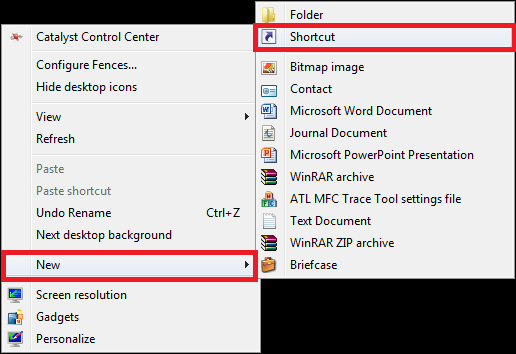
1.Right click on your Desktop. Hover over New and select Shortcut.
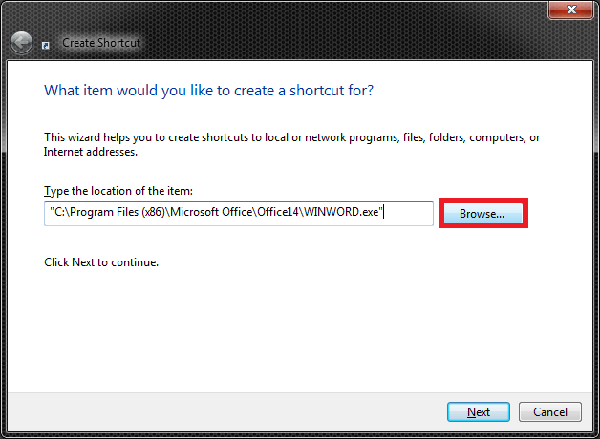
2. Click the Browse button and browse to the Word executable file.
- Default location on 32bit machines: C:\Program Files\Microsoft Office\Office14\WINWORD.exe
- Default location on 64bit machines with 64bit installation: C:\Program Files\Microsoft Office\Office14\WINWORD.exe
- Default location on 64bit machines with 32bit installation: C:\Program Files (x86)\Microsoft Office\Office14\WINWORD.exe
3.After the full path and the end quotes, add one space and type in /q. Click Next.
"C:\Program Files\Microsoft Office\Office14\WINWORD.exe" /q

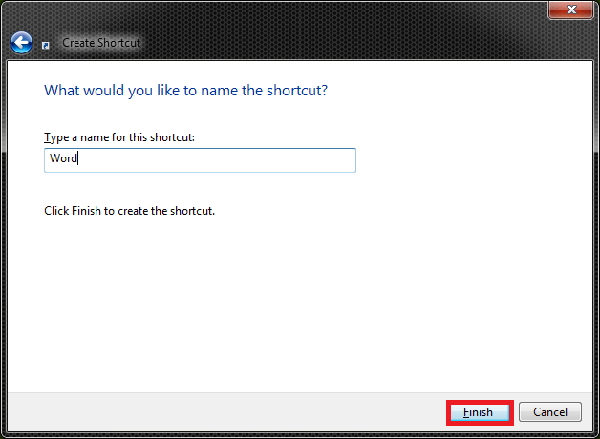
4.Type a name for the shortcut and click Finish.