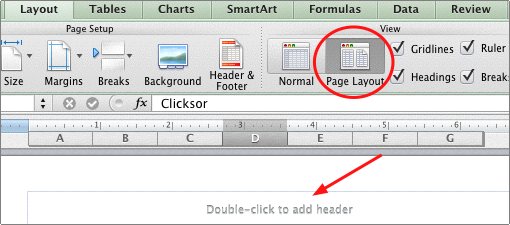
Previous versions of Excel required you to utilize a dialog box to add or modify the header and footer. With newer versions of Excel, it is much simpler to add a header and/or footer to your worksheet. This method works for Excel 2007, 2010, and 2011 for Mac.
In Excel, you can place a header and footer upon your worksheet to add extra information and assist with sorting. Often page numbers, dates, categories are included. Headers and footers can be located on the left, middle or center of the page.
Excel 2007 and 2010
1. Click the View tab.
2. Select Page Layout.
3. Click in the area marked Click to add header or Click to add footer.
4. Choose where you want the text to be, left, center or right aligned.
5. Type the desired text in the appropriate box.
6. Click the Home tab to apply formatting to the text (font, bold, underline, or color).
Excel 2011
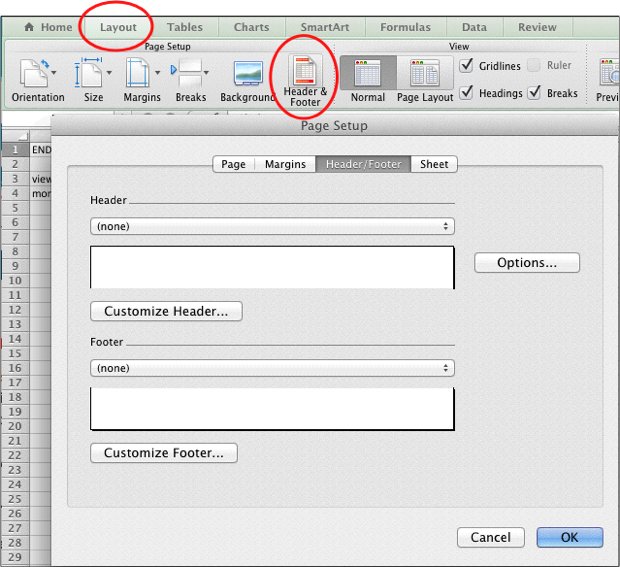
1. Select the Layout tab
2. Click Header & Footer
3. Customize the header information in the dialog box that appears.
Alternatively, you can also manually insert a header or footer by clicking at the blank area at the top or bottom of the page while your are viewing from Layout -> Page Layout mode.